A clock
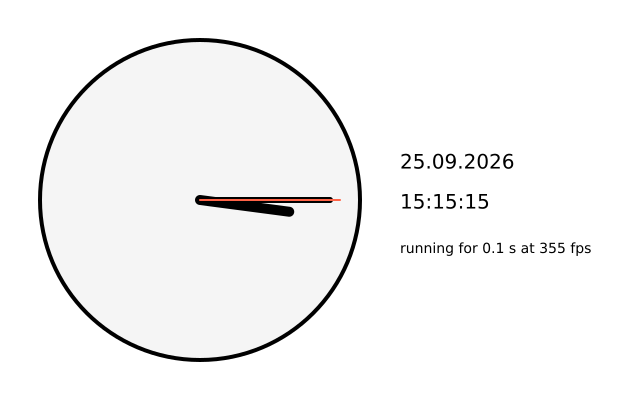
hour(), minute() and second() read the computer's clock. day(), month() and year() give the date. millis() counts milliseconds since the sketch started. frame_rate() says how many frames a second it is really drawing. (This one uses real time, so the picture changes from run to run.)
How it works
- f.hour(), f.minute() and f.second() give the time as whole numbers. f.day(), f.month() and f.year() give the date.
- hand() draws one hand. It moves the origin to the middle of the clock with f.translate() and turns with f.rotate(). Then it draws a line along the x axis.
- An angle of 0 points right, but a clock starts at 12. So hand() turns by angle - 90.
- The hour hand turns 30 degrees an hour, the minute and second hands 6 degrees a step. The hour hand also adds half a degree for each minute, so it creeps round.
- f.saved_state() keeps each hand's turn and stroke from leaking into the next one.
- f.millis() and f.frame_rate() are written at the bottom, with an f-string.
Make it yours
- Change the hand colours, widths and lengths in the three hand() calls.
- Add tick marks. Loop 12 times, rotate 30 degrees each time, and draw a short line at the edge.
- Make a stopwatch hand: hand(f.millis() / 1000 * 6, 140, 2, "navy") turns once a minute from the start.
- Show the time in 12-hour form: use f.hour() % 12 in the f-string.
- Move the clock and the text to new places by changing the 200 and 400 values.
The code
Copy it into a file and run it.
"""A clock

hour(), minute() and second() read the computer's clock. day(), month() and year() give the date.
millis() counts milliseconds since the sketch started. frame_rate() says how many frames a second
it is really drawing.

How it works:
- f.hour(), f.minute() and f.second() give the time as whole numbers. f.day(), f.month() and
  f.year() give the date.
- hand() draws one hand. It moves the origin to the middle of the clock with f.translate() and
  turns with f.rotate(). Then it draws a line along the x axis.
- An angle of 0 points right, but a clock starts at 12. So hand() turns by angle - 90.
- The hour hand turns 30 degrees an hour, the minute and second hands 6 degrees a step. The hour
  hand also adds half a degree for each minute, so it creeps round.
- f.saved_state() keeps each hand's turn and stroke from leaking into the next one.
- f.millis() and f.frame_rate() are written at the bottom, with an f-string.

Make it yours:
- Change the hand colours, widths and lengths in the three hand() calls.
- Add tick marks. Loop 12 times, rotate 30 degrees each time, and draw a short line at the edge.
- Make a stopwatch hand: hand(f.millis() / 1000 * 6, 140, 2, "navy") turns once a minute from the
  start.
- Show the time in 12-hour form: use f.hour() % 12 in the f-string.
- Move the clock and the text to new places by changing the 200 and 400 values.
"""
# gallery: time-dependent
import funground as f


def setup():
    f.size(640, 400)


def hand(angle, length, width, colour):
    with f.saved_state():
        f.translate(200, 200)
        f.rotate(angle - 90)             # 0 degrees points right; clock hands start at 12
        f.stroke(colour)
        f.stroke_width(width)
        f.line(0, 0, length, 0)


def draw():
    f.background("white")
    f.fill("whitesmoke")
    f.stroke("black")
    f.stroke_width(4)
    f.circle(200, 200, 320)
    hand((f.hour() % 12) * 30 + f.minute() * 0.5, 90, 10, "black")
    hand(f.minute() * 6, 130, 6, "black")
    hand(f.second() * 6, 140, 2, "tomato")

    f.fill("black")
    f.text_size(20)
    f.text(f"{f.day():02d}.{f.month():02d}.{f.year()}", 400, 150)
    f.text(f"{f.hour():02d}:{f.minute():02d}:{f.second():02d}", 400, 190)
    f.text_size(14)
    f.text(f"running for {f.millis() / 1000:.1f} s at {f.frame_rate():.0f} fps", 400, 240)


f.run()