Project 7: Scratch-card reveal game
A scratch card hides a prize under a layer of silver foil. You rub the foil away with a coin. In this project you do the same with the mouse. Three symbols are hidden on a card. Scratch one clear and a soft chime plays. Find three that match and you win. You will learn how to erase on a layer, how to know what has been uncovered, and how to play a sound at the right moment.
Run it
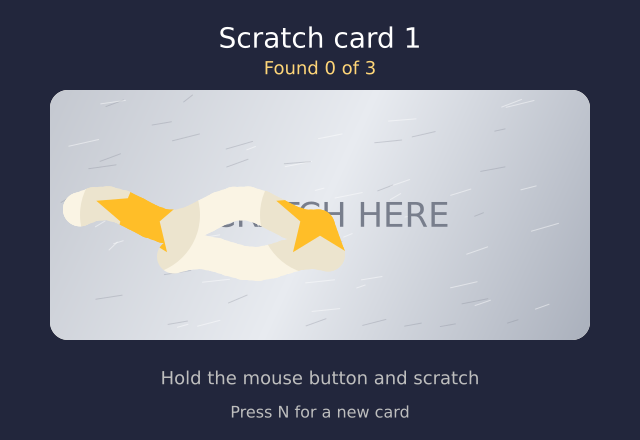
The full game is in the gallery. Run it with python examples/gallery/projects/07_scratch_card.py.
Hold the mouse button down and scratch. Press N for a new card. On the first frames the card
scratches itself a little, to show you how. It stops when you use the mouse.
How it works
The foil is a layer. A layer is a see-through sheet that keeps its drawing. The foil is painted once for each card, and the scratches stay on it. Everything else (the card, the symbols and the words) is on the canvas under it.
with f.layer("foil"):
    f.clear()                              # wipe the layer, then paint it again
    f.fill(f.linear_gradient(x, y, x + w, y + h, [(196, 200, 208), (232, 235, 240), (170, 176, 188)]))
    f.rect(x, y, w, h, 18)
Scratching is erasing. After f.erase(), anything you draw removes what is under it. It does
not paint. So a circle at the mouse makes a hole in the foil, and the symbol shows through. A line
from the last mouse place to this one keeps the scratch joined up when you move fast. The sketch
draws circles every 5 pixels along that line.
with f.layer("foil"):
    f.erase()                              # drawing now removes the foil
    f.no_stroke()
    for sx, sy in spots:                   # points along the mouse's path
        f.circle(sx, sy, BRUSH * 2)
Knowing what is found. You cannot read a layer back to see how much is left. So the sketch keeps its own list. For each symbol it makes a grid of sample points, 12 pixels apart. Each scratch marks the points that are close to it as cleared. When 60% of a symbol's points are cleared, the symbol is found.
for p in points[place]:                    # p is [x, y, cleared]
    if not p[2] and any(f.distance(p[0], p[1], sx, sy) <= BRUSH for sx, sy in spots):
        p[2] = True
cleared = sum(1 for p in points[place] if p[2]) / len(points[place])
if cleared >= FOUND_AT:
    reveal(place)
The same card every time. Each card has a number, and f.random_seed(number) is called before the
symbols are chosen. So card 1 is always the same, and card 2 is always the same. That is what makes
a game fair, and easy to test.
The sounds. f.pluck() makes a soft plucked note. Three notes, C, E and G, rise as you find
symbols. A win plays a short tune made with f.melody(). If the computer has no sound device,
play() quietly does nothing, so the game never stops.
CHIMES = [f.pluck("C5", 0.7, volume=0.4), f.pluck("E5", 0.7, volume=0.4), f.pluck("G5", 0.7, volume=0.4)]
Stage 1: make it work
One piece of foil, one hidden symbol, and a mouse that scratches. Hold the button down and move.
The line gets its round ends from f.stroke_cap("round"), and its width from f.stroke_width().
import funground as f


def setup():
    f.size(480, 300)
    with f.layer("foil"):
        f.no_stroke()
        f.fill(180, 185, 195)
        f.rect(40, 40, 400, 220, 16)


def draw():
    f.background(250, 244, 228)
    f.fill(255, 190, 40)
    f.no_stroke()
    f.circle(240, 150, 120)                # the hidden prize
    if f.is_mouse_pressed:
        with f.layer("foil"):
            f.erase()
            f.stroke_width(30)
            f.stroke_cap("round")
            f.line(f.pmouse_x, f.pmouse_y, f.mouse_x, f.mouse_y)


f.run()
Run it and scratch. The circle shows through. Try a thicker line, a different foil colour, or a square symbol.
Stage 2: make it yours
Three symbols, and a card number. Keep the symbols in a list. Choose them with a seed, so each card number always has the same ones.
KINDS = ["star", "heart", "moon", "diamond"]

def new_card(number):
    global symbols
    f.random_seed(number)
    symbols = [f.random_choice(KINDS) for _ in range(3)]
Draw the symbols. A star is ten corners, alternately far from the middle and near it. A moon is
one circle with a second circle cut out of it, using - on two paths.
corners = []
for i in range(10):
    radius = r if i % 2 == 0 else r * 0.45
    angle = math.radians(-90 + i * 36)
    corners.append((cx + radius * math.cos(angle), cy + radius * math.sin(angle)))
f.polygon(corners)

moon = f.path().circle(cx, cy, r * 2) - f.path().circle(cx + r * 0.5, cy - r * 0.2, r * 1.7)
f.draw_path(moon)
Make a win more likely. Choose the three symbols the same one time in three. Then keep choosing until the other cards are not all the same.
if f.random() < WIN_CHANCE:
    symbols = [f.random_choice(KINDS)] * 3     # three of a kind
A counter and a message. Draw "Found 1 of 3" from the list of found flags. When all three are
found, check that the symbols match, and draw the result.
f.text(f"Found {sum(found)} of 3", W / 2, 68)
if sum(found) == 3 and len(set(symbols)) == 1:
    f.text("Three the same. You win!", W / 2, 378)
Make a sound. play(sound) wraps sound.play() so that a computer with no sound device
carries on in silence.
def play(sound):
    try:
        sound.play()
    except Exception:
        pass
Press N for a new card. The key_pressed() function adds one to the card number and starts
again with new foil.
def key_pressed():
    if f.key in ("n", "N"):
        new_card(card_number + 1)
Stage 3: make it shine
The full version is in the gallery: examples/gallery/projects/07_scratch_card.py. The foil is a
silver gradient with bright and dark flecks, and the words "SCRATCH HERE" are printed on it, so
they scratch away too. The symbols are a star, a heart, a moon and a diamond. When a symbol is
60% clear, the rest of its foil is cleared too, and a chime plays. The three chimes rise in pitch.
A win plays a short tune. A card with no match plays one low note. The first card scratches itself
a little to show you what to do, and stops the moment you use the mouse. Every card number gives the
same card each time. The first screen is always the same.
Challenge cards
- Can you make the scratch smaller on each new card, so the cards get harder?
- Can you add a scratch count, so the card shows how many marks you made?
- Can you add a fifth symbol, such as a flower or a lightning bolt?
- Can you make the foil gold, and then change the chime to a higher note?
- Can you keep a score: one point for a win, and the total shown on the screen?
- Can you hide a prize word under the foil as well as the symbols?
Credits and ideas
This project builds on the idea of the scratchcard, a coating you rub off to see what is under it. The code is written for funground (CC0). See CREDITS.md.
Back to: 18. Projects. Related chapters:
9. Paths, clipping and pictures (layers and erasing),
10. Interaction (the mouse and the keys),
11. Randomness and noise (seeds) and
16. Sound (pluck and melody).