4. Colour
Wherever funground wants a colour, you can give it in any of these forms:
| Form | Example | Notes |
|---|---|---|
| A name | "tomato", "skyblue", "gray50" |
Hundreds of names; capitals and spaces are ignored |
An (r, g, b) tuple |
(255, 99, 71) |
Red, green, blue, each 0–255 |
| Separate numbers | f.fill(255, 99, 71) |
The same as the tuple. Two, three or four numbers work in fill, stroke and background |
An (r, g, b, a) tuple |
(255, 0, 0, 120) |
The last number is opacity: 0 invisible, 255 solid |
| One number | 128 |
A grey: 0 is black, 255 is white |
| Two numbers | 128, 100 or (128, 100) |
A grey and its opacity |
| Hex | "#FF6347", "#FF634780" |
As on web pages; the optional last pair is opacity |
import funground as f


def setup():
    f.size(640, 400)


def draw():
    f.background("white")
    f.no_stroke()
    f.fill((255, 0, 0, 120))
    f.circle(260, 305, 150)
    f.fill((0, 0, 255, 120))
    f.circle(360, 305, 150)
    f.fill((0, 200, 0, 120))
    f.circle(310, 245, 150)


f.run()
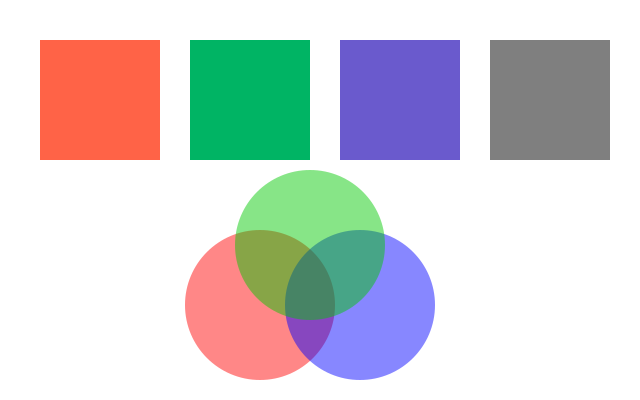
Translucent colours mix where they overlap.
Colour by hue
By default a tuple means red, green, blue. For colour by hue, ask for it by name, or change the colour mode (see below):
| Function | Makes a colour from |
|---|---|
f.hsb(hue, saturation, brightness, alpha=255) |
hue 0–360 (0 red, 120 green, 240 blue), saturation and brightness 0–100 |
f.hsl(hue, saturation, lightness, alpha=255) |
hue 0–360, saturation and lightness 0–100 (50 is the pure colour) |
Hue goes round: f.hsb(370, 80, 90) is the same as f.hsb(10, 80, 90), so
f.hsb(f.frame_count, 80, 90) cycles through the rainbow forever.
Colours you can read and mix
f.color(...) turns any colour into one you can ask about: .red, .green, .blue,
.alpha (0–255), .hue (0–360), .saturation, .brightness and .lightness (0–100).
f.lerp_color(c1, c2, t) mixes two colours: 0 gives c1, 1 gives c2.
import funground as f


def setup():
    f.size(640, 200)


def draw():
    f.background("white")
    f.no_stroke()
    for i in range(24):
        f.fill(f.hsb(i * 15, 90, 95))
        f.rect(20 + i * 25, 30, 25, 60)
    start, end = f.color("tomato"), f.color("royalblue")
    for i in range(11):
        f.fill(f.lerp_color(start, end, i / 10))
        f.circle(47 + i * 54, 150, 44)


f.run()
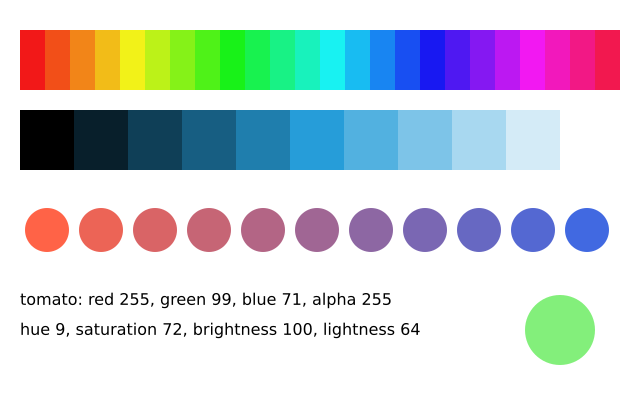
f.hsb() and f.hsl() always use these ranges, whatever the colour mode is, so they stay handy
shortcuts: f.fill(f.hsb(200, 80, 90)) always means the same colour.
Colour mode
f.color_mode() changes how numbers are read as a colour. It works like colorMode() in p5.
import funground as f


def setup():
    f.size(640, 400)


def draw():
    f.background((30, 30, 40))
    f.no_stroke()

    f.color_mode("hsb", 360, 100, 100)     # hue 0-360, saturation and brightness 0-100
    for i in range(32):
        f.fill((i * 360 / 32, 85, 95))
        f.rect(20 + i * 19, 30, 19, 70)

    f.color_mode("hsb", 1)                 # now every part runs from 0 to 1
    for i in range(16):
        f.fill((i / 16, 1, 0.5 + i / 32))
        f.circle(36 + i * 38, 185, 30)

    f.color_mode("rgb", 1)                 # red, green, blue from 0 to 1
    for i in range(16):
        f.fill((i / 15, 0.2, 1 - i / 15))
        f.rect(20 + i * 38, 225, 38, 50)


f.run()
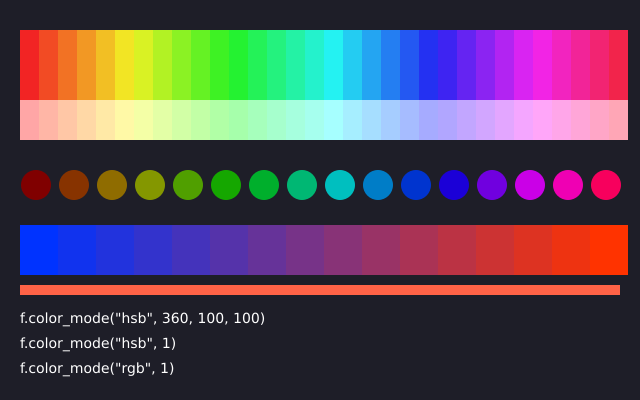
You can give the mode "rgb", "hsb" or "hsl", and then:
| Call | Meaning |
|---|---|
f.color_mode("hsb") |
switch mode, keep that mode's ranges |
f.color_mode("hsb", 1) |
switch mode; all four ranges (three parts and opacity) are 1 |
f.color_mode("hsb", 360, 100, 100) |
the three parts; the opacity range stays as it was |
f.color_mode("hsb", 360, 100, 100, 255) |
all four ranges |
The starting ranges are rgb 255 for every part, and hsb and hsl 360, 100, 100 with opacity 0
to 1. Each mode remembers its own ranges, so you can switch back and forth. Hue goes round; the
other parts stop at their largest and smallest values. f.color_mode("rgb", 1) reads colours
the way DrawBot does.
Names and hex colours are not affected: "tomato" and "#FF6347" mean the same in every
mode. So do colour objects. The mode is part of the saved state, so f.push(), f.pop() and
with f.saved_state(): bring it back, and a picture from f.create_graphics() has its own.
It stays set from one frame to the next, like f.fill().
A single number is a grey, and two numbers are a grey and its opacity. They are read on the third
range of the mode, so f.fill(128) is mid grey in the default mode, and in "hsb" mode it is a
brightness of 128 out of 100, which is white. Ranges must be above 0, or you get an error.
Gradients
A gradient blends colours smoothly. Make one, then use it anywhere a colour goes: in
f.fill(), f.stroke(), f.background(), or f.text(..., color=...).
| Function | Blends |
|---|---|
f.linear_gradient(x1, y1, x2, y2, colors) |
along the line from (x1, y1) to (x2, y2) |
f.radial_gradient(x, y, radius, colors) |
outward from the centre (x, y) to radius |
colors is a list of two or more colours. Add stops=[0, 0.3, 1], one number from 0 to 1 per
colour, to say where each colour sits; otherwise they are spread evenly. A colour with a fourth
value fades to transparent.
import funground as f


def setup():
    f.size(640, 200)


def draw():
    f.background(f.linear_gradient(0, 0, 0, 200, ["midnightblue", "coral"]))
    f.no_stroke()
    f.fill(f.radial_gradient(320, 160, 80, ["lightyellow", "gold", (255, 140, 0, 0)]))
    f.circle(320, 160, 160)


f.run()
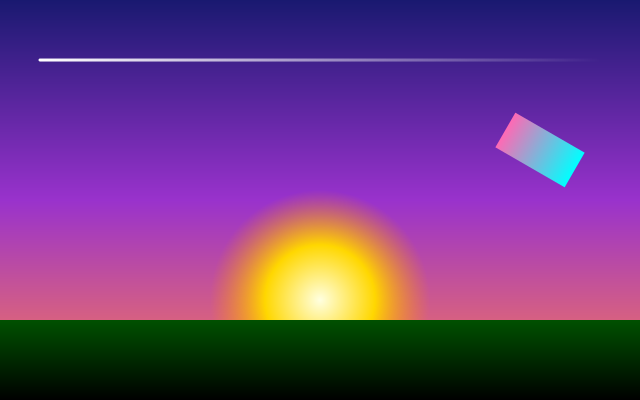
A gradient's positions are measured in the same space as the shapes, so after f.translate()
or f.rotate() the gradient moves and turns with the shape. Saved as PDF or SVG, a gradient
stays smooth at any zoom.
See also
- Gallery: Colour.
- Quick Reference: 3. Colours, fill, stroke and text and 10. Named colours.
- Colour not accepted? See When something goes wrong.
Try it
- Paint the background with a colour written as hex, such as
"#2E4057", then draw a circle in(255, 200, 0). - Draw 12 circles in a row, each one a different hue. Hint:
f.hsb(i * 30, 80, 90). - Make a sky: a background
f.linear_gradient()from dark blue at the top to orange at the bottom.