16. Sound
funground can play a sound file and listen to it as it plays. You can use that to make a picture move with the music. It can also make sound for itself: tones, notes and whole tunes, from a line of text. Then you can draw the wave, or see which note is playing.
Playing a sound
f.load_sound("beep.wav") reads a sound file. It can be a WAV, OGG or MP3 file. Like a picture, it
is looked for next to your sketch first, then in the current folder. You get a sound back.
beep = f.load_sound("beep.wav")

beep.play()             # play from the start
beep.loop()             # play over and over
beep.pause()            # stop, but keep the place
beep.stop()             # stop and go back to the start
beep.set_volume(0.5)    # from 0 (silent) to 1 (full)
beep.is_playing()       # True or False
beep.duration()         # the length, in seconds
beep.current_time()     # how far into the sound it is now, in seconds
play() after pause() carries on from where it stopped. play() on a sound that is already
playing starts it again from the start. You can load as many sounds as you like, and they play
together.
A sound that is not looping stops by itself at the end, and is_playing() becomes False.
Watching the sound
Two methods tell you what the sound is doing right now. Both are plain numbers from 0 to 1.
sound.level()is how loud it is. It is 0 when the sound is not playing.sound.spectrum(bands)is a list ofbandsnumbers, one for each range of pitch, from low notes to high notes. The default is 32 bands. A band is strong when the sound has a lot of that pitch.
This sketch makes a short tune file for itself, so it runs as it is. Then it plays the tune and draws it as bars.
import math
import struct
import wave

import funground as f

# Make a two-second file of two notes, so there is something to play.
with wave.open("tune.wav", "wb") as out:
    out.setnchannels(1)
    out.setsampwidth(2)
    out.setframerate(22050)
    for i in range(44100):
        note = 330 if i < 22050 else 880
        out.writeframes(struct.pack("<h", int(12000 * math.sin(2 * math.pi * note * i / 22050))))

tune = f.load_sound("tune.wav")


def setup():
    f.size(640, 400)
    tune.loop()


def draw():
    f.background("black")
    f.fill("white")
    for i, strength in enumerate(tune.spectrum(16)):
        f.rect(20 + i * 38, 380, 30, -300 * strength)
    f.circle(320, 40, 20 + 60 * tune.level())


f.run()
The gallery has a bigger one: see the Sound area.
Making sound
You do not need a file. A sound can be made from numbers.
f.tone(frequency, seconds) makes one steady tone. The frequency is in hertz: how many times
the wave goes up and down each second. 440 is the note A. A sound made this way is an ordinary
sound, so it has play(), loop(), level() and everything else above.
f.tone(440, 1).play()                          # one second of A
f.tone(220, 2, "square", volume=0.3).play()    # a buzzier wave, and quieter
f.tone(440, 1, attack=0.2, release=0.5).play() # fades in, then fades out
The wave can be "sine" (pure and smooth), "soft" (gentle, like a recorder), "triangle"
(a little brighter), "square" (hollow, like a clarinet), "saw" (bright and buzzy) or "noise"
(a hiss). Noise is random, so f.random_seed() makes it the same every time.
f.pluck("E3", 2) is a plucked string. It starts with a soft pluck and dies away by itself.
Volume and headroom
Sounds are made at half volume (volume=0.5) unless you ask for more. That leaves room
(headroom) for a few sounds to play at the same time. When sounds add up to more than full
volume, the speakers clip: the tops of the waves are cut off, and that sounds harsh. If you play
one sound alone, you can turn it up with volume=1 or sound.set_volume().
The shape of a note
A real note does not switch on and off. It rises, settles, and fades. Four numbers shape it, and together they are called the envelope:
attack: how long the note takes to rise to full volume, in seconds (0.01 at first).decay: how long it then takes to settle down (0.15).sustain: the level it settles at, from 0 to 1 (0.7). It stays there until the end.release: how long the fade out at the end takes (0.15).
f.note("C4", 2, attack=0.5, sustain=1)                 # swells in slowly, then holds
f.note("C4", 1, attack=0.005, decay=0.3, sustain=0)    # a short, struck sound
f.note("C4", 2, "saw", attack=0.1, release=1)          # a long fade at the end
Each part follows a smooth curve, fast at first and then slower, as real instruments do. The fades also stop the click a sound makes when it starts or ends in the middle of a wave. If the sound is too short for the attack and the release, they are made shorter.
A room for the sound
A sound made from numbers is completely dry: it stops the moment it ends. In a real room, the
sound bounces off the walls and rings on for a moment. sound.reverb(amount) gives you a new sound
in a room. amount goes from 0 (no room) to 1 (a large hall). The new sound is a little longer,
because the room rings on after the end: up to 1.5 seconds at 1.
import funground as f

dry = f.pluck("G3", 1.5)
wet = dry.reverb(0.5)                     # the same pluck, in a room
both = f.sequence(dry, wet)


def setup():
    f.size(400, 200)
    both.play()


def draw():
    f.background("black")
    f.fill("deepskyblue")
    f.no_stroke()
    f.draw_wave(both, 10, 50, 380, 100)   # the second half rings on for longer


f.run()
reverb() takes a moment to work out: about a twentieth of a second for each second of sound.
Make the sound once, at the start, not in draw().
The numbers inside a sound
A sound is a long list of numbers from -1 to 1, one for each tiny slice of time. There are 44 100
of them every second. sound.samples() gives you the list, so you can draw it. And
f.create_sound(numbers) goes the other way: it turns a list into a sound. Numbers outside -1 to
1 are cut off at -1 or 1.
This sketch makes a sound from a list of numbers, and draws the start of it. A sound made from a list is just a sound, so the sketch plays it.
import math

import funground as f

# Two sine waves added together make a richer sound.
numbers = [0.5 * math.sin(2 * math.pi * 220 * i / 44100)
           + 0.25 * math.sin(2 * math.pi * 330 * i / 44100)
           for i in range(44100)]
chord = f.create_sound(numbers)


def setup():
    f.size(640, 200)
    chord.loop()


def draw():
    f.background("black")
    f.stroke("white")
    wave = chord.samples()
    for x in range(639):
        f.line(x, 100 - 150 * wave[x * 4], x + 1, 100 - 150 * wave[x * 4 + 4])


f.run()
Putting sounds together
f.sequence(a, b, c)makes a new sound that plays them one after another.f.mix(a, b, c)makes a new sound that plays them all at once. A quiet sum is left alone. If the sum gets loud, its loudest moments are gently squashed (a soft limiter), so it never goes above 0.9 and never clips. For the cleanest sound, give each part a lowervolumeso the limiter has little to do.sound.pan(-1)moves a sound to the left speaker,sound.pan(1)to the right, and 0 is the middle. It works on sounds from files too.level()andspectrum()do not change with pan.sound.save("name.wav")writes the sound to a WAV file. The pan is kept. The volume is not.
Notes and melodies
f.note("A4", 1) is like f.tone(), with a note name instead of a frequency. A name is a letter
from A to G, an optional # (sharp) or b (flat), and an octave number. "C4" is middle C,
"A4" is 440 Hz and "Bb3" is B flat just below. The notes use equal temperament, the tuning of a
piano.
f.note_to_frequency("C4") gives the frequency, 261.63. f.frequency_to_note(300) goes back and
gives the nearest note, "D4".
A tune from text
f.melody() turns a line of text into a sound. The parts are separated by spaces.
- A note name plays that note.
-is a rest: silence.[C4 E4 G4]is a chord: all its notes together.:2after any of these makes it last 2 beats. With nothing, it lasts 1 beat.
tempo is beats a minute (120 if you do not say). wave is "soft" unless you choose another,
and volume is 0.5.
The notes are smooth (legato): each note keeps sounding until its beats are over, and then it fades
out over 0.15 seconds while the next note begins. So there is no gap between the notes. The sound is
as long as the beats add up to, plus that last fade of 0.15 seconds if the tune ends on a note. End
with a rest, like -:0.5, and the fade fits inside it: then the sound is exactly as long as the
beats, which is handy for a tune that loops in time.
import funground as f

tune = f.melody("C4 C4 G4 G4 A4 A4 G4:2 - F4 F4 E4 E4 [D4 G4]:2 [C4 E4 G4]:3",
                tempo=110).reverb(0.2)


def setup():
    f.size(640, 200)
    tune.loop()


def draw():
    f.background("black")
    f.fill("gold")
    f.circle(20 + 600 * tune.current_time() / tune.duration(), 100, 20 + 80 * tune.level())


f.run()
A token that melody() cannot read gives a ValueError that names it, for example
bad token 'H4'.
Sargam
Indian music names the notes from a starting note, Sa. Give sa= the note that Sa is, and the
tokens are swaras: S r R g G m M P d D n N. The small letters r g d n are the flat (komal)
ones, and M is the sharp (tivra) Ma. A ' after a swara is the octave above, and a comma is the
octave below.
f.melody("S R G m P D N S'", sa="D4").play()        # a scale up from D
f.melody("P, S R G:2 R S", sa="C4", tuning="just")  # the same, in just tuning
With tuning="just" each swara is a simple fraction of Sa's frequency, like 5/4 for G and
3/2 for P. The notes then ring together more purely. With the default, tuning="equal", the
notes are the ones on a piano. f.note_to_frequency("G", sa="D4") and
f.frequency_to_note(hz, sa="D4") work in swaras too.
Which note is it?
sound.pitch() listens to the sound at the place it is playing now and gives the frequency of the
note, in hertz. It gives None if the sound is quiet, if there is no clear note (noise has none),
or if it is not playing. It listens to one voice or one instrument. It cannot tell the notes of a
chord apart. It looks for pitches from 50 to 2000 Hz.
hz = tune.pitch()
if hz:
    f.text(f.frequency_to_note(hz), 20, 40)
Listening with the microphone
A sound does not have to come from a file. f.microphone() listens to your computer's microphone.
Call mic.start() to begin and mic.stop() to end. While it listens, mic.level(),
mic.spectrum() and mic.pitch() work just as they do on a sound. They tell you about the last
fraction of a second that it heard. When it is not listening they give 0, a list of zeros, and
None.
Here is a tuner. Sing or hum a note, or play one on an instrument.
import math

import funground as f

mic = f.microphone()


def setup():
    f.size(300, 200)
    mic.start()
    f.text_align("center")


def draw():
    f.background("black")
    hz = mic.pitch()
    f.fill("white")
    f.text_size(64)
    f.text(f.frequency_to_note(hz) if hz else "-", 150, 90)
    f.fill("deepskyblue")
    db = 20 * math.log10(mic.level() + 1e-9)                 # decibels: a quiet room is about -65
    f.rect(20, 160, 260 * f.constrain((db + 70) / 50, 0, 1), 16)


f.run()
mic.pitch() is None when it is quiet or when there is no clear note, so the sketch above shows a
dash. f.microphones() lists the names of the microphones on your computer. Give part of a name to
f.microphone("USB") to choose one.
Laptop microphones can be very quiet. A voice may read only 0.01 on mic.level(), and a quiet room
0.0005. So the microphone examples measure loudness against the room, in decibels. You can do the
same in two lines: db = 20 * math.log10(level + 1e-9) turns a level into decibels, and
above = db - room_db says how far above the quiet room you are. Measure room_db for half a
second at the start, while nothing is happening.
Record, then draw
mic.capture(seconds) gives you a new sound made of the last few seconds the microphone heard, up
to 10. It is an ordinary sound, so you can play it, save it, or draw its wave with samples().
import funground as f

mic = f.microphone()
recording = None


def setup():
    global recording
    f.size(400, 160)
    mic.start()


def draw():
    global recording
    f.background("white")
    if f.frame_count == 60:                 # after about a second, keep what it heard
        recording = mic.capture(1)
        mic.stop()
    if recording:
        numbers = recording.samples()
        f.stroke("crimson")
        f.no_fill()
        f.begin_shape()
        for x in range(400):
            f.vertex(x, 80 - 70 * numbers[x * len(numbers) // 400])
        f.end_shape()
    else:
        f.fill("gray")
        f.text("listening...", 20, 30)


f.run()
A few things to know:
- The microphone is never played back, so there is no squeal from the speakers.
- Nothing is recorded to a file unless you call
save()on a capture. - With no microphone, or if the computer will not let funground use it,
f.microphone()ormic.start()gives aRuntimeErrorthat says so. On a Mac, allow microphone access in System Settings, Privacy and Security, Microphone. - With
FUNGROUND_HEADLESS=1the microphone is silent and hears nothing, so a sketch still runs. A capture is then a second of silence. mic.start()forgets what was heard before.mic.stop()keeps it, so you can stop, then capture.- This needs pygame-ce 2.5 or newer.
Drawing sound
Four ready-made functions draw sound for you. You could draw all of them yourself from samples(),
spectrum() and pitch(). These just save you the work. Each one fills a box: you give its left,
top, width and height.
f.draw_wave(source, x, y, w, h) draws the wave. The source can be a sound (you see all of it, and
a line shows where it is while it plays), a microphone (you see the last half second) or a list of
numbers. f.draw_spectrum(source, x, y, w, h) draws bars for the spectrum, as it is right now. They
use your current fill, stroke and transform, like f.rect() does, so f.fill("orange") first
changes the colour.
import funground as f

song = f.melody("C4 E4 G4 C5:2 - G4 E4 C4:2", tempo=150, wave="triangle")


def setup():
    f.size(420, 240)
    song.loop()


def draw():
    f.background("black")
    f.fill("deepskyblue")
    f.stroke("white")
    f.draw_wave(song, 10, 10, 400, 100)       # the whole song, and a line where it is now
    f.no_stroke()
    f.fill("orange")
    f.draw_spectrum(song, 10, 130, 400, 100, bands=32)


f.run()
f.draw_pitch_line(source, x, y, w, h) draws the pitch heard over the last few seconds, as a line
that scrolls. Low notes are at the bottom and high notes at the top. Faint lines are labelled with
note names. Give sa="C4" and they are labelled with swaras instead. Where there is no clear pitch,
the line has a gap. Call it once in every frame, because it looks at the pitch each time. Use
seconds=, low= and high= to change how far back it shows and which notes it covers.
import funground as f

mic = f.microphone()


def setup():
    f.size(420, 240)
    mic.start()


def draw():
    f.background(20)
    f.no_fill()
    f.stroke("limegreen")
    f.stroke_width(3)
    f.draw_pitch_line(mic, 10, 10, 400, 220, seconds=8, low="C3", high="C6")


f.run()
f.spectrogram(sound, width, height) gives you a picture of a whole sound. Time goes across, pitch
goes up, and the louder it is, the brighter it is. The brightest colour is your current fill, so
set the fill first. It takes about a second for a ten second sound, so make it once, in setup(),
not in draw(). Then draw it with f.image(), or save it.
import funground as f

song = f.mix(f.melody("A3 C4 E4 A4:2 G4 E4 C4:2", tempo=130),
             f.melody("A2:4 E2:4", tempo=130, wave="triangle"))
picture = None


def setup():
    global picture
    f.size(420, 200)
    f.fill("gold")
    picture = f.spectrogram(song, 400, 180)


def draw():
    f.background("black")
    f.image(picture, 10, 10)
    if song.is_playing():                    # a line shows where the song is
        x = 10 + 400 * song.current_time() / song.duration()
        f.stroke("white")
        f.line(x, 10, x, 190)


def mouse_pressed():
    song.play()


f.run()
Because these draw with ordinary shapes, they also work inside with f.layer(...), and a saved PDF
or SVG keeps them as sharp shapes. The spectrogram is a picture made of pixels, so a saved file
holds it as an image.
Beats and tempo
A sound can tell you where its beats are. Every method here listens to the whole sound, and works it all out the first time you ask. After that the answers are remembered. A three-minute song takes a few seconds the first time.
sound.onsets()is a list of times, in seconds, where a note or a hit begins.sound.tempo()is the speed in beats a minute, from 60 to 200. It isNonewhen the sound has no steady pulse, as with silence, hiss or one long note.sound.beats()is a list of the times of the beats at that tempo. They line up with the onsets.
The next sketch plays a tune and flashes a circle on every beat.
import funground as f

tune = f.melody("C4 E4 G4 E4 A3 C4 E4 C4", tempo=100, wave="triangle")
beats = tune.beats()            # for example [0.0, 0.6, 1.2, ...]
print(round(tune.tempo()), "beats a minute")


def setup():
    f.size(300, 200)
    tune.loop()


def draw():
    now = tune.current_time()
    since = min([now - b for b in beats if b <= now] or [9.0])
    f.background("black")
    f.fill("gold" if since < 0.15 else "gray")
    f.circle(150, 100, 100)


f.run()
sound.is_onset() is for the moment. It is True in the frame where a new note or hit is
heard, so you can flash a light on each one. It works on a playing sound, and on a microphone, for
what it heard most recently. It is False when nothing is playing or listening.
Rhythm is easy to hear in drums and plucked or struck notes. It is harder in smooth singing
or bowed strings, where notes begin softly. A song with no clear beat gives None for the tempo.
A microphone has no "whole sound". To find the beats of what it heard, take a piece of it first:
mic.capture(8).tempo().
Chords and keys
sound.chroma() is twelve numbers from 0 to 1. They say how strong each note name is right now:
C, C#, D, D#, E, F, F#, G, G#, A, A#, B. Every octave counts as the same note name, so a low C and a
high C add up. The strongest is 1. It works on a playing sound and on a microphone, and gives
twelve zeros when nothing is playing or listening.
sound.chord() names the chord that fits the chroma best. The name is a note and then nothing
(major), m (minor), dim, aug, 7, maj7 or m7: "C", "Am", "Bdim", "G7", "Fmaj7". If no chord
fits well it is None. One note on its own is not a chord, so it is None too. It is meant for
clear chords on a piano, a guitar or a synth, not for a busy band.
f.chord_notes(name) goes the other way. It gives the notes in a chord: f.chord_notes("C") is
["C", "E", "G"], and f.chord_notes("Am") is ["A", "C", "E"].
sound.key() is for a whole sound. It adds up the chroma over the sound and says which key fits:
"G major" or "E minor", or None. It is a good guess for a tune with a clear home note. It
cannot see a key change in the middle.
import funground as f

names = ["C", "Am", "F", "G7"]
song = f.sequence(*[f.mix(*[f.note(n + "4", 1.0, "triangle") for n in f.chord_notes(c)])
                    for c in names])
print(song.key())


def setup():
    f.size(300, 200)
    f.text_align("center")
    song.loop()


def draw():
    f.background("black")
    f.fill("white")
    f.text_size(64)
    f.text(song.chord() or "-", 150, 100)
    for i, v in enumerate(song.chroma()):
        f.rect(20 + i * 22, 190 - 60 * v, 18, 60 * v)


f.run()
(The notes in that sketch are all in one octave, so a chord such as "Am" comes out as A4, C4, E4. That is fine for the chord finder, which ignores the octave.)
Learning with sound
Four gallery examples in the Music area use sound to teach. Each one is a small sketch you can open, run and change.
Draw a wave and hear it
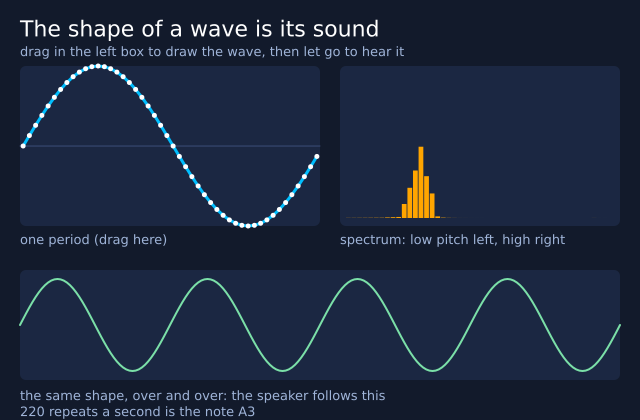
Every sound is a wave, and the shape of the wave is its colour, or timbre. Drag the mouse in the box to
draw one period of a wave. f.create_sound() repeats it 220 times a second, and the sketch plays it
again when you let go. f.draw_spectrum() shows which pitches are in it. A smooth wave has one tall
bar and a jagged one has many. Four buttons give you a sine, a square, a saw and a soft wave to start from.
Compose and save
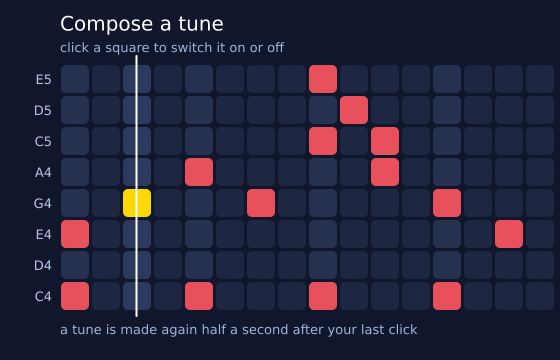
Click squares on a grid: beats go across and notes go up. The notes come from a five-note scale, or from
sargam if you tick the box, so nothing you write sounds wrong. The loop is f.melody() with a quiet pulse
from f.mix() and a little reverb, and a line sweeps along it. "save WAV" writes the tune with sound.save()
and "save poster" writes the grid as a PDF with f.save(). Both files go in the folder the sketch runs in.
Ear training
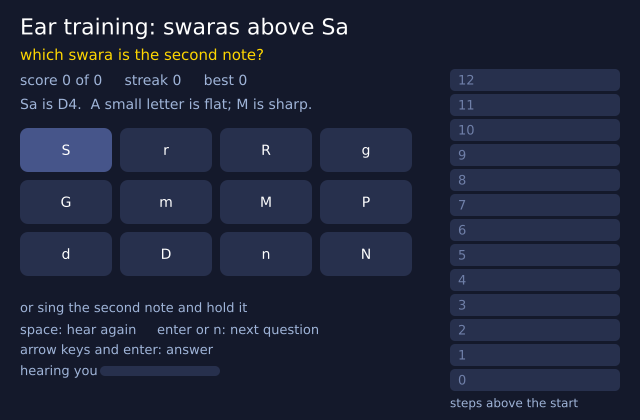
The sketch plays a starting note and then a mystery note. Say how far up it is: a swara above Sa, or an interval such as a major 3rd. Click a button, press a key, or sing the note into the microphone. The sketch keeps your score and your streak, and the ladder shows the right answer with its two notes. It folds the sung pitch into one octave and smooths it, the same way as the sargam-over-a-drone example in the Sound area of the gallery. With no microphone, clicks and keys still work.
A piano roll of a tune you wrote
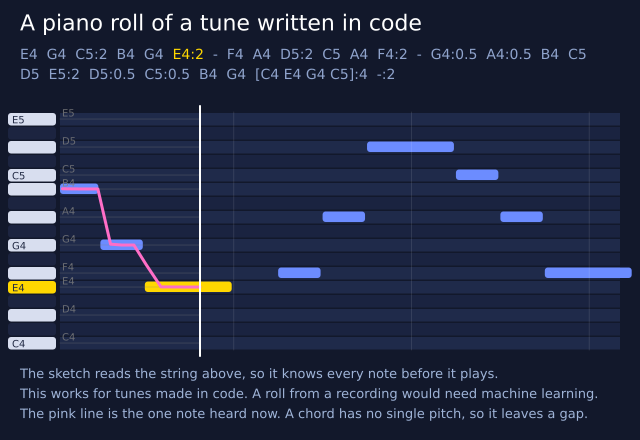
A melody string is read by the sketch and drawn as bars: time goes across and pitch goes up. The roll scrolls
past a fixed line, and each note lights up as it sounds. Tick the box to lay f.draw_pitch_line() over it and
see the pitch that sound.pitch() hears follow the bars. This only works because the notes were written in
code. A piano roll from a recording would have to guess the notes, which needs machine learning.
Good to know
- No sound device? The sketch still works. With no speakers, or with
FUNGROUND_HEADLESS=1, a sound loads and "plays" in silence. It keeps time, sois_playing(),level()andspectrum()give the same answers as if you could hear it. - Time, not speakers. The place in the sound comes from the sketch's clock, not from the speakers. If the computer is slow to start the sound, the numbers can be a little ahead of what you hear.
- Slow the first time.
onsets(),tempo(),beats()andkey()read the whole sound, so the first call takes about a second for each minute of sound (a few seconds for a song). After that they answer at once.is_onset(),chroma()andchord()take only a few milliseconds. - Stereo is mixed down to one channel before it is measured.
- Made sounds are made first. A tone or a tune is worked out before it plays: about a hundredth of a
second for each second of sound. Nothing about it can change while it plays, except the volume and
the pan.
square,saw,triangleandsoftare built from a pitch and its overtones, and the overtones too high to play are left out, so even high notes sound clean. - Speed.
spectrum()is worked out only when you ask, and at most once for each frame. It takes about a millisecond or two, so it is fine to call every frame. - Not drawing. Sounds add nothing to the picture, to a saved file or to the list of drawing commands.
- Mistakes. A file that is not there gives
FileNotFoundError, saying where it looked. A file that is not a sound givesValueError. So do a volume outside 0 to 1 andbandsoutside 1 to - The functions that make sound say which argument was wrong.
Where the sound comes from
Playing and mixing use pygame-ce's mixer (SDL audio), and the microphone uses pygame-ce's
experimental pygame._sdl2.audio. Everything else is funground's own plain Python, with no numpy and
no audio library: the plucked string is the Karplus-Strong method, the room is a Schroeder-style
reverb, the spectrum is an FFT, and pitch is found by autocorrelation. CREDITS.md
names each method with its reference.
See also
- Gallery: Sound and Music.
- Quick Reference: Sound.
- No microphone or no sound? See When something goes wrong. Words: sample, frequency, pitch, spectrum and decibel.
Try it
- Play one second of the note A with
f.note("A4", 1). Then play it an octave higher. - Write a short tune with
f.melody(), with a rest and a chord in it, and draw its wave withf.draw_wave(). - Make a circle that gets bigger when you speak into the microphone. Hint:
mic.level().
Previous: 15. Coming from DrawBot · Next: 17. Ragas and talas