15. Coming from DrawBot
DrawBot is further from funground than p5.js or Processing. It draws by running a script once
from top to bottom, in points on a page whose origin is the bottom-left corner, with colours as
floats from 0 to 1. funground draws in pixels from a top-left origin, with colours mostly as
0–255 values or names, either as a script or by calling setup() once and draw() every frame. This chapter states the big
differences plainly, then goes name by name.
The drawing loop
A DrawBot script has no loop: it runs once, in order, and whatever it draws stays on the page.
Animation and multi-page documents come from calling newPage() again and again — each call adds
a page, and saveImage(...) at the end can write them out as a PDF, or as frames of a video or
GIF. funground has pages too: f.new_page() (see "Pages" below).
funground has both styles. A DrawBot script ports as a funground script: no draw(), no
f.run(), the same top-to-bottom order. f.size(w, h) makes the canvas without opening a window,
f.save(path) writes the file at once, and f.show() opens a window to look at the result.
When you want movement, write an animated sketch instead, with setup(), draw() and f.run()
(chapter 2). A file is one style or the other.
Coordinates
DrawBot's origin is the bottom-left corner, with y pointing up — "the origin of the drawing
board is at the bottom left," in DrawBot's own words. funground's origin is the top-left
corner, with y pointing down, the p5/Processing/screen convention. A shape near
the bottom of a DrawBot page is drawn with a large y; the same shape near the bottom of a
funground canvas is drawn with y close to f.height.
Colour
DrawBot's fill() and stroke() take floats from 0.0 to 1.0 per channel, with alpha the
same: fill(1, 0, 0, .5) is half-transparent red, fill(0) is black, fill(0, .5) is grey at
half opacity. There are no colour names.
funground's colours are 0–255 integers, or a name, or a hex string, with alpha
also 0–255: f.fill((255, 0, 0, 128)), f.fill("red"), or f.fill("#FF000080").
To use DrawBot's 0–1 numbers as they are, call f.color_mode("rgb", 1) once. Then
f.fill((1, 0, 0, 0.5)) is half-transparent red. One number is a grey and two are a grey and an
opacity, as in DrawBot: f.fill(0) is black and f.fill(0, 0.5) is grey at half opacity.
Shapes: oval and rect
DrawBot's rect(x, y, w, h) and oval(x, y, w, h) take the same four numbers: x, y is the
corner of the shape's bounding box, for both of them. funground's f.rect(x, y, w, h) also uses
the top-left corner, but f.ellipse(x, y, w, h) and f.circle(x, y, d) are placed
by their centre — the p5/Processing convention, not DrawBot's. To place ellipses
the DrawBot way, call f.ellipse_mode("corner") once.
oval(100, 100, 80, 80) # bounding box from (100, 100)
f.ellipse(140, 140, 80, 80) # centre at (140, 140) — same circle, shifted to its middle
Paths: BezierPath and f.path()
DrawBot builds a path with a BezierPath object (path.moveTo(...), path.lineTo(...),
path.curveTo(...), path.closePath()) and draws it with drawPath(path). funground's
f.path() returns a similar builder (move_to, line_to, curve_to, close), drawn with
f.draw_path(path). The main difference is points: DrawBot takes an (x, y) pair
for each point; funground's builder takes plain x, y numbers.
Shapes and booleans. DrawBot's names, in funground's style:
DrawBot BezierPath |
funground f.path() |
|---|---|
path.rect(x, y, w, h) |
path.rect(x, y, w, h) (x, y is the top-left; DrawBot's is the bottom-left) |
path.oval(x, y, w, h) |
path.ellipse(x, y, w, h) or path.circle(x, y, d) (x, y is the centre) |
path.polygon(*points) |
path.polygon(points) (one list of (x, y)) |
a.union(b) / a \| b |
a.union(b) / a \| b |
a.intersection(b) / a & b |
a.intersection(b) / a & b |
a.difference(b) / a % b |
a.difference(b) / a % b or a - b |
a.xor(b) / a ^ b |
a.xor(b) / a ^ b |
path.removeOverlap() |
path.remove_overlap() |
Outlines, queries and moves:
DrawBot BezierPath |
funground f.path() |
|---|---|
path.expandStroke(width, lineCap, lineJoin, miterLimit) |
path.expand_stroke(width, cap, join, miter_limit, dash) (open lines work too; dash replaces DrawBot's separate dashStroke) |
path.bounds() gives (x min, y min, x max, y max) |
path.bounds() gives (x, y, width, height) |
path.pointInside((x, y)) |
path.contains(x, y) |
path.translate(x, y) |
path.translate(dx, dy) |
path.scale(x, y, center) |
path.scale(sx, sy) (about the origin) |
path.rotate(angle, center) |
path.rotate(degrees, cx, cy) (clockwise on screen) |
path.copy() |
path.copy() |
Letters as a path:
DrawBot BezierPath |
funground |
|---|---|
path.text(txt, offset, font, fontSize, align) |
f.text_path(message, x, y) (uses the current font, size, style and alignment; a "\n" starts a new line) |
Asking about a font:
| DrawBot | funground |
|---|---|
listFontVariations(fontName) gives {"wght": {"minValue": ..., "defaultValue": ..., "maxValue": ...}} |
f.current_font().variations() gives {"wght": (min, default, max)}; {} for a static font |
listOpenTypeFeatures(fontName) gives a list of tags |
f.current_font().features() gives a sorted list of tags |
fontContainsCharacters(characters) asks the current font |
f.current_font().contains(text) |
DrawBot names the font by its installed name and asks about it. funground asks the font object,
which you get from f.current_font() (the font text is set in now) or f.load_font().
DrawBot's fontContainsCharacters takes a string of characters like funground's contains.
In funground a new line in text is skipped, and a space needs a glyph.
DrawBot's translate, scale and rotate change the path itself. funground's give back a new
path. DrawBot turns anticlockwise because its y axis points up; funground's y axis points down,
so a positive angle turns clockwise, as in f.rotate.
Two differences for the booleans. All
the funground calls return a new path: DrawBot's removeOverlap() changes the path itself. And
the drawn result is the same, but the order of points inside a result may differ, because funground
uses a different library underneath.
Saved state
DrawBot recommends with savedState(): over the older save()/restore(), to save and restore
the graphics state — transform, colours and more — for one block. funground's with
f.saved_state(): does exactly the same job, alongside f.push()/f.pop().
Text
| DrawBot | funground |
|---|---|
font(name, size=None) |
f.text_font(font, size=None) — funground loads a font file with f.load_font(path) first; DrawBot names an installed font by its PostScript name |
fontSize(n) |
f.text_size(n) |
text(str, (x, y)) |
f.text(message, x, y) |
textBox(str, (x, y, w, h)) |
f.text_box(message, x, y, w, h) |
Spacing, features and variable fonts. Checked in DrawBot's source:
drawBot/drawBotDrawingTools.py (tracking, openTypeFeatures, fontVariations) and
drawBot/context/baseContext.py.
| DrawBot | funground |
|---|---|
tracking(value) — "an absolute number of points between the characters" |
f.text_tracking(pixels) — space added after every letter, the last one too |
tracking(None) |
f.text_tracking(0) |
openTypeFeatures(liga=False, smcp=True) |
f.text_features(liga=False, smcp=True) |
openTypeFeatures(resetFeatures=True) |
f.text_features() with no arguments |
fontVariations(wght=700) |
f.font_variations(wght=700) |
fontVariations(resetVariations=True) |
f.font_variations() with no arguments |
Mixed styles in one text. Checked in DrawBot's source: drawBot/context/baseContext.py,
class FormattedString (line 1154), append (1353), __add__ (1552), __len__ (1610), __repr__ (1613);
and drawBot/drawBotDrawingTools.py, text (1833) and textBox (1902).
| DrawBot | funground |
|---|---|
FormattedString() |
f.FormattedString() |
fs.append(txt, font=, fontSize=, fill=, tracking=, openTypeFeatures=, fontVariations=) |
fs.append(text, font=, size=, style=, color=, tracking=, features=, variations=). Returns fs, so calls chain. A setting left out follows the drawing state when the text is drawn. |
fs + txt |
fs + other, a FormattedString or a string |
len(fs) |
len(fs) |
repr(fs) is the plain text |
str(fs) is the plain text; repr shows the number of runs |
text(fs, (x, y)), textBox(fs, (x, y, w, h)) |
f.text(fs, x, y), f.text_box(fs, x, y, w, h) |
textBox returns the overflow as a FormattedString |
f.text_box returns the overflow as a FormattedString; an empty one when all fits |
DrawBot's FormattedString also has methods that change its current settings (fs.font(),
fs.fontSize(), fs.fill() and so on), fallbackFont, baselineShift, underline, tabs, indents,
copy() and indexing. funground does not have them yet. It takes its settings only in append().
fill is color here, and a run has no stroke of its own.
DrawBot's two functions also return the current settings. funground's do not return anything yet.
For the axes and features a font has, see font.variations() and font.features() above. As in DrawBot, an axis the font
lacks is ignored. DrawBot picks the font by its installed name, funground by a font file.
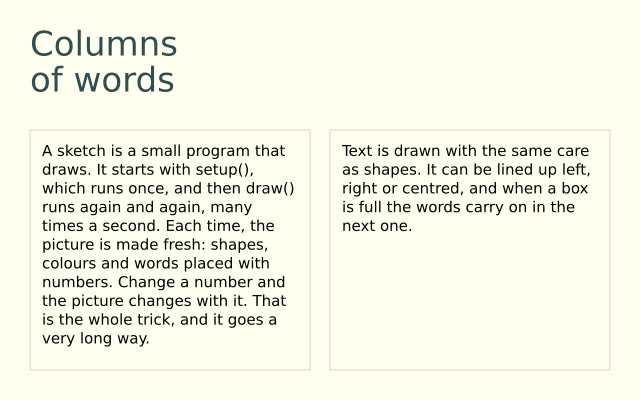
Both textBox and f.text_box wrap text inside a box and return the text that did not fit,
so the rest can flow into a second box (DrawBot: "if the text overflows the rectangle, the
overflowed text is returned"; funground does the same). funground's text anchor
defaults to the top-left of the message; DrawBot's (x, y) is the box's corner in
its own bottom-left, y-up space, so the two need opposite y arithmetic — see the walk-through
below.
Gradients
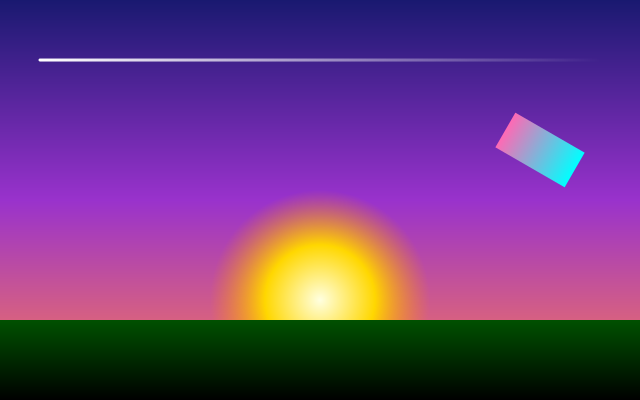
DrawBot's linearGradient(startPoint, endPoint, colors, locations=None) and
radialGradient(startPoint, endPoint, colors, locations=None, startRadius=0, endRadius=100) blend
between two circles, one at each point, each with its own radius — useful for a gradient that
also drifts sideways. funground's f.linear_gradient(x1, y1, x2, y2, colors, stops=None) works
the same way as DrawBot's linear one; f.radial_gradient(x, y, radius, colors, stops=None) is
simpler — one centre, growing out to radius — rather than DrawBot's two
circles.
Blend mode, opacity and shadow
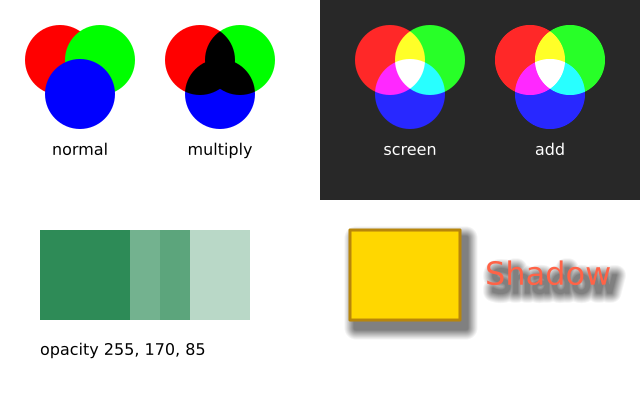
Both have blendMode(mode)/f.blend_mode(mode) for the same idea — how new drawing mixes with
what's underneath — though the two libraries don't spell every mode name the same way (DrawBot's
colorDodge/colorBurn are funground's dodge/burn).
DrawBot's opacity(value) (0.0–1.0) is a single, global setting. funground's f.opacity(0–255)
multiplies the alpha of fill and stroke separately, so a stroke drawn over its
own fill still shows both, rather than the pair being faded as one flattened group.
DrawBot's shadow(offset, blur=None, color=None) and funground's
f.shadow(x_offset, y_offset, blur=5, color=(0, 0, 0, 128)) do the same job — a soft, offset copy
drawn under the shape — with the offset as one (x, y) pair in DrawBot and two numbers in
funground. funground's color defaults to a dark, half-transparent grey, so f.shadow(4, 4) on
its own already draws something.
Saving
DrawBot's saveImage(path, **options) writes the current page (or every page, as a multi-page
PDF or an animation) to a file whose extension picks the format — pdf, png, svg, gif,
mp4, and several more. funground's f.save(path) writes the picture, as .png, .pdf or
.svg (chapter 13), and as .gif or .mp4. In a script it writes at once, like saveImage; every
page is one frame, and f.frame_duration(seconds) is DrawBot's frameDuration(seconds): it sets how
long the current page, and the pages after it, are shown (0.1 seconds to begin with). All the pages of a GIF or MP4 must be the
same size. A GIF needs Pillow (pip install funground[extras]); an MP4 needs the program ffmpeg.
f.save_frames(pattern, count) writes a numbered sequence of frames instead. In an animated sketch
(DrawBot has none), f.save_gif(path, seconds) and f.save_movie(path, seconds) record it.
Pages
DrawBot documents can hold many pages: newPage(w, h) starts a new one, and pageCount() says
how many there are. A funground script can do the same:
| DrawBot | funground |
|---|---|
newPage("A4") |
f.new_page("A4") |
newPage(300, 200) |
f.new_page(300, 200) |
newPage("A4Landscape") |
f.new_page("A4Landscape") |
newPage() |
f.new_page() (keeps the size of the current page) |
pageCount() |
f.page_count() |
sizes("A4") |
f.page_size("A4") gives (595, 842) |
saveImage("x.pdf") |
f.save("x.pdf") writes every page |
Colours, fonts and other settings carry over to the new page; the transform and
any open f.push() start afresh. f.save("x.png") writes one picture per page: x_1.png,
x_2.png, and so on. f.show() shows the current page, and the left and right arrow keys turn the
pages. funground does not have DrawBot's pages() list or with page: blocks: drawing always goes on
the current page. Chapter 13 has a runnable example. Separately, create_graphics pictures
(chapter 9) give you more drawing surfaces within a single page. DrawBot has no layers.
funground's with f.layer("name"): (chapter 9) draws on a see-through layer over the canvas, which
is not a DrawBot idea. Each page has its own layers.
Controls: Variable
DrawBot's Variable([...], globals()) puts sliders, checkboxes and fields in a panel and runs the
whole script again each time one changes. funground does not run a script again. To steer a
drawing with controls, make it an animated sketch: make the controls in setup(), and read them
in draw(), which runs every frame.
| DrawBot | funground |
|---|---|
{"name": "size", "ui": "Slider", "args": {"minValue": 10, "maxValue": 100, "value": 40}} |
size = f.create_slider(10, 100, 40, label="size") |
{"name": "grid", "ui": "CheckBox"} |
grid = f.create_checkbox("grid") |
| (a button needs a callback) | reset = f.create_button("reset") |
size is a global the script reads |
size.value() |
The controls sit in a panel below the canvas. They are not part of the page you save. Chapter 10 shows a complete sketch.
A porting walk-through
An original DrawBot script: a page with a row of translucent circles over a background, each one a little further along the hue wheel, with a caption at the bottom.
size(400, 200)
fill(0.05, 0.05, 0.08)
rect(0, 0, width(), height())

for i in range(10):
    x = 20 + i * 38
    r, g, b = 1 - i / 9, i / 18, i / 9
    fill(r, g, b, .7)
    oval(x, 70, 36, 36)

fill(1)
fontSize(14)
text("ten circles", (20, 20))

saveImage("~/Desktop/circles.pdf")
And the same picture as a funground script, with the y-flip and the 0–1 colours made explicit:
import funground as f

f.size(400, 200)
f.background((13, 13, 20))
for i in range(10):
    x = 20 + i * 38 + 18                        # + 18: DrawBot's x was the oval's left edge
    red, green, blue = 1 - i / 9, i / 18, i / 9
    f.fill((red * 255, green * 255, blue * 255, int(.7 * 255)))
    y = f.height - (70 + 36)                    # DrawBot's y counts up from the bottom
    f.circle(x, y + 18, 36)
f.fill("white")
f.text_size(14)
f.text("ten circles", 20, f.height - 20 - 14)   # y flipped from DrawBot's bottom-left origin

f.save("circles.pdf")                           # written at once, like saveImage
f.show()                                        # look at it; close the window to finish
What is not here
Some DrawBot features are not in funground. CMYK colour is left out for good. The list of what is left out says why, and what to use instead.
See also
- Gallery: Documents and pages, Saving your work and Paths and clipping.
- Quick Reference: 9. One-page cheat sheet.
Try it
- Port a DrawBot sketch of your own that uses
oval(). Remember that the origin is at the top-left. - Write a script with two pages of different sizes and save it as a PDF.
- Use
f.color_mode("rgb", 1)so you can write colours as 0 to 1 numbers, as in DrawBot.
Next: 16. Sound