Record an animation as a GIF
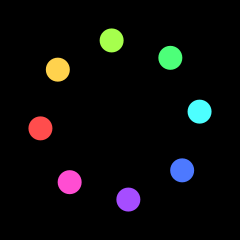
f.save_gif("spinner.gif", 2) records the next 2 seconds and writes them as a GIF that loops for ever. The animation turns once in 60 frames, so the GIF loops without a jump.
How it works
- f.size(240, 240, fps=30) sets the window and the frame rate. Each GIF frame is shown for 1 divided by the frame rate.
- f.save_gif("spinner.gif", 2) records the next 2 seconds of the sketch. Call it once. Here it is on the first frame, so the test is f.frame_count == 0.
- 2 seconds at 30 frames a second is 60 frames. The dots turn 6 degrees a frame, so 60 frames is a full turn. The last frame joins up with the first, and there is no jump.
- Eight dots sit 45 degrees apart on a circle. f.hsb() gives each its own hue.
- f.save_movie("spinner.mp4", 2) does the same for an MP4, but it needs the free program ffmpeg.
Make it yours
- Change the 80 in the dot position to a bigger or smaller circle.
- Change the 24 to make the dots bigger or smaller.
- Use 12 dots: change range(8) to range(12), and 45 to 30 and i * 45 to i * 30, so they stay evenly spaced.
- Make the dots turn the other way: use - f.frame_count * 6 in the angle.
- Change the saved name in f.save_gif(), and try f.save_movie() if you have ffmpeg.
The code
Copy it into a file and run it.
"""Record an animation as a GIF

f.save_gif("spinner.gif", 2) records the next 2 seconds and writes them as a GIF that loops for
ever. The animation turns once in 60 frames, so the GIF loops without a jump.

How it works:
- f.size(240, 240, fps=30) sets the window and the frame rate. Each GIF frame is shown for 1
  divided by the frame rate.
- f.save_gif("spinner.gif", 2) records the next 2 seconds of the sketch. Call it once. Here it is
  on the first frame, so the test is f.frame_count == 0.
- 2 seconds at 30 frames a second is 60 frames. The dots turn 6 degrees a frame, so 60 frames is a
  full turn. The last frame joins up with the first, and there is no jump.
- Eight dots sit 45 degrees apart on a circle. f.hsb() gives each its own hue.
- f.save_movie("spinner.mp4", 2) does the same for an MP4, but it needs the free program ffmpeg.

Make it yours:
- Change the 80 in the dot position to a bigger or smaller circle.
- Change the 24 to make the dots bigger or smaller.
- Use 12 dots: change range(8) to range(12), and 45 to 30 and i * 45 to i * 30, so they stay evenly
  spaced.
- Make the dots turn the other way: use - f.frame_count * 6 in the angle.
- Change the saved name in f.save_gif(), and try f.save_movie() if you have ffmpeg.
"""
import math

import funground as f


def setup():
    f.size(240, 240, fps=30)


def draw():
    f.background("black")
    f.no_stroke()
    for i in range(8):
        angle = f.frame_count * 6 + i * 45             # 60 frames turn 360 degrees
        f.fill(f.hsb(i * 45, 70, 100))
        f.circle(120 + 80 * math.cos(f.radians(angle)), 120 + 80 * math.sin(f.radians(angle)), 24)
    if f.frame_count == 0:
        f.save_gif("spinner.gif", 2)


f.run()