Four ways to say a colour
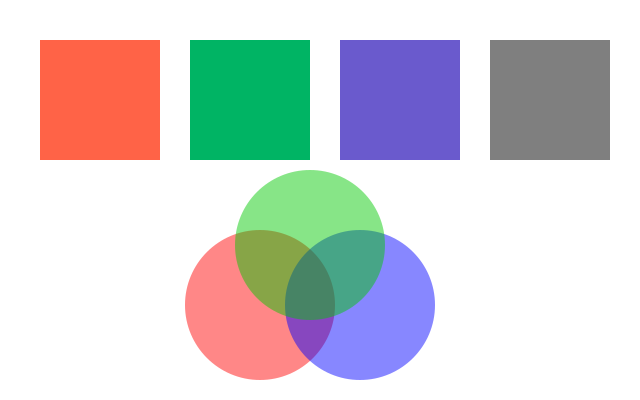
A name, an (r, g, b) tuple from 0 to 255, a hex string, or an (r, g, b, a) tuple whose last number is the opacity. Overlapping translucent circles mix.
How it works
- f.fill() takes a colour in several forms. A name like "tomato" is the easiest to read.
- A tuple (red, green, blue) has three numbers from 0 to 255. (0, 180, 100) is mostly green.
- A hex string like "#6A5ACD" is the same three numbers, written in base 16.
- "gray50" is a grey name. The number goes from 0 (black) to 100 (white).
- A fourth number is opacity. 255 is solid and 0 is invisible. Where the three translucent circles overlap, the colours mix.
Make it yours
- Change the numbers in (0, 180, 100) and see what each one does. Try (255, 255, 0).
- Try another name in f.fill("tomato"), for example "coral", "navy" or "gold".
- Change 120 in the circles' opacity. A smaller number lets more of the white show through.
- Use f.fill(200) for a grey: one number is enough.
- Add a fourth circle with a new colour in the middle of the other three.
The code
Copy it into a file and run it.
"""Four ways to say a colour

A name, an (r, g, b) tuple from 0 to 255, a hex string, or an (r, g, b, a) tuple whose last
number is the opacity. Overlapping translucent circles mix.

How it works:
- f.fill() takes a colour in several forms. A name like "tomato" is the easiest to read.
- A tuple (red, green, blue) has three numbers from 0 to 255. (0, 180, 100) is mostly green.
- A hex string like "#6A5ACD" is the same three numbers, written in base 16.
- "gray50" is a grey name. The number goes from 0 (black) to 100 (white).
- A fourth number is opacity. 255 is solid and 0 is invisible. Where the three translucent circles
  overlap, the colours mix.

Make it yours:
- Change the numbers in (0, 180, 100) and see what each one does. Try (255, 255, 0).
- Try another name in f.fill("tomato"), for example "coral", "navy" or "gold".
- Change 120 in the circles' opacity. A smaller number lets more of the white show through.
- Use f.fill(200) for a grey: one number is enough.
- Add a fourth circle with a new colour in the middle of the other three.
"""
import funground as f


def setup():
    f.size(640, 400)


def draw():
    f.background("white")
    f.no_stroke()
    f.fill("tomato")                 # a name
    f.rect(40, 40, 120, 120)
    f.fill((0, 180, 100))            # red, green, blue
    f.rect(190, 40, 120, 120)
    f.fill("#6A5ACD")                # hex
    f.rect(340, 40, 120, 120)
    f.fill("gray50")
    f.rect(490, 40, 120, 120)

    f.fill((255, 0, 0, 120))         # red, green, blue, opacity
    f.circle(260, 305, 150)
    f.fill((0, 0, 255, 120))
    f.circle(360, 305, 150)
    f.fill((0, 200, 0, 120))
    f.circle(310, 245, 150)


f.run()