Hue-based colour: hsb, hsl and colour objects
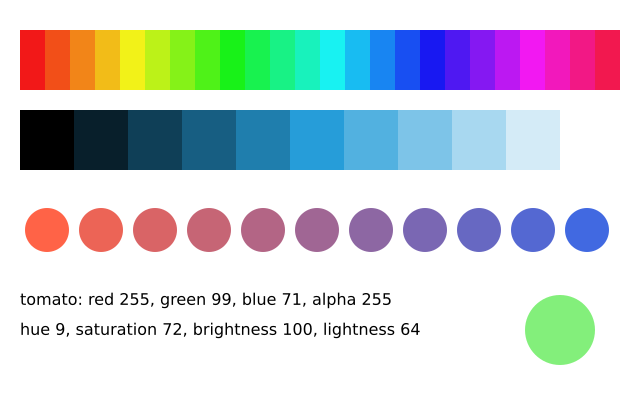
f.hsb(hue, saturation, brightness) and f.hsl(hue, saturation, lightness) make colours by hue: 0 red, 120 green, 240 blue, and around again. By default a tuple means red, green, blue. f.color() makes a colour you can read (.hue, .brightness ...), and lerp_color mixes two colours.
How it works
- A hue is a place on the colour wheel, from 0 to 360 degrees. f.hsb(i * 15, 90, 95) steps round the wheel to make the top strip.
- f.hsl() is like f.hsb(), but its third number is lightness. 0 is black, 50 is the pure colour and 100 is white. The second strip keeps one hue and changes only that number.
- f.color() makes a colour object. It has parts you can read: .red, .green, .blue, .alpha, .hue, .saturation, .brightness and .lightness. The two text lines print them.
- f.lerp_color(start, end, amount) mixes two colours. 0 gives the first, 1 gives the second and 0.5 is halfway. The row of circles uses it.
- The last circle uses f.frame_count in the hue, so it slowly cycles. The hue wraps after 360.
Make it yours
- Change the 200 in f.hsl(200, 70, i * 10) to another hue, such as 0 or 120.
- Lower the 90 in f.hsb(i * 15, 90, 95) to make a paler wheel.
- Change "tomato" and "royalblue" to other colours and see the blend.
- Make the last circle change faster: change the 4 in f.frame_count * 4.
- Print another reading of tomato, such as tomato.hue, with a new f.text() line.
The code
Copy it into a file and run it.
"""Hue-based colour: hsb, hsl and colour objects

f.hsb(hue, saturation, brightness) and f.hsl(hue, saturation, lightness) make colours by hue:
0 red, 120 green, 240 blue, and around again. By default a tuple means red, green, blue. f.color()
makes a colour you can read (.hue, .brightness ...), and lerp_color mixes two colours.

How it works:
- A hue is a place on the colour wheel, from 0 to 360 degrees. f.hsb(i * 15, 90, 95) steps round the
  wheel to make the top strip.
- f.hsl() is like f.hsb(), but its third number is lightness. 0 is black, 50 is the pure colour and
  100 is white. The second strip keeps one hue and changes only that number.
- f.color() makes a colour object. It has parts you can read: .red, .green, .blue, .alpha, .hue,
  .saturation, .brightness and .lightness. The two text lines print them.
- f.lerp_color(start, end, amount) mixes two colours. 0 gives the first, 1 gives the second and 0.5
  is halfway. The row of circles uses it.
- The last circle uses f.frame_count in the hue, so it slowly cycles. The hue wraps after 360.

Make it yours:
- Change the 200 in f.hsl(200, 70, i * 10) to another hue, such as 0 or 120.
- Lower the 90 in f.hsb(i * 15, 90, 95) to make a paler wheel.
- Change "tomato" and "royalblue" to other colours and see the blend.
- Make the last circle change faster: change the 4 in f.frame_count * 4.
- Print another reading of tomato, such as tomato.hue, with a new f.text() line.
"""
import funground as f


def setup():
    f.size(640, 400)


def draw():
    f.background("white")
    f.no_stroke()
    for i in range(24):                               # the colour wheel as a strip
        f.fill(f.hsb(i * 15, 90, 95))
        f.rect(20 + i * 25, 30, 25, 60)
    for i in range(11):                               # one hue, lightness from dark to light
        f.fill(f.hsl(200, 70, i * 10))
        f.rect(20 + i * 54, 110, 54, 60)

    start, end = f.color("tomato"), f.color("royalblue")
    for i in range(11):                               # a blend from one colour to another
        f.fill(f.lerp_color(start, end, i / 10))
        f.circle(47 + i * 54, 230, 44)

    tomato = f.color(255, 99, 71)
    f.fill("black")
    f.text_size(16)
    f.text(f"tomato: red {tomato.red}, green {tomato.green}, blue {tomato.blue}, alpha {tomato.alpha}", 20, 290)
    f.text(f"hue {tomato.hue:.0f}, saturation {tomato.saturation:.0f}, "
           f"brightness {tomato.brightness:.0f}, lightness {tomato.lightness:.0f}", 20, 320)
    f.fill(f.hsb(f.frame_count * 4, 80, 90, 160))   # hue wraps around past 360
    f.circle(560, 330, 70)


f.run()