Gradients
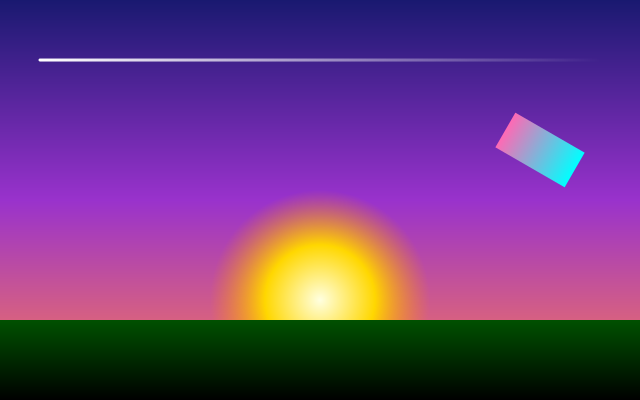
f.linear_gradient() blends colours along a line; f.radial_gradient() blends them outward from a centre. Either can be used wherever a colour goes - fill, stroke or background - and it follows f.translate() and f.rotate() like any shape. Saved as PDF or SVG, it stays smooth.
How it works
- f.linear_gradient(x1, y1, x2, y2, colours) blends along the line from one point to the other. The sky runs from the top (0, 0) to the bottom (0, 400).
- f.radial_gradient(x, y, radius, colours, stops=...) blends outward from a centre. The sun goes from yellow at the middle to a see-through orange at the edge.
- stops=[0, 0.5, 1] says where along the way each colour sits. Without it, colours are spread evenly.
- A gradient is used like any colour: f.background(sky), f.fill(sun) and f.stroke(...) all take one.
- A gradient is drawn in the shape's own coordinates, so it moves and turns with f.translate() and f.rotate(). That is why the small rectangle at the right keeps its blend as it turns.
Make it yours
- Change the colour names in the sky list. Add a fourth colour to make a longer blend.
- Move the stops in the sun: try stops=[0, 0.2, 1] for a smaller bright centre.
- Make the sky run sideways: use f.linear_gradient(0, 0, 640, 0, ...).
- Change the 30 in f.rotate(30) to turn the small rectangle more.
- Give the hills a different gradient, such as ["seagreen", "black"].
The code
Copy it into a file and run it.
"""Gradients

f.linear_gradient() blends colours along a line; f.radial_gradient() blends them outward
from a centre. Either can be used wherever a colour goes - fill, stroke or background - and
it follows f.translate() and f.rotate() like any shape. Saved as PDF or SVG, it stays smooth.

How it works:
- f.linear_gradient(x1, y1, x2, y2, colours) blends along the line from one point to the other. The
  sky runs from the top (0, 0) to the bottom (0, 400).
- f.radial_gradient(x, y, radius, colours, stops=...) blends outward from a centre. The sun goes from
  yellow at the middle to a see-through orange at the edge.
- stops=[0, 0.5, 1] says where along the way each colour sits. Without it, colours are spread evenly.
- A gradient is used like any colour: f.background(sky), f.fill(sun) and f.stroke(...) all take one.
- A gradient is drawn in the shape's own coordinates, so it moves and turns with f.translate() and
  f.rotate(). That is why the small rectangle at the right keeps its blend as it turns.

Make it yours:
- Change the colour names in the sky list. Add a fourth colour to make a longer blend.
- Move the stops in the sun: try stops=[0, 0.2, 1] for a smaller bright centre.
- Make the sky run sideways: use f.linear_gradient(0, 0, 640, 0, ...).
- Change the 30 in f.rotate(30) to turn the small rectangle more.
- Give the hills a different gradient, such as ["seagreen", "black"].
"""
import funground as f


def setup():
    f.size(640, 400)


def draw():
    sky = f.linear_gradient(0, 0, 0, 400, ["midnightblue", "darkorchid", "coral"])
    f.background(sky)

    sun = f.radial_gradient(320, 300, 110, ["lightyellow", "gold", (255, 140, 0, 0)], stops=[0, 0.5, 1])
    f.no_stroke()
    f.fill(sun)
    f.circle(320, 300, 220)

    hills = f.linear_gradient(0, 300, 0, 400, ["darkgreen", "black"])
    f.fill(hills)
    f.rect(0, 320, 640, 80)

    f.stroke(f.linear_gradient(40, 0, 600, 0, ["white", (255, 255, 255, 0)]))
    f.stroke_width(3)
    f.line(40, 60, 600, 60)

    with f.saved_state():                          # a gradient turns with the shape
        f.translate(540, 150)
        f.rotate(30)
        f.no_stroke()
        f.fill(f.linear_gradient(-40, 0, 40, 0, ["hotpink", "cyan"]))
        f.rect(-40, -20, 80, 40)


f.run()