Blend modes, opacity and shadows
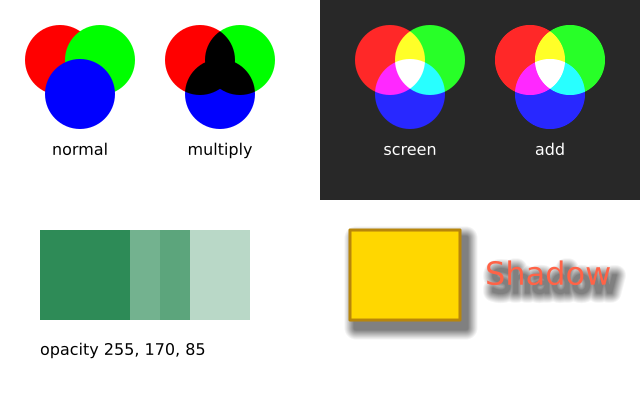
f.blend_mode() changes how new drawing mixes with what is already on the canvas: "multiply" darkens like overlapping inks, "screen" lightens like overlapping lights. f.opacity() makes everything after it see-through, and f.shadow() gives it a soft shadow.
How it works
- f.blend_mode(mode) decides how a new shape mixes with what is under it. trio() draws the same three circles in each mode, then sets "normal" again.
- "multiply" darkens, as when inks overlap. "screen" and "add" lighten, as when lights overlap. That is why they sit on a dark panel: on white there would be nothing to see.
- f.opacity(amount) makes everything after it see-through. 255 is solid and 0 is invisible. The three green squares use 255, 170 and 85. The 255 call afterwards puts it back.
- f.shadow(x_offset, y_offset, blur=...) adds a soft shadow under what you draw next. It moves right and down by the first two numbers. f.no_shadow() switches it off.
Make it yours
- Try other modes in the trio() calls: "overlay", "darken", "lighten" or "difference".
- Change the three numbers in [255, 170, 85] to make the squares more or less see-through.
- Change the shadow: a bigger blur makes it softer, and negative offsets throw it up and left.
- Give the shadow a colour: f.shadow(6, 8, blur=10, color=(255, 0, 0, 120)).
- Change the three circle colours in the list inside trio().
The code
Copy it into a file and run it.
"""Blend modes, opacity and shadows

f.blend_mode() changes how new drawing mixes with what is already on the canvas: "multiply"
darkens like overlapping inks, "screen" lightens like overlapping lights. f.opacity() makes
everything after it see-through, and f.shadow() gives it a soft shadow.

How it works:
- f.blend_mode(mode) decides how a new shape mixes with what is under it. trio() draws the same
  three circles in each mode, then sets "normal" again.
- "multiply" darkens, as when inks overlap. "screen" and "add" lighten, as when lights overlap.
  That is why they sit on a dark panel: on white there would be nothing to see.
- f.opacity(amount) makes everything after it see-through. 255 is solid and 0 is invisible.
  The three green squares use 255, 170 and 85. The 255 call afterwards puts it back.
- f.shadow(x_offset, y_offset, blur=...) adds a soft shadow under what you draw next. It moves right
  and down by the first two numbers. f.no_shadow() switches it off.

Make it yours:
- Try other modes in the trio() calls: "overlay", "darken", "lighten" or "difference".
- Change the three numbers in [255, 170, 85] to make the squares more or less see-through.
- Change the shadow: a bigger blur makes it softer, and negative offsets throw it up and left.
- Give the shadow a colour: f.shadow(6, 8, blur=10, color=(255, 0, 0, 120)).
- Change the three circle colours in the list inside trio().
"""
import funground as f


def trio(x, y, mode, label_colour="black"):
    f.blend_mode(mode)
    f.no_stroke()
    for dx, dy, colour in [(0, 0, "red"), (40, 0, "lime"), (20, 34, "blue")]:
        f.fill(colour)
        f.circle(x + dx, y + dy, 70)
    f.blend_mode("normal")
    f.fill(label_colour)
    f.text_align("center")
    f.text(mode, x + 20, y + 80)
    f.text_align("left")


def setup():
    f.size(640, 400)


def draw():
    f.background("white")
    f.fill((40, 40, 40))
    f.rect(320, 0, 320, 200)                          # a dark half, so "screen" and "add" show
    f.text_size(16)
    trio(60, 60, "normal")
    trio(200, 60, "multiply")
    trio(390, 60, "screen", "white")
    trio(530, 60, "add", "white")

    for i, amount in enumerate([255, 170, 85]):
        f.opacity(amount)
        f.fill("seagreen")
        f.rect(40 + i * 60, 230, 90, 90)
    f.opacity(255)
    f.fill("black")
    f.text("opacity 255, 170, 85", 40, 340)

    f.shadow(6, 8, blur=10)
    f.fill("gold")
    f.stroke("darkgoldenrod")
    f.stroke_width(3)
    f.rect(350, 230, 110, 90)
    f.no_stroke()
    f.fill("tomato")
    f.text_size(32)
    f.text("Shadow", 485, 255)
    f.no_shadow()


f.run()