Off-screen graphics: a trail
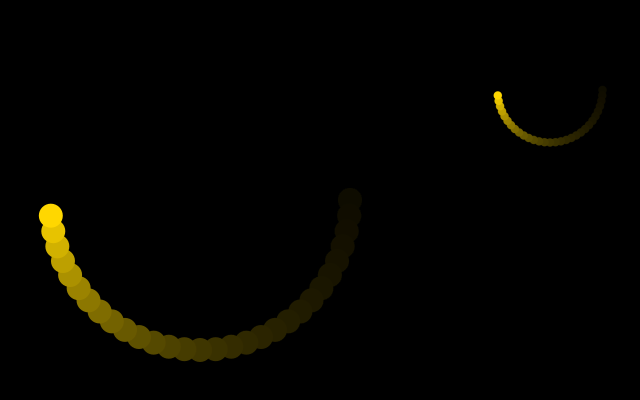
f.create_graphics() makes a picture: an off-screen canvas with the same drawing commands as the window. Painting a translucent rectangle over it every frame, instead of clearing it, makes older drawing fade instead of vanish - a comet trail, the same trick Processing's PGraphics is used for. f.image() then places the picture wherever you like, at any size.
How it works
- f.create_graphics(400, 400) makes a picture. It is created once in setup(). It has its own fill(), circle(), rect() and so on, which draw on the picture and not on the window.
- Every frame, trail.rect() paints a nearly see-through black square over the whole picture. The old gold dots dim a little each frame, so they fade out.
- The gold dot goes round in a circle. Its place comes from math.cos() and math.sin() of an angle that grows with f.frame_count. f.radians() turns degrees into the radians those functions need.
- f.image(trail, 0, 0) draws the picture on the window. Giving a width and height, as in f.image(trail, 480, 20, 140, 140), draws a smaller copy.
Make it yours
- Change the 24 in trail.fill((0, 0, 0, 24)). A smaller number gives a longer trail.
- Change the 6 in f.frame_count * 6 to make the dot go faster or slower.
- Change the 150 in the x and y lines to make a bigger or smaller circle of travel.
- Move or resize the small copy: change the numbers in f.image(trail, 480, 20, 140, 140).
- Draw a second dot with another colour, at the opposite side of the circle.
The code
Copy it into a file and run it.
"""Off-screen graphics: a trail

f.create_graphics() makes a picture: an off-screen canvas with the same drawing commands as
the window. Painting a translucent rectangle over it every frame, instead of clearing it, makes
older drawing fade instead of vanish - a comet trail, the same trick Processing's PGraphics is
used for. f.image() then places the picture wherever you like, at any size.

How it works:
- f.create_graphics(400, 400) makes a picture. It is created once in setup(). It has its own
  fill(), circle(), rect() and so on, which draw on the picture and not on the window.
- Every frame, trail.rect() paints a nearly see-through black square over the whole picture. The
  old gold dots dim a little each frame, so they fade out.
- The gold dot goes round in a circle. Its place comes from math.cos() and math.sin() of an angle
  that grows with f.frame_count. f.radians() turns degrees into the radians those functions need.
- f.image(trail, 0, 0) draws the picture on the window. Giving a width and height, as in
  f.image(trail, 480, 20, 140, 140), draws a smaller copy.

Make it yours:
- Change the 24 in trail.fill((0, 0, 0, 24)). A smaller number gives a longer trail.
- Change the 6 in f.frame_count * 6 to make the dot go faster or slower.
- Change the 150 in the x and y lines to make a bigger or smaller circle of travel.
- Move or resize the small copy: change the numbers in f.image(trail, 480, 20, 140, 140).
- Draw a second dot with another colour, at the opposite side of the circle.
"""
import math

import funground as f

trail = None


def setup():
    global trail
    f.size(640, 400)
    trail = f.create_graphics(400, 400)


def draw():
    f.background("black")

    trail.no_stroke()
    trail.fill((0, 0, 0, 24))          # translucent: painted over the old trail, it fades
    trail.rect(0, 0, trail.width, trail.height)

    angle = f.radians(f.frame_count * 6)
    x = trail.width / 2 + math.cos(angle) * 150
    y = trail.height / 2 + math.sin(angle) * 150
    trail.fill("gold")
    trail.circle(x, y, 24)

    f.image(trail, 0, 0)                    # full size
    f.image(trail, 480, 20, 140, 140)       # a second, smaller copy: image() can scale


f.run()