Scratch card: erasing
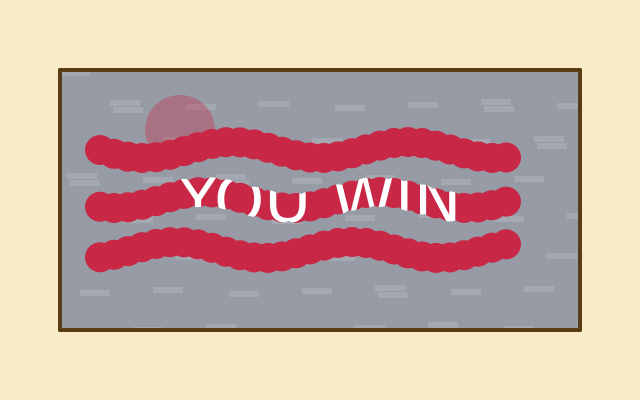
After f.erase(), everything you draw removes what is under it instead of painting. Here a grey "foil" picture covers a prize. Wavy scratch marks erase the foil, so the prize shows through the holes. Strength 255 removes the foil completely. A smaller number, like 90, only thins it. f.no_erase() goes back to normal painting.
How it works
- f.create_graphics(520, 260) makes the foil: a picture drawn once in setup(). It starts see-through, and foil.background() paints it grey.
- foil.erase(90, 90) makes the next shapes remove only about a third of what is under them. That is the thin scratch.
- foil.erase() with no numbers erases at full strength. The loops of foil.circle() calls cut a wavy track, using math.sin() for the wobble.
- foil.no_erase() goes back to normal painting.
- In draw(), the prize is drawn first. f.image(foil, 60, 70) then lays the foil on top. The prize shows wherever the foil was erased.
Make it yours
- Change the 90 in foil.erase(90, 90) for a lighter or stronger first scratch.
- Change the 30 in foil.circle(x, ..., 30) to make a wider scratch.
- Add another track: change range(3) to range(4).
- Change the words in f.text("YOU WIN", ...) or the prize colour.
- Change the foil colour in foil.background((150, 155, 165)). Try gold: (212, 175, 55).
The code
Copy it into a file and run it.
"""Scratch card: erasing

After f.erase(), everything you draw removes what is under it instead of painting. Here a grey
"foil" picture covers a prize. Wavy scratch marks erase the foil, so the prize shows through the
holes. Strength 255 removes the foil completely. A smaller number, like 90, only thins it.
f.no_erase() goes back to normal painting.

How it works:
- f.create_graphics(520, 260) makes the foil: a picture drawn once in setup(). It starts see-through,
  and foil.background() paints it grey.
- foil.erase(90, 90) makes the next shapes remove only about a third of what is under them. That is
  the thin scratch.
- foil.erase() with no numbers erases at full strength. The loops of foil.circle() calls cut a wavy
  track, using math.sin() for the wobble.
- foil.no_erase() goes back to normal painting.
- In draw(), the prize is drawn first. f.image(foil, 60, 70) then lays the foil on top. The prize
  shows wherever the foil was erased.

Make it yours:
- Change the 90 in foil.erase(90, 90) for a lighter or stronger first scratch.
- Change the 30 in foil.circle(x, ..., 30) to make a wider scratch.
- Add another track: change range(3) to range(4).
- Change the words in f.text("YOU WIN", ...) or the prize colour.
- Change the foil colour in foil.background((150, 155, 165)). Try gold: (212, 175, 55).
"""
import math

import funground as f

foil = None


def setup():
    global foil
    f.size(640, 400)
    foil = f.create_graphics(520, 260)

    foil.background((150, 155, 165))
    foil.no_stroke()
    for i in range(60):                              # a little texture, painted before erasing
        foil.fill(170, 175, 185, 160)
        foil.rect((i * 53) % 520, (i * 37) % 260, 30, 6)

    foil.erase(90, 90)                               # a thin, light scratch first
    foil.circle(120, 60, 70)

    foil.erase()                                     # then strong ones: full strength removes the foil
    for k in range(3):
        y = 80 + k * 50
        for step in range(30):
            x = 40 + step * 14
            foil.circle(x, y + math.sin(step * 0.5 + k) * 8, 30)
    foil.no_erase()


def draw():
    f.background((250, 235, 200))

    f.fill((200, 40, 70))                            # the prize, under the foil
    f.rect(60, 70, 520, 260)
    f.fill("white")
    f.text_size(64)
    f.text_align("center", "center")
    f.text("YOU WIN", 320, 200)

    f.image(foil, 60, 70)                            # the foil goes on top, with its holes
    f.no_fill()
    f.stroke((90, 60, 20))
    f.stroke_width(4)
    f.rect(60, 70, 520, 260)


f.run()