Layers: a sky that stays and a trail that builds up
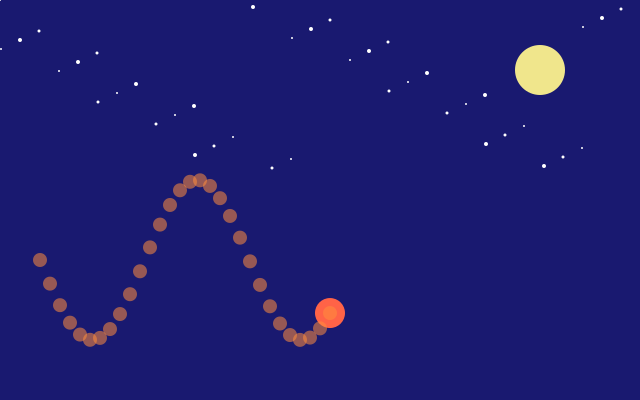
with f.layer("name"): sends everything drawn inside the block to a see-through layer that sits over the canvas. A layer keeps its drawing from one frame to the next. Here the canvas is wiped and redrawn every frame, yet the "trail" layer keeps every dot the ball leaves behind. The "sky" layer is drawn once, in the first frame, and never again. hide_layer() and show_layer() switch it off and on; it keeps its stars while it is hidden.
How it works
- f.background() wipes the canvas at the start of each frame, so normal drawing does not last.
- with f.layer("trail"): sends the drawing in the block to a layer with that name. The layer is kept between frames, so each new dot is added to the old ones.
- The "sky" layer is filled only when f.frame_count is 0. After that it just stays.
- f.hide_layer("sky") and f.show_layer("sky") switch the layer off and on. A hidden layer keeps its contents, so the stars come back unchanged.
- The ball itself is drawn on the canvas, under the layers. Its height comes from math.sin() of the frame number.
Make it yours
- Change the last 140 in f.fill(255, 140, 60, 140) to make the trail dots more or less solid.
- Change the 0.3 in math.sin(t * 0.3) for a faster or slower wave.
- Change the t % 40 numbers to make the sky blink more or less often.
- Add a third layer with another colour: with f.layer("echo"): drawing a circle at y + 40.
- Add more stars: change range(40) in the sky layer to range(80).
The code
Copy it into a file and run it.
"""Layers: a sky that stays and a trail that builds up

`with f.layer("name"):` sends everything drawn inside the block to a see-through layer that
sits over the canvas. A layer keeps its drawing from one frame to the next. Here the canvas is
wiped and redrawn every frame, yet the "trail" layer keeps every dot the ball leaves behind.
The "sky" layer is drawn once, in the first frame, and never again. hide_layer() and
show_layer() switch it off and on; it keeps its stars while it is hidden.

How it works:
- f.background() wipes the canvas at the start of each frame, so normal drawing does not last.
- with f.layer("trail"): sends the drawing in the block to a layer with that name. The layer is
  kept between frames, so each new dot is added to the old ones.
- The "sky" layer is filled only when f.frame_count is 0. After that it just stays.
- f.hide_layer("sky") and f.show_layer("sky") switch the layer off and on. A hidden layer keeps its
  contents, so the stars come back unchanged.
- The ball itself is drawn on the canvas, under the layers. Its height comes from math.sin() of the
  frame number.

Make it yours:
- Change the last 140 in f.fill(255, 140, 60, 140) to make the trail dots more or less solid.
- Change the 0.3 in math.sin(t * 0.3) for a faster or slower wave.
- Change the t % 40 numbers to make the sky blink more or less often.
- Add a third layer with another colour: with f.layer("echo"): drawing a circle at y + 40.
- Add more stars: change range(40) in the sky layer to range(80).
"""
import math

import funground as f


def setup():
    f.size(640, 400)


def draw():
    f.background("midnightblue")            # the canvas starts afresh every frame

    if f.frame_count == 0:
        with f.layer("sky"):                # drawn once: the layer remembers it
            f.no_stroke()
            f.fill("white")
            for i in range(40):
                f.circle((i * 97) % 640, (i * 53) % 170, 2 + i % 3)
            f.fill("khaki")
            f.circle(540, 70, 50)

    t = f.frame_count
    if t % 40 == 20:                        # the sky blinks off for a moment...
        f.hide_layer("sky")
    elif t % 40 == 25:
        f.show_layer("sky")                 # ...and back on: it kept its stars all the time
    x = 40 + t * 10
    y = 260 + 80 * math.sin(t * 0.3)

    with f.layer("trail"):                  # one dot a frame, and each one stays
        f.no_stroke()
        f.fill(255, 140, 60, 140)
        f.circle(x, y, 14)

    f.fill("tomato")                        # the ball itself is on the canvas, under the layers
    f.no_stroke()
    f.circle(x, y, 30)


f.run()