Curves
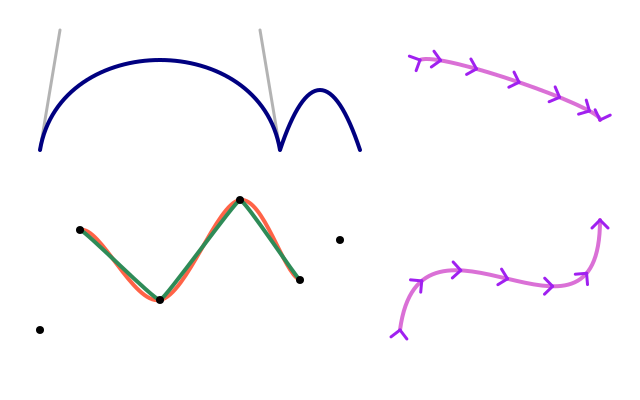
bezier_vertex bends toward two control points; curve_vertex draws a smooth curve through the points (the first and last only steer it); curve_tightness straightens it. bezier and curve draw one curve in a single call; bezier_point and bezier_tangent find places and directions along it.
How it works
- f.bezier_vertex(x1, y1, x2, y2, x3, y3) inside f.begin_shape() ... f.end_shape() draws a curve that bends towards two control points. The grey lines show them. f.quadratic_vertex() uses one.
- f.curve_vertex() draws a smooth curve that passes through each point. The first and last points only steer the ends.
- f.curve_tightness() changes the same points from loose (0) to straight (close to 1).
- f.bezier() and f.curve() draw a whole curve in one call.
- f.bezier_point() gives the position at a place t along the curve, from 0 to 1. f.bezier_tangent() gives its direction. The example uses both to turn small arrowheads along the curve.
Make it yours
- Move the control points of the first f.bezier_vertex() and watch the bend.
- Change the points list: move a point, or add one more. Both curves follow.
- Try another value in the (0, "tomato") pair, such as 0.5.
- Change range(7) and t = i / 6 to range(13) and i / 12 for more arrowheads.
- Change the numbers in f.bezier(400, 330, ...). Keep the arrowhead code in step if you do.
The code
Copy it into a file and run it.
"""Curves

bezier_vertex bends toward two control points; curve_vertex draws a smooth curve through the
points (the first and last only steer it); curve_tightness straightens it. bezier and curve draw
one curve in a single call; bezier_point and bezier_tangent find places and directions along it.

How it works:
- f.bezier_vertex(x1, y1, x2, y2, x3, y3) inside f.begin_shape() ... f.end_shape() draws a curve
  that bends towards two control points. The grey lines show them. f.quadratic_vertex() uses one.
- f.curve_vertex() draws a smooth curve that passes through each point. The first and last points
  only steer the ends.
- f.curve_tightness() changes the same points from loose (0) to straight (close to 1).
- f.bezier() and f.curve() draw a whole curve in one call.
- f.bezier_point() gives the position at a place t along the curve, from 0 to 1. f.bezier_tangent()
  gives its direction. The example uses both to turn small arrowheads along the curve.

Make it yours:
- Move the control points of the first f.bezier_vertex() and watch the bend.
- Change the points list: move a point, or add one more. Both curves follow.
- Try another value in the (0, "tomato") pair, such as 0.5.
- Change range(7) and t = i / 6 to range(13) and i / 12 for more arrowheads.
- Change the numbers in f.bezier(400, 330, ...). Keep the arrowhead code in step if you do.
"""
import math

import funground as f

points = [(40, 330), (80, 230), (160, 300), (240, 200), (300, 280), (340, 240)]


def setup():
    f.size(640, 400)


def draw():
    f.background("white")
    f.no_fill()

    # a Bezier segment and its two control points
    f.stroke("gray70")
    f.line(40, 150, 60, 30)
    f.line(260, 30, 280, 150)
    f.stroke("navy")
    f.stroke_width(4)
    f.begin_shape()
    f.vertex(40, 150)
    f.bezier_vertex(60, 30, 260, 30, 280, 150)
    f.quadratic_vertex(320, 30, 360, 150)       # one control point
    f.end_shape()

    # smooth curves through points, loose and tight
    for tightness, colour in ((0, "tomato"), (0.8, "seagreen")):
        f.curve_tightness(tightness)
        f.stroke(colour)
        f.begin_shape()
        for x, y in points:
            f.curve_vertex(x, y)
        f.end_shape()
    f.no_stroke()
    f.fill("black")
    for x, y in points:
        f.circle(x, y, 8)

    # one-call curves, with direction marks placed by the point and tangent helpers
    f.no_fill()
    f.stroke("orchid")
    f.bezier(400, 330, 420, 180, 600, 380, 600, 220)
    f.curve(0, 400, 420, 60, 600, 120, 300, 400)
    f.stroke("purple")
    f.stroke_width(3)
    for i in range(7):
        t = i / 6
        x, y = f.bezier_point(400, 420, 600, 600, t), f.bezier_point(330, 180, 380, 220, t)
        angle = math.atan2(f.bezier_tangent(330, 180, 380, 220, t), f.bezier_tangent(400, 420, 600, 600, t))
        with f.saved_state():
            f.translate(x, y)
            f.rotate(f.degrees(angle))
            f.line(-8, -8, 0, 0)          # a small arrowhead pointing along the curve
            f.line(-8, 8, 0, 0)
        x, y = f.curve_point(0, 420, 600, 300, t), f.curve_point(400, 60, 120, 400, t)
        angle = math.atan2(f.curve_tangent(400, 60, 120, 400, t), f.curve_tangent(0, 420, 600, 300, t))
        with f.saved_state():
            f.translate(x, y)
            f.rotate(f.degrees(angle))
            f.line(-8, -8, 0, 0)
            f.line(-8, 8, 0, 0)


f.run()