A booklet with three pages
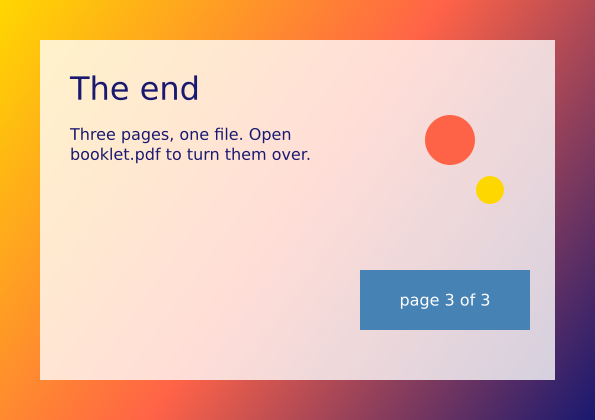
A script can make a document. Three pages are drawn, and f.save("booklet.pdf") writes them into one PDF. The gallery picture shows the last page, which is on its side.
How it works
- f.new_page() ends one page and starts the next. A size name such as "A5" sets the page size.
- Colours and text settings carry over to the next page, so page 2 does not set its size again.
- f.page_size("A5", landscape=True) gives the width and height as numbers. They go straight into f.new_page(*...) for the last page. The * unpacks the pair into two values.
- f.linear_gradient() fills the cover and the last page with a smooth blend of colours.
- f.text_box() wraps a long line of text inside a box, and f.text_align() places it.
- f.save("booklet.pdf") writes every page into one PDF. f.page_count() says how many there are, and f.show() shows the last page in a window.
Make it yours
- Change "A5" to "A4" or "A6" in the first f.new_page() call.
- Change the texts, the title and the colours on the three pages.
- Add a fourth page. Call f.new_page() and draw on it before f.save().
- Make the last page upright. Replace the page_size line with a plain f.new_page().
- Draw more on page 2. Use f.width and f.height to place shapes, so they fit if you change the size.
The code
Copy it into a file and run it.
"""A booklet with three pages

A script can make a document. Three pages are drawn, and f.save("booklet.pdf") writes them into
one PDF. The gallery picture shows the last page, which is on its side.

How it works:
- f.new_page() ends one page and starts the next. A size name such as "A5" sets the page size.
- Colours and text settings carry over to the next page, so page 2 does not set its size again.
- f.page_size("A5", landscape=True) gives the width and height as numbers. They go straight into
  f.new_page(*...) for the last page. The * unpacks the pair into two values.
- f.linear_gradient() fills the cover and the last page with a smooth blend of colours.
- f.text_box() wraps a long line of text inside a box, and f.text_align() places it.
- f.save("booklet.pdf") writes every page into one PDF. f.page_count() says how many there are,
  and f.show() shows the last page in a window.

Make it yours:
- Change "A5" to "A4" or "A6" in the first f.new_page() call.
- Change the texts, the title and the colours on the three pages.
- Add a fourth page. Call f.new_page() and draw on it before f.save().
- Make the last page upright. Replace the page_size line with a plain f.new_page().
- Draw more on page 2. Use f.width and f.height to place shapes, so they fit if you change the size.
"""
import funground as f

# Page 1: the cover, A5 upright.
f.new_page("A5")
f.background("ivory")
f.no_stroke()
f.fill(f.linear_gradient(0, 0, 0, 300, ["midnightblue", "steelblue"]))
f.rect(0, 0, f.width, 300)
f.fill("gold")
f.circle(300, 210, 70)
f.fill("ivory")
f.triangle(0, 300, 140, 170, 280, 300)
f.triangle(180, 300, 320, 140, 420, 300)
f.text_size(44)
f.text_align("center", "top")
f.fill("midnightblue")
f.text_box("A Walk by the Sea", 30, 340, 360)
f.text_size(18)
f.fill("steelblue")
f.text_box("a little booklet", 30, 470, 360)

# Page 2: the inside, same size. Colours and text settings carry over.
f.new_page()
f.background("white")
f.text_align("left", "top")
f.fill("midnightblue")
f.text_size(30)
f.text("Low tide", 40, 40)
f.stroke("gold")
f.stroke_width(3)
f.line(40, 90, 380, 90)
f.no_stroke()
f.fill("black")
f.text_size(16)
f.text_box("The sea goes out a long way. It leaves wet sand, shallow pools and a few small "
           "crabs in a hurry. We walk along the edge and count the shells we find.", 40, 110, 340)
f.fill("steelblue")
f.circle(100, 420, 36)
f.circle(210, 420, 36)
f.circle(320, 420, 36)
f.fill("white")
f.text_align("center", "center")
f.text("1", 100, 420)
f.text("2", 210, 420)
f.text("3", 320, 420)

# Page 3: the last page, A5 on its side (page_size gives the numbers).
f.new_page(*f.page_size("A5", landscape=True))
f.background(f.linear_gradient(0, 0, f.width, f.height, ["gold", "tomato", "midnightblue"]))
f.no_stroke()
f.fill((255, 255, 255, 200))
f.rect(40, 40, f.width - 80, f.height - 80)
f.fill("midnightblue")
f.text_align("left", "top")
f.text_size(32)
f.text("The end", 70, 70)
f.text_size(16)
f.text_box("Three pages, one file. Open booklet.pdf to turn them over.", 70, 125, 270)
f.fill("tomato")
f.circle(450, 140, 50)
f.fill("gold")
f.circle(490, 190, 28)
f.fill("steelblue")
f.rect(360, 270, 170, 60)
f.fill("white")
f.text_align("center", "center")
f.text("page 3 of " + str(f.page_count()), 445, 300)

f.save("booklet.pdf")
f.show()