Loading and drawing an image
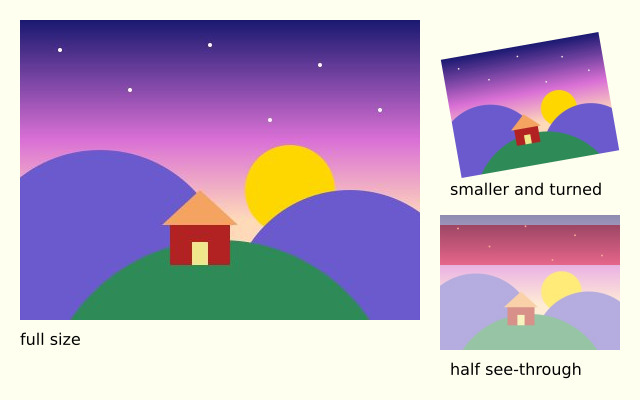
f.load_image() reads a picture file and gives you a picture. f.image() draws it at its own size, smaller, turned and half see-through.
How it works
- f.load_image("data/photo.jpg") reads PNG, JPEG, GIF, BMP and TGA files. A relative path is looked for next to this file. It runs once, outside draw(), so the file is read only once.
- f.image(photo, x, y) draws the picture at its own size, with its top-left corner at (x, y).
- Give a width and a height and the picture is stretched to fit.
- A picture follows f.translate(), f.rotate() and f.opacity() like any other drawing. The smaller copy is turned inside f.saved_state(), so the turn stays inside it.
- The red stripe shows that the last copy, with f.opacity(128), is half see-through.
Make it yours
- Put your own picture in the data folder and change "data/photo.jpg" to its name.
- Change the 160 and 120 in the turned copy to make it bigger. Keep 4 by 3 so it is not squashed.
- Change the -10 in f.rotate() to turn it another way.
- Change the 128 in f.opacity() from 0 (gone) to 255 (solid).
- Draw the photo again at several places with a loop.
The code
Copy it into a file and run it.
"""Loading and drawing an image

f.load_image() reads a picture file and gives you a picture. f.image() draws it at its own size,
smaller, turned and half see-through.

How it works:
- f.load_image("data/photo.jpg") reads PNG, JPEG, GIF, BMP and TGA files. A relative path is looked
  for next to this file. It runs once, outside draw(), so the file is read only once.
- f.image(photo, x, y) draws the picture at its own size, with its top-left corner at (x, y).
- Give a width and a height and the picture is stretched to fit.
- A picture follows f.translate(), f.rotate() and f.opacity() like any other drawing. The smaller
  copy is turned inside f.saved_state(), so the turn stays inside it.
- The red stripe shows that the last copy, with f.opacity(128), is half see-through.

Make it yours:
- Put your own picture in the data folder and change "data/photo.jpg" to its name.
- Change the 160 and 120 in the turned copy to make it bigger. Keep 4 by 3 so it is not squashed.
- Change the -10 in f.rotate() to turn it another way.
- Change the 128 in f.opacity() from 0 (gone) to 255 (solid).
- Draw the photo again at several places with a loop.
"""
import funground as f

photo = f.load_image("data/photo.jpg")       # found next to this file


def setup():
    f.size(640, 400)


def draw():
    f.background("ivory")

    f.image(photo, 20, 20)                    # full size: 400 x 300
    f.fill("black")
    f.text_size(16)
    f.text("full size", 20, 330)

    with f.saved_state():                     # a smaller copy, turned
        f.translate(530, 105)
        f.rotate(-10)
        f.image(photo, -80, -60, 160, 120)
    f.text("smaller and turned", 450, 180)

    f.no_stroke()                             # a stripe, to see through the copy
    f.fill("tomato")
    f.rect(440, 225, 180, 40)
    with f.saved_state():
        f.opacity(128)
        f.image(photo, 440, 215, 180, 135)
    f.fill("black")
    f.text("half see-through", 450, 360)


f.run()