Changing pictures: copy, resize, mask and filters
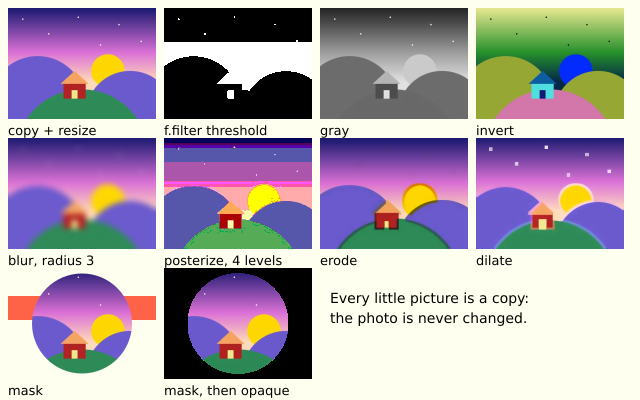
One photo is copied, shrunk and put through a set of filters. A mask lets a round hole show the photo. The big photo is never changed, only copies of it.
How it works
- picture.copy() makes a new picture. Changing the copy does not touch the first.
- picture.resize(w, h) changes the size of a picture.
- A picture's filter(kind) changes every pixel. The kinds are "threshold", "gray", "invert", "blur", "posterize", "erode", "dilate" and "opaque". Some take a value, such as pic.filter("blur", 3).
- picture.mask(other) lets the other picture decide what shows through. Its alpha is what counts, so a black circle drawn on a see-through picture makes a round hole.
- f.filter() does the same to the whole canvas. Here it is used once, then f.get() picks the result up as a new picture.
- filtered() and put() are helper functions, so each cell of the grid is one short line.
Make it yours
- Change the 3 in filtered("blur", 3) to blur more or less.
- Change the 4 in "posterize" to 2 or 8.
- Try a different filter in a cell, such as "invert" in place of "gray".
- Change the circle size in masked(): 100 is its diameter.
- Use a different shape for the mask: draw hole.rect(...) in place of hole.circle(...).
The code
Copy it into a file and run it.
"""Changing pictures: copy, resize, mask and filters

One photo is copied, shrunk and put through a set of filters. A mask lets a round hole show the
photo. The big photo is never changed, only copies of it.

How it works:
- picture.copy() makes a new picture. Changing the copy does not touch the first.
- picture.resize(w, h) changes the size of a picture.
- A picture's filter(kind) changes every pixel. The kinds are "threshold", "gray", "invert", "blur",
  "posterize", "erode", "dilate" and "opaque". Some take a value, such as pic.filter("blur", 3).
- picture.mask(other) lets the other picture decide what shows through. Its alpha is what counts,
  so a black circle drawn on a see-through picture makes a round hole.
- f.filter() does the same to the whole canvas. Here it is used once, then f.get() picks the result
  up as a new picture.
- filtered() and put() are helper functions, so each cell of the grid is one short line.

Make it yours:
- Change the 3 in filtered("blur", 3) to blur more or less.
- Change the 4 in "posterize" to 2 or 8.
- Try a different filter in a cell, such as "invert" in place of "gray".
- Change the circle size in masked(): 100 is its diameter.
- Use a different shape for the mask: draw hole.rect(...) in place of hole.circle(...).
"""
import funground as f

photo = f.load_image("data/photo.jpg")       # found next to this file
CELL_W, CELL_H = 148, 111                    # each little copy


def setup():
    f.size(640, 400)
    f.no_loop()


def small_copy():
    """A new, small copy of the photo. The photo itself never changes."""
    pic = photo.copy()
    pic.resize(CELL_W, CELL_H)
    return pic


def filtered(kind, value=None):
    pic = small_copy()
    if value is None:
        pic.filter(kind)
    else:
        pic.filter(kind, value)
    return pic


def masked():
    """The photo, seen only through a round hole. The mask is any picture: its alpha is what counts."""
    pic = small_copy()
    hole = f.create_graphics(CELL_W, CELL_H)     # see-through to start
    hole.no_stroke()
    hole.fill("black")
    hole.circle(CELL_W / 2, CELL_H / 2, 100)
    pic.mask(hole)
    return pic


def put(pic, column, row, words):
    x = 8 + column * 156
    y = 8 + row * 130
    f.image(pic, x, y)
    f.fill("black")
    f.text_size(13)
    f.text(words, x, y + CELL_H + 4)


def canvas_threshold():
    """f.filter() changes the whole canvas. Here: draw a copy, filter the canvas, pick the copy up with get()."""
    f.image(small_copy(), 0, 0)
    f.filter("threshold")                    # white where the photo is bright, black elsewhere
    return f.get(0, 0, CELL_W, CELL_H)       # a new picture


def draw():
    f.background("ivory")
    threshold = canvas_threshold()
    f.background("ivory")

    # Row 1: the photo, then three filters that need no value.
    put(small_copy(), 0, 0, "copy + resize")
    put(threshold, 1, 0, "f.filter threshold")
    put(filtered("gray"), 2, 0, "gray")
    put(filtered("invert"), 3, 0, "invert")

    # Row 2: filters with a value.
    put(filtered("blur", 3), 0, 1, "blur, radius 3")
    put(filtered("posterize", 4), 1, 1, "posterize, 4 levels")
    put(filtered("erode"), 2, 1, "erode")
    put(filtered("dilate"), 3, 1, "dilate")

    # Row 3: a mask, drawn over a stripe so you can see through it, and "opaque", which fills the
    # see-through parts (with black, as the pixels were empty).
    f.no_stroke()
    f.fill("tomato")
    f.rect(8, 296, CELL_W, 24)
    put(masked(), 0, 2, "mask")
    solid = masked()
    solid.filter("opaque")
    put(solid, 1, 2, "mask, then opaque")
    f.fill("black")
    f.text_size(14)
    f.text("Every little picture is a copy:", 330, 290)
    f.text("the photo is never changed.", 330, 310)


f.run()