Loading an SVG drawing
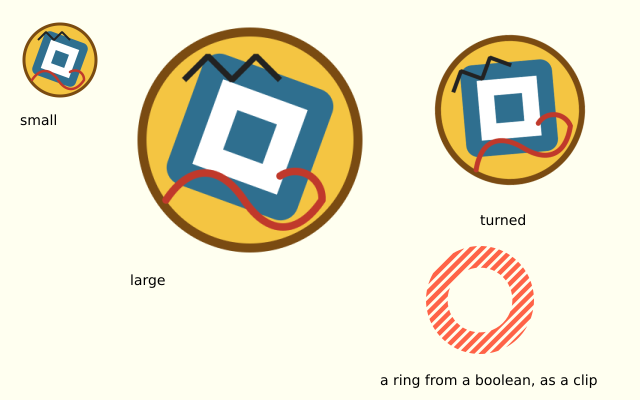
f.load_svg() reads an SVG file and gives you a picture. It is made of shapes, not pixels, so it stays sharp when it is large. f.svg_paths() gives the same shapes as paths.
How it works
- f.load_svg("data/badge.svg") works like f.load_image(). A relative path is looked for next to this file.
- f.image() draws the badge small, large and turned. It follows f.translate() and f.rotate().
- f.svg_paths() gives one path for each shape in the file. The first, the round plate, is kept in plate.
- A path can be changed with .translate() and .scale() and combined with other paths. plate - inner cuts the middle out and leaves a ring.
- f.clip(ring) means anything drawn afterwards only shows inside the ring. The tomato stripes are clipped to it.
- f.saved_state() puts the clip and the transforms away again.
Make it yours
- Use your own SVG: put it in the data folder and change both file names.
- Change 0.6 in the inner scale to make the ring thicker or thinner.
- Change the stripe colour in f.stroke("tomato").
- Change the 14 in range(-160, 320, 14) to space the stripes closer or wider.
- Draw the badge many times in a loop, with a different size each time.
The code
Copy it into a file and run it.
"""Loading an SVG drawing

f.load_svg() reads an SVG file and gives you a picture. It is made of shapes, not pixels, so it
stays sharp when it is large. f.svg_paths() gives the same shapes as paths.

How it works:
- f.load_svg("data/badge.svg") works like f.load_image(). A relative path is looked for next to
  this file.
- f.image() draws the badge small, large and turned. It follows f.translate() and f.rotate().
- f.svg_paths() gives one path for each shape in the file. The first, the round plate, is kept in
  plate.
- A path can be changed with .translate() and .scale() and combined with other paths. plate -
  inner cuts the middle out and leaves a ring.
- f.clip(ring) means anything drawn afterwards only shows inside the ring. The tomato stripes are
  clipped to it.
- f.saved_state() puts the clip and the transforms away again.

Make it yours:
- Use your own SVG: put it in the data folder and change both file names.
- Change 0.6 in the inner scale to make the ring thicker or thinner.
- Change the stripe colour in f.stroke("tomato").
- Change the 14 in range(-160, 320, 14) to space the stripes closer or wider.
- Draw the badge many times in a loop, with a different size each time.
"""
import funground as f

badge = f.load_svg("data/badge.svg")             # found next to this file, 160 x 160
shapes = f.svg_paths("data/badge.svg")           # one path for each shape
plate = shapes[0]                                # the round plate


def setup():
    f.size(640, 400)


def label(words, x, y):
    f.fill("black")
    f.no_stroke()
    f.text_size(14)
    f.text(words, x, y)


def draw():
    f.background("ivory")

    f.image(badge, 20, 20, 80, 80)               # small
    label("small", 20, 112)

    f.image(badge, 130, 20, 240, 240)            # large: still sharp
    label("large", 130, 272)

    with f.saved_state():                        # turned, like any picture
        f.translate(510, 110)
        f.rotate(-25)
        f.image(badge, -80, -80)
    label("turned", 480, 212)

    # A path from the file, used in a boolean and as a clip.
    inner = plate.translate(-80, -80).scale(0.6).translate(80, 80)
    ring = plate - inner                         # the plate with its middle cut out
    with f.saved_state():
        f.translate(420, 240)
        f.scale(0.75)
        f.clip(ring)
        f.stroke("tomato")
        f.stroke_width(6)
        for x in range(-160, 320, 14):
            f.line(x, 170, x + 170, 0)
    label("a ring from a boolean, as a clip", 380, 372)


f.run()