Fill and stroke
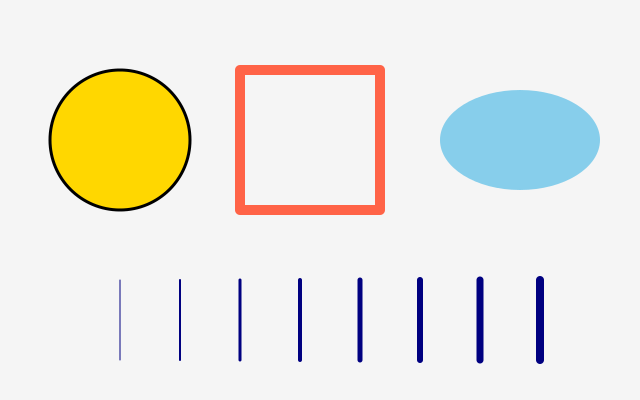
fill is the inside, stroke the outline. no_fill() and no_stroke() switch either off; the stroke is centred on the edge, half outside and half inside.
How it works
- Every closed shape has two parts. f.fill() sets the inside colour. f.stroke() sets the outline colour. f.stroke_width() sets how thick the outline is.
- f.no_fill() draws outlines only. f.no_stroke() draws the inside only.
- A style stays until you change it, so each group of shapes sets what it needs.
- The outline is centred on the edge. Half of it is outside the shape and half is inside, so a thick stroke makes a shape look bigger.
- A line has no inside. It uses the stroke only. The loop draws eight lines with widths 1 to 8.
Make it yours
- Change the 10 in the tomato square's f.stroke_width(). A thicker stroke eats into the shape.
- Swap the colour names: "gold", "skyblue", "tomato" and "navy" can be any other name.
- Make the lines grow faster: use f.stroke_width(i * 2) in the loop.
- Give the last ellipse an outline: replace f.no_stroke() with f.stroke("black").
- Use a see-through fill: f.fill((255, 215, 0, 100)).
The code
Copy it into a file and run it.
"""Fill and stroke

fill is the inside, stroke the outline. no_fill() and no_stroke() switch either off; the
stroke is centred on the edge, half outside and half inside.

How it works:
- Every closed shape has two parts. f.fill() sets the inside colour. f.stroke() sets the outline
  colour. f.stroke_width() sets how thick the outline is.
- f.no_fill() draws outlines only. f.no_stroke() draws the inside only.
- A style stays until you change it, so each group of shapes sets what it needs.
- The outline is centred on the edge. Half of it is outside the shape and half is inside, so a
  thick stroke makes a shape look bigger.
- A line has no inside. It uses the stroke only. The loop draws eight lines with widths 1 to 8.

Make it yours:
- Change the 10 in the tomato square's f.stroke_width(). A thicker stroke eats into the shape.
- Swap the colour names: "gold", "skyblue", "tomato" and "navy" can be any other name.
- Make the lines grow faster: use f.stroke_width(i * 2) in the loop.
- Give the last ellipse an outline: replace f.no_stroke() with f.stroke("black").
- Use a see-through fill: f.fill((255, 215, 0, 100)).
"""
import funground as f


def setup():
    f.size(640, 400)


def draw():
    f.background("whitesmoke")
    f.fill("gold")
    f.stroke("black")
    f.stroke_width(3)
    f.circle(120, 140, 140)

    f.no_fill()                      # outline only
    f.stroke("tomato")
    f.stroke_width(10)
    f.rect(240, 70, 140, 140)

    f.fill("skyblue")
    f.no_stroke()                    # inside only
    f.ellipse(520, 140, 160, 100)

    for i in range(1, 9):            # stroke widths 1 to 8
        f.stroke("navy")
        f.stroke_width(i)
        f.line(60 + i * 60, 280, 60 + i * 60, 360)


f.run()