Line ends, corners and dashes
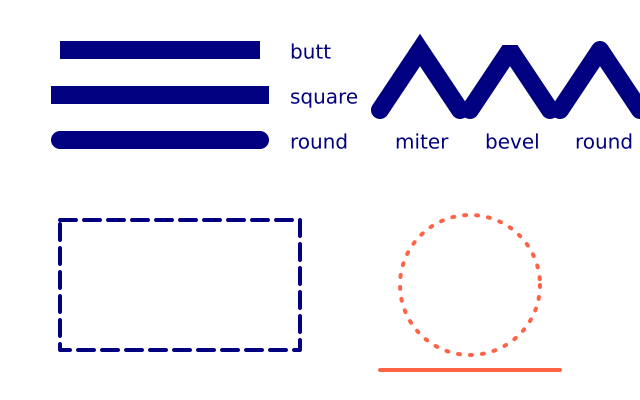
stroke_cap sets how a line ends, stroke_join how corners look, and stroke_dash draws dashed outlines. They are style, like fill: saved_state puts them back.
How it works
- f.stroke_cap() sets how a line ends: "butt" stops at the end, "square" goes a little further, and "round" adds a half circle.
- f.stroke_join() sets how a corner looks: "miter" is sharp, "bevel" is cut flat and "round" is smooth. The zigzag() shape uses f.begin_shape(), f.vertex() and f.end_shape().
- f.miter_limit(4) stops a very sharp corner from sticking out too far.
- f.stroke_dash([16, 8]) draws dashes 16 pixels long with 8-pixel gaps. f.no_dash() makes lines solid again.
- Cap, join and dash are style, like fill. f.saved_state() puts them back after each block, so one line does not change the next.
Make it yours
- Change the numbers in f.stroke_dash([16, 8]). Try [4, 4] or [30, 10].
- Make the lines thicker or thinner: change f.stroke_width(18) at the top.
- Change f.miter_limit(4) to 1 and watch the sharp corner get cut.
- Change the shape in zigzag(): move the f.vertex() points to make the corners sharper.
- Dash the line at the bottom: add f.stroke_dash([10, 6]) before f.line(380, 370, 560, 370).
The code
Copy it into a file and run it.
"""Line ends, corners and dashes

stroke_cap sets how a line ends, stroke_join how corners look, and stroke_dash draws dashed
outlines. They are style, like fill: saved_state puts them back.

How it works:
- f.stroke_cap() sets how a line ends: "butt" stops at the end, "square" goes a little further, and
  "round" adds a half circle.
- f.stroke_join() sets how a corner looks: "miter" is sharp, "bevel" is cut flat and "round" is
  smooth. The zigzag() shape uses f.begin_shape(), f.vertex() and f.end_shape().
- f.miter_limit(4) stops a very sharp corner from sticking out too far.
- f.stroke_dash([16, 8]) draws dashes 16 pixels long with 8-pixel gaps. f.no_dash() makes lines
  solid again.
- Cap, join and dash are style, like fill. f.saved_state() puts them back after each block, so one
  line does not change the next.

Make it yours:
- Change the numbers in f.stroke_dash([16, 8]). Try [4, 4] or [30, 10].
- Make the lines thicker or thinner: change f.stroke_width(18) at the top.
- Change f.miter_limit(4) to 1 and watch the sharp corner get cut.
- Change the shape in zigzag(): move the f.vertex() points to make the corners sharper.
- Dash the line at the bottom: add f.stroke_dash([10, 6]) before f.line(380, 370, 560, 370).
"""
import funground as f


def setup():
    f.size(640, 400)


def zigzag(x, y):
    f.begin_shape()
    f.vertex(x, y + 60)
    f.vertex(x + 40, y)
    f.vertex(x + 80, y + 60)
    f.end_shape()


def draw():
    f.background("white")
    f.fill("navy")                    # label colour (text uses the fill)
    f.stroke("navy")
    f.stroke_width(18)
    for i, cap in enumerate(["butt", "square", "round"]):
        with f.saved_state():
            f.stroke_cap(cap)
            f.line(60, 50 + i * 45, 260, 50 + i * 45)
        f.text(cap, 290, 40 + i * 45)

    f.no_fill()
    f.miter_limit(4)                  # sharp corners may stick out up to 4 x the stroke width
    for i, join in enumerate(["miter", "bevel", "round"]):
        with f.saved_state():
            f.stroke_join(join)
            zigzag(380 + i * 90, 50)
        f.text(join, 395 + i * 90, 130)

    f.stroke_width(4)
    with f.saved_state():
        f.stroke_dash([16, 8])
        f.rect(60, 220, 240, 130)
    f.stroke_dash([2, 10])
    f.stroke("tomato")
    f.circle(470, 285, 140)
    f.no_dash()                       # solid again
    f.line(380, 370, 560, 370)


f.run()