Pixel art with no_smooth
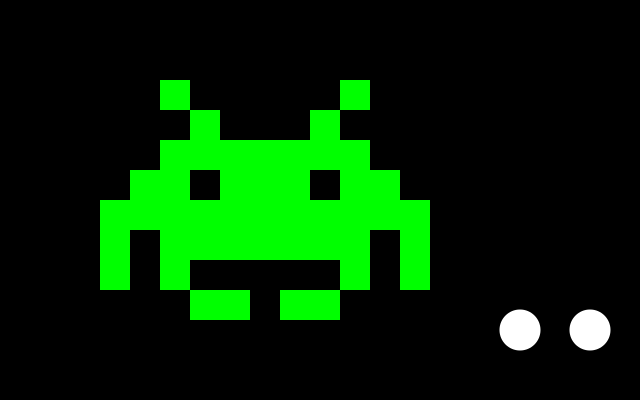
no_smooth() turns off the soft edges, so every pixel is either the shape's colour or not. Draw big and blocky with scale() and it looks like a retro game. smooth() switches back: compare the two white circles.
How it works
- INVADER is a list of text rows. An "X" is a filled square and a "." is an empty one.
- Two loops, over rows and then over the letters in each row, call f.rect(col, row, 1, 1) for every "X". Each square is just 1 unit big.
- f.scale(30) makes one unit 30 pixels. f.translate(100, 80) moves the origin first. f.saved_state() puts both back afterwards.
- f.no_smooth() in setup() turns off anti-aliasing, so the edges stay hard and blocky.
- f.smooth() turns it back on. The second white circle is soft at the edge, and the first is jagged.
Make it yours
- Change the "X" and "." characters in INVADER to draw your own picture. Keep every row the same length.
- Change the 30 in f.scale(30) to make the picture bigger or smaller.
- Change f.fill("lime") to another colour name.
- Add a second picture: copy the loops and use another list of rows and another f.translate().
- Remove f.no_smooth() from setup() and see how the pixels get soft.
The code
Copy it into a file and run it.
"""Pixel art with no_smooth

no_smooth() turns off the soft edges, so every pixel is either the shape's colour or not. Draw
big and blocky with scale() and it looks like a retro game. smooth() switches back: compare the
two white circles.

How it works:
- INVADER is a list of text rows. An "X" is a filled square and a "." is an empty one.
- Two loops, over rows and then over the letters in each row, call f.rect(col, row, 1, 1) for every
  "X". Each square is just 1 unit big.
- f.scale(30) makes one unit 30 pixels. f.translate(100, 80) moves the origin first. f.saved_state()
  puts both back afterwards.
- f.no_smooth() in setup() turns off anti-aliasing, so the edges stay hard and blocky.
- f.smooth() turns it back on. The second white circle is soft at the edge, and the first is jagged.

Make it yours:
- Change the "X" and "." characters in INVADER to draw your own picture. Keep every row the same length.
- Change the 30 in f.scale(30) to make the picture bigger or smaller.
- Change f.fill("lime") to another colour name.
- Add a second picture: copy the loops and use another list of rows and another f.translate().
- Remove f.no_smooth() from setup() and see how the pixels get soft.
"""
import funground as f

INVADER = [
    "..X.....X..",
    "...X...X...",
    "..XXXXXXX..",
    ".XX.XXX.XX.",
    "XXXXXXXXXXX",
    "X.XXXXXXX.X",
    "X.X.....X.X",
    "...XX.XX...",
]


def setup():
    f.size(640, 400)
    f.no_smooth()


def draw():
    f.background("black")
    f.no_stroke()
    f.fill("lime")
    with f.saved_state():
        f.translate(100, 80)
        f.scale(30)
        for row, line in enumerate(INVADER):
            for col, ch in enumerate(line):
                if ch == "X":
                    f.rect(col, row, 1, 1)
    f.fill("white")
    f.circle(520, 330, 41)            # a jagged circle: no anti-aliasing
    f.smooth()                        # smooth edges again for the rest of this frame
    f.circle(590, 330, 41)


f.run()