Mapping and blending numbers
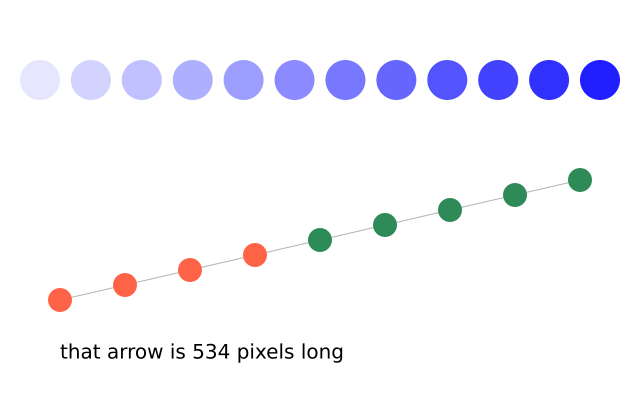
map_range re-scales a number from one range to another; lerp finds a point part of the way between two numbers; norm says how far along a range a number is; mag measures an arrow.
How it works
- f.map_range(value, in_low, in_high, out_low, out_high) moves a number from one range to another. Here 0 to 11 becomes 40 to 600 for the x, and 230 to 30 for the shade.
- f.lerp(a, b, t) finds the number part of the way from a to b. At t = 0 it gives a, at 1 it gives b, and at 0.5 it gives the middle. It is used for both x and y along the line.
- f.norm(value, low, high) says how far along a range a number is, from 0 to 1. The circles turn green once they pass the half way mark.
- f.mag(dx, dy) measures the length of an arrow from its two sides. It gives the length of the line.
Make it yours
- Change range(12) to range(20), and both 11s in the first loop to 19, for more circles.
- Swap 230 and 30 in the shade line, so the circles go from dark to light.
- Change the 0.5 in the f.norm() test to move where the colour switches.
- Change range(9) and i / 8 to range(17) and i / 16 for more circles on the line.
- Move the line's end point and watch the length in the text change.
The code
Copy it into a file and run it.
"""Mapping and blending numbers

map_range re-scales a number from one range to another; lerp finds a point part of the way
between two numbers; norm says how far along a range a number is; mag measures an arrow.

How it works:
- f.map_range(value, in_low, in_high, out_low, out_high) moves a number from one range to another.
  Here 0 to 11 becomes 40 to 600 for the x, and 230 to 30 for the shade.
- f.lerp(a, b, t) finds the number part of the way from a to b. At t = 0 it gives a, at 1 it gives
  b, and at 0.5 it gives the middle. It is used for both x and y along the line.
- f.norm(value, low, high) says how far along a range a number is, from 0 to 1. The circles turn
  green once they pass the half way mark.
- f.mag(dx, dy) measures the length of an arrow from its two sides. It gives the length of the line.

Make it yours:
- Change range(12) to range(20), and both 11s in the first loop to 19, for more circles.
- Swap 230 and 30 in the shade line, so the circles go from dark to light.
- Change the 0.5 in the f.norm() test to move where the colour switches.
- Change range(9) and i / 8 to range(17) and i / 16 for more circles on the line.
- Move the line's end point and watch the length in the text change.
"""
import funground as f


def setup():
    f.size(640, 400)


def draw():
    f.background("white")
    f.no_stroke()
    for i in range(12):
        x = f.map_range(i, 0, 11, 40, 600)                 # 0..11 spread across the window
        shade = f.map_range(i, 0, 11, 230, 30)             # and from light to dark
        f.fill((shade, shade, 255))
        f.circle(x, 80, 40)

    start, end = (60, 300), (580, 180)
    f.stroke("gray70")
    f.line(*start, *end)                                   # the arrow mag() measures
    f.no_stroke()
    for i in range(9):
        t = i / 8
        x, y = f.lerp(start[0], end[0], t), f.lerp(start[1], end[1], t)
        f.fill("tomato" if f.norm(x, start[0], end[0]) < 0.5 else "seagreen")
        f.circle(x, y, 24)
    f.fill("black")
    f.text(f"that arrow is {f.mag(end[0] - start[0], end[1] - start[1]):.0f} pixels long", 60, 340)


f.run()