Music: tap along to the beat
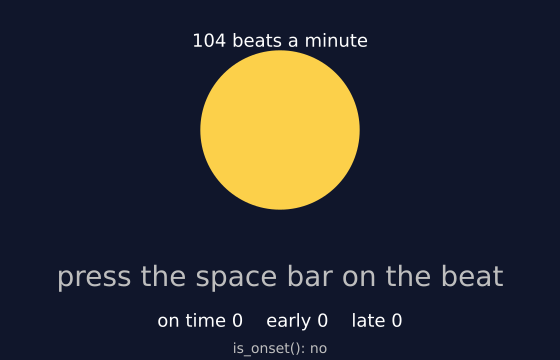
A tune plays over and over. The circle lights up on each beat. Press the space bar in time with it. Each press is scored: on time, a little early, or a little late. With no sound device, the tune is silent but still keeps time. (This one uses real time, so the picture changes from run to run.)
How it works
- f.melody(..., tempo=TEMPO) makes the tune. The last note is followed by a short rest, so the tune is exactly 16 beats long and the loop keeps the beat.
- tune.beats() lists the time of every beat in seconds. It is found by listening to the sound itself. tune.tempo() gives the speed that was heard.
- Each frame, tune.current_time() minus the last beat is how long ago the beat was. The glow fades over a quarter of a second, and f.lerp_color() sets the colour.
- key_pressed() runs when a key goes down, and f.key says which. distance_to_beat() finds the nearest beat. It also tries the beats of the loop before and after.
- A press within ON_TIME seconds of a beat is on time. Before it is early, after it is late. A dictionary keeps the three counts.
- tune.is_onset() says whether a new note begins right now. It is shown at the bottom.
Make it yours
- Change TEMPO to 70 for a slow beat, or 140 for a fast one.
- Make the game stricter. Change ON_TIME from 0.07 to 0.04.
- Change the notes in the f.melody() text. Keep the total length and the final rest.
- Make the circle a square: swap f.circle() for f.rect() and move its corner.
- Count a streak. Add a global called streak, add 1 when name is "on time" in key_pressed(), and set it to 0 otherwise.
The code
Copy it into a file and run it.
"""Music: tap along to the beat

A tune plays over and over. The circle lights up on each beat. Press the space bar in time with
it. Each press is scored: on time, a little early, or a little late. With no sound device, the
tune is silent but still keeps time.

How it works:
- f.melody(..., tempo=TEMPO) makes the tune. The last note is followed by a short rest, so the
  tune is exactly 16 beats long and the loop keeps the beat.
- tune.beats() lists the time of every beat in seconds. It is found by listening to the sound
  itself. tune.tempo() gives the speed that was heard.
- Each frame, tune.current_time() minus the last beat is how long ago the beat was. The glow
  fades over a quarter of a second, and f.lerp_color() sets the colour.
- key_pressed() runs when a key goes down, and f.key says which. distance_to_beat() finds the nearest
  beat. It also tries the beats of the loop before and after.
- A press within ON_TIME seconds of a beat is on time. Before it is early, after it is late. A
  dictionary keeps the three counts.
- tune.is_onset() says whether a new note begins right now. It is shown at the bottom.

Make it yours:
- Change TEMPO to 70 for a slow beat, or 140 for a fast one.
- Make the game stricter. Change ON_TIME from 0.07 to 0.04.
- Change the notes in the f.melody() text. Keep the total length and the final rest.
- Make the circle a square: swap f.circle() for f.rect() and move its corner.
- Count a streak. Add a global called streak, add 1 when name is "on time" in key_pressed(),
  and set it to 0 otherwise.
"""
# gallery: time-dependent
import funground as f

TEMPO = 104
# The last note is followed by a short rest. A note rings on for a moment after it ends, and
# the rest gives it room, so the tune stays exactly 16 beats long and the loop keeps the beat.
tune = f.melody("C4 E4 G4 E4  A3 C4 E4 C4  F3 A3 C4 A3  G3 B3 D4:1.5 -:0.5", tempo=TEMPO)
beats = tune.beats()              # beat times in seconds, found from the sound
length = tune.duration()
speed = tune.tempo()              # beats a minute, as heard (close to TEMPO)

ON_TIME = 0.07                    # seconds: this close counts as on time
counts = {"on time": 0, "early": 0, "late": 0}
verdict = "press the space bar on the beat"
verdict_age = 99.0


def distance_to_beat(now):
    """Seconds from the nearest beat (negative: you are before it). The tune loops, so the
    beat just after the end is the first beat again."""
    options = [now - b for b in beats] + [now - b - length for b in beats] + [now - b + length for b in beats]
    return min(options, key=abs)


def setup():
    f.size(560, 360)
    f.text_align("center")
    tune.set_volume(0.9)          # melodies are made at half volume, so this is still comfortable
    tune.loop()


def key_pressed():
    global verdict, verdict_age
    if f.key != " ":
        return
    off = distance_to_beat(tune.current_time())
    if abs(off) <= ON_TIME:
        name = "on time"
    elif off < 0:
        name = "early"
    else:
        name = "late"
    counts[name] += 1
    verdict = f"{name}  ({off * 1000:+.0f} ms)"
    verdict_age = 0.0


def draw():
    global verdict_age
    verdict_age += 1 / 60
    now = tune.current_time()
    since = min(now - b for b in beats if b <= now) if any(b <= now for b in beats) else 99.0
    glow = max(0.0, 1.0 - since / 0.25)           # bright on the beat, fading away

    f.background("#10162b")
    f.no_stroke()
    f.fill(f.lerp_color("#2b3566", "#ffd24a", glow))
    f.circle(280, 130, 110 + 50 * glow)

    f.fill("white")
    f.text_size(18)
    f.text(f"{speed:.0f} beats a minute", 280, 30)
    f.text_size(28)
    f.fill("limegreen" if verdict.startswith("on time") else "orange" if verdict_age < 1.5 else "gray")
    f.text(verdict, 280, 260)

    f.text_size(18)
    f.fill("white")
    f.text(f"on time {counts['on time']}    early {counts['early']}    late {counts['late']}", 280, 310)
    f.text_size(14)
    f.fill("gray")
    f.text("is_onset(): " + ("yes" if tune.is_onset() else "no"), 280, 340)


f.run()