Music: see a chord
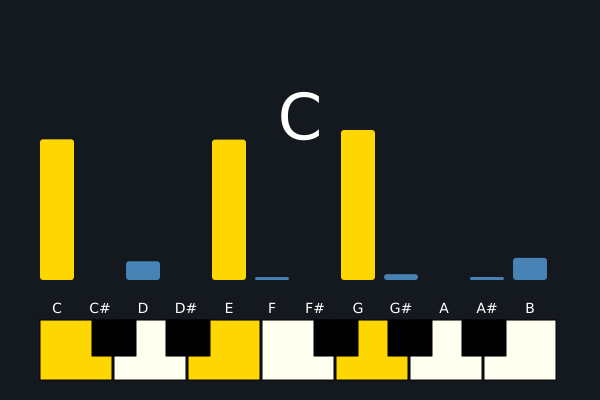
Chords play one after another. The twelve bars show how strong each note name is right now. The chord's name is at the top, and the notes of the chord are lit on a small keyboard. With no sound device, the chords stay silent and the bars stay flat. (This one uses real time, so the picture changes from run to run.)
How it works
- PROGRESSION is a list of chord names. f.chord_notes("Am") lists the note names in a chord. voicing() adds octave numbers to them, going up from octave 3.
- Each chord is f.mix() of f.note() sounds. The notes are quiet, so the sum does not clip. f.sequence() puts the chords one after another, and sound.reverb(0.2) adds a little room.
- song.chroma() gives 12 numbers for C, C#, D ... B. Each says how strong that note name is now, in any octave. The bars are those twelve numbers.
- shown[i] moves a third of the way to the new number each frame, so the bars glide.
- song.chord() names the chord that fits what is sounding. It gives nothing between chords, so the sketch keeps the last name.
- The keys are rectangles. White ones are drawn first and black ones on top. The notes of the chord are gold or orange.
Make it yours
- Change PROGRESSION. Try "Em", "A7" or "Cmaj7".
- Change SECONDS to make the chords shorter or longer.
- Change "triangle" in make_chord() to "sine" or "square". The bars show the new sound.
- Change the colours: "gold" and "steelblue" in draw().
- Change the 0.3 in the bars' smoothing. A smaller number glides more slowly.
The code
Copy it into a file and run it.
"""Music: see a chord

Chords play one after another. The twelve bars show how strong each note name is right now.
The chord's name is at the top, and the notes of the chord are lit on a small keyboard. With no
sound device, the chords stay silent and the bars stay flat.

How it works:
- PROGRESSION is a list of chord names. f.chord_notes("Am") lists the note names in a chord.
  voicing() adds octave numbers to them, going up from octave 3.
- Each chord is f.mix() of f.note() sounds. The notes are quiet, so the sum does not clip.
  f.sequence() puts the chords one after another, and sound.reverb(0.2) adds a little room.
- song.chroma() gives 12 numbers for C, C#, D ... B. Each says how strong that note name is now,
  in any octave. The bars are those twelve numbers.
- shown[i] moves a third of the way to the new number each frame, so the bars glide.
- song.chord() names the chord that fits what is sounding. It gives nothing between chords, so the
  sketch keeps the last name.
- The keys are rectangles. White ones are drawn first and black ones on top. The notes of the
  chord are gold or orange.

Make it yours:
- Change PROGRESSION. Try "Em", "A7" or "Cmaj7".
- Change SECONDS to make the chords shorter or longer.
- Change "triangle" in make_chord() to "sine" or "square". The bars show the new sound.
- Change the colours: "gold" and "steelblue" in draw().
- Change the 0.3 in the bars' smoothing. A smaller number glides more slowly.
"""
# gallery: time-dependent
import funground as f

PROGRESSION = ["C", "Am", "F", "G7", "Dm7", "Bdim", "Fmaj7", "C"]
SECONDS = 1.6
NAMES = ["C", "C#", "D", "D#", "E", "F", "F#", "G", "G#", "A", "A#", "B"]
BLACK = {1, 3, 6, 8, 10}


def voicing(chord):
    """The chord's notes with octaves, going up from octave 3, as the names f.note() wants."""
    out = []
    octave = 3
    previous = -1
    for name in f.chord_notes(chord):
        step = NAMES.index(name)
        if step <= previous:
            octave += 1
        out.append(f"{name}{octave}")
        previous = step
    return out


def make_chord(chord):
    # Three or four notes are added together, so each one is quiet (0.2): the sum stays below
    # the loudest a sound can be, and mix() does not have to squash it.
    notes = [f.note(n, SECONDS, "triangle", 0.2) for n in voicing(chord)]
    return f.mix(*notes)


song = f.sequence(*[make_chord(c) for c in PROGRESSION]).reverb(0.2)    # a little room
shown = [0.0] * 12            # the bars, smoothed so they glide
heard = None                  # the chord name now


def setup():
    f.size(600, 400)
    f.text_align("center")
    song.set_volume(0.9)
    song.loop()


def draw():
    global heard
    name = song.chord()
    if name:                      # between chords nothing stands out: keep the last name
        heard = name
    now = song.chroma()
    for i in range(12):
        shown[i] += (now[i] - shown[i]) * 0.3
    lit = set()
    if heard:
        lit = {NAMES.index(n) for n in f.chord_notes(heard)}

    f.background("#14181f")
    f.fill("white")
    f.text_size(64)
    f.text(heard or "-", 300, 80)

    # the twelve bars
    f.text_size(14)
    for i in range(12):
        x = 40 + i * 43
        height = 150 * shown[i]
        f.no_stroke()
        f.fill("gold" if i in lit else "steelblue")
        f.rect(x, 280 - height, 34, height, 3)
        f.fill("white")
        f.text(NAMES[i], x + 17, 300)

    # a keyboard with one octave: the chord's notes are lit
    left = 40
    for i in range(12):
        if i not in BLACK:
            slot = sum(1 for j in range(i) if j not in BLACK)
            f.stroke("black")
            f.fill("gold" if i in lit else "ivory")
            f.rect(left + slot * 74, 320, 72, 60)
    for i in sorted(BLACK):
        slot = sum(1 for j in range(i) if j not in BLACK)
        f.stroke("black")
        f.fill("orange" if i in lit else "black")
        f.rect(left + slot * 74 - 22, 320, 44, 36)


f.run()