Music: sing with the drone
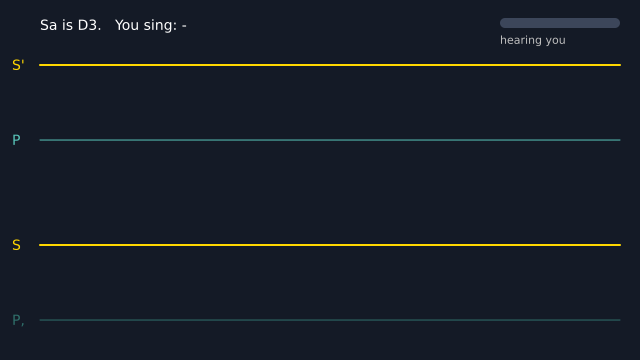
A drone plays, and you sing along. The microphone hears you, and your pitch is drawn as a line that moves to the left. The bright lines are Sa and Pa. Try to hold your voice on them. With no microphone, the drone still plays and the line waits. (This one uses real time, so the picture changes from run to run.)
How it works
- Sa is the home note of Indian music, and the drone holds it. SA = "D3" is a comfortable Sa for many voices. f.drone(SA, 7) makes a sound like a tanpura: plucked strings that play Pa, Sa, Sa, Sa and ring on. Pa is the fifth note above Sa.
- Reverb makes the strings warmer, but it adds a tail, and the loop would pause. room() folds the tail back onto the start, so the loop has no gap.
- mic.pitch() gives your pitch in hertz, or None when you are quiet. The code turns it into cents above Sa: 100 cents is one semitone, so Pa is 700 and the next Sa up is 1200.
- GUIDES holds the lines to sing to. y_for() turns cents into a height on the screen.
- line keeps the last 280 readings. A None is a gap, where the line breaks.
- f.frequency_to_note(hz, sa=SA) names the swara you sing, for example "P" or "G". The small bar at the top right shows how loud the microphone hears you, in decibels (loudness()), so you can see it hears you even if your microphone is quiet.
Make it yours
- Change SA to "C3" or "A3" to suit your voice. The lines move with it.
- Add a guide line for Ga, the third swara. Add (400, "G", "tomato") to GUIDES.
- Change the drone for a raga without Pa. Use f.drone(SA, 7, pattern="m S' S' S"), with Ma on the first string.
- Change 0.4 in room(f.drone(...), 0.4) to 0 for a dry drone, or to 0.7 for a big room.
- Change the pink line's colour and f.stroke_width(). Change the -70 and 50 in loudness() if the bar moves too much or too little.
The code
Copy it into a file and run it.
"""Music: sing with the drone

A drone plays, and you sing along. The microphone hears you, and your pitch is drawn as a line
that moves to the left. The bright lines are Sa and Pa. Try to hold your voice on them. With no
microphone, the drone still plays and the line waits.

How it works:
- Sa is the home note of Indian music, and the drone holds it. SA = "D3" is a comfortable Sa for
  many voices. f.drone(SA, 7) makes a sound like a tanpura: plucked strings that play Pa, Sa, Sa,
  Sa and ring on. Pa is the fifth note above Sa.
- Reverb makes the strings warmer, but it adds a tail, and the loop would pause. room() folds the
  tail back onto the start, so the loop has no gap.
- mic.pitch() gives your pitch in hertz, or None when you are quiet. The code turns it into cents
  above Sa: 100 cents is one semitone, so Pa is 700 and the next Sa up is 1200.
- GUIDES holds the lines to sing to. y_for() turns cents into a height on the screen.
- line keeps the last 280 readings. A None is a gap, where the line breaks.
- f.frequency_to_note(hz, sa=SA) names the swara you sing, for example "P" or "G".
  The small bar at the top right shows how loud the microphone hears you, in decibels (loudness()),
  so you can see it hears you even if your microphone is quiet.

Make it yours:
- Change SA to "C3" or "A3" to suit your voice. The lines move with it.
- Add a guide line for Ga, the third swara. Add (400, "G", "tomato") to GUIDES.
- Change the drone for a raga without Pa. Use f.drone(SA, 7, pattern="m S' S' S"), with Ma on the
  first string.
- Change 0.4 in room(f.drone(...), 0.4) to 0 for a dry drone, or to 0.7 for a big room.
- Change the pink line's colour and f.stroke_width(). Change the -70 and 50 in loudness() if the
  bar moves too much or too little.
"""
# gallery: time-dependent
import math

import funground as f

SA = "D3"                                  # a comfortable Sa for many voices; try "C3" or "A3"
SA_HZ = f.note_to_frequency(SA)


def room(sound, amount):
    """sound.reverb(amount), with the echo that runs past the end added back onto the start,
    so the sound still loops with no gap."""
    length = len(sound.samples())
    wet = sound.reverb(amount).samples()
    looped = wet[:length]
    for i, value in enumerate(wet[length:]):
        looped[i % length] += value
    return f.create_sound(looped)


# Two rounds of the strings. A drone loops without a gap; room() keeps it that way with reverb,
# which makes the strings sound warmer and fuller.
drone = room(f.drone(SA, 7), 0.4)
mic = f.microphone()
line = []                                  # cents above Sa for each frame, or None when quiet

# The lines to sing to: (cents above Sa, swara, colour)
GUIDES = [(-500, "P,", "#2f6f6a"), (0, "S", "gold"), (700, "P", "#58c4b8"), (1200, "S'", "gold")]


def loudness(level):
    """A number from 0 to 1 for a bar. It uses decibels, so a quiet laptop microphone still moves it:
    -70 dB (a very quiet room) is 0 and -20 dB (loud) is 1."""
    return f.constrain((20 * math.log10(level + 1e-9) + 70) / 50, 0, 1)


def y_for(cents):
    return 335 - (cents + 600) * 0.15      # from P, (low) to S' (high)


def setup():
    f.size(640, 360)
    drone.loop()
    mic.start()


def draw():
    f.background("#141a26")
    hz = mic.pitch()
    if hz:
        cents = 1200 * math.log2(hz / SA_HZ)
        line.append(cents if -650 < cents < 1300 else None)
    else:
        line.append(None)
    del line[:-280]

    f.text_size(14)
    f.text_align("left", "center")
    for cents, swara, colour in GUIDES:
        f.stroke(colour)
        f.stroke_width(2 if swara.startswith("S") else 1)
        f.line(40, y_for(cents), 620, y_for(cents))
        f.no_stroke()
        f.fill(colour)
        f.text(swara, 12, y_for(cents))

    f.stroke("hotpink")
    f.stroke_width(3)
    last = None
    for i, cents in enumerate(line):
        point = None if cents is None else (620 - (len(line) - 1 - i) * 2, y_for(cents))
        if point and last:
            f.line(*last, *point)
        last = point

    f.no_stroke()
    f.fill("white")
    sung = f.frequency_to_note(hz, sa=SA) if hz else "-"
    f.text(f"Sa is {SA}.   You sing: {sung}", 40, 25)

    # the microphone light: it moves whenever the microphone hears anything
    f.fill(60, 70, 90)
    f.rect(500, 18, 120, 10, 5)
    f.fill("limegreen" if hz else "deepskyblue")
    f.rect(500, 18, 120 * loudness(mic.level()) + 0.001, 10, 5)
    f.fill("gray")
    f.text_size(11)
    f.text("hearing you", 500, 40)


f.run()