Music: see your voice
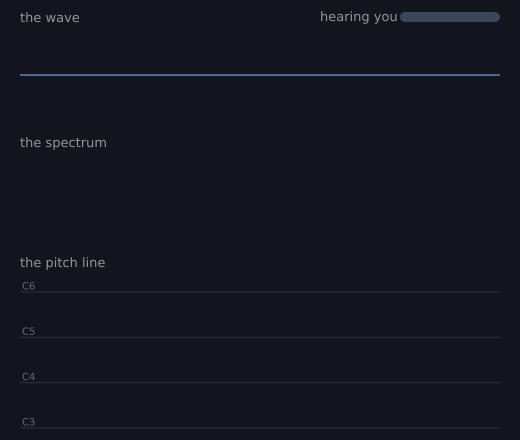
Sing, hum or talk to the microphone and watch three views of the same sound. The top one is the wave, the middle one is the spectrum, and the bottom one is the note you sing, scrolling across. Nothing is recorded or played back. With no microphone, the sketch still runs and shows quiet. (This one uses real time, so the picture changes from run to run.)
How it works
- f.microphone() makes the microphone, and mic.start() in setup() begins listening.
- f.draw_wave(mic, x, y, w, h) draws the wave: how the air moves over the last half second.
- f.draw_spectrum(mic, x, y, w, h, bands=40) draws a bar for each range of pitch, low on the left and high on the right.
- f.draw_pitch_line(mic, x, y, w, h, seconds=6, low="C3", high="C6") draws the note you sing, scrolling across. It leaves a gap when you are quiet.
- These functions draw with the current fill and stroke. So the code sets f.fill() and f.stroke() before each one, to give each view its own colour.
- label() is a small helper that writes a title above each view. The small bar at the top right shows how loud the microphone hears you, in decibels (loudness()), even for a quiet microphone.
Make it yours
- Change bands=40 to 80 for finer bars, or to 12 for fat ones.
- Change seconds=6 to 12 to see a longer stretch of your voice.
- Change low="C3" and high="C6" to "C2" and "C5" for a deep voice.
- Change the colours in the f.fill() and f.stroke() lines.
- Make the window taller with f.size(), and give each view more height. Change the -70 and 50 in loudness() if the bar moves too much or too little.
The code
Copy it into a file and run it.
"""Music: see your voice

Sing, hum or talk to the microphone and watch three views of the same sound. The top one is the
wave, the middle one is the spectrum, and the bottom one is the note you sing, scrolling across.
Nothing is recorded or played back. With no microphone, the sketch still runs and shows quiet.

How it works:
- f.microphone() makes the microphone, and mic.start() in setup() begins listening.
- f.draw_wave(mic, x, y, w, h) draws the wave: how the air moves over the last half second.
- f.draw_spectrum(mic, x, y, w, h, bands=40) draws a bar for each range of pitch, low on the left
  and high on the right.
- f.draw_pitch_line(mic, x, y, w, h, seconds=6, low="C3", high="C6") draws the note you sing,
  scrolling across. It leaves a gap when you are quiet.
- These functions draw with the current fill and stroke. So the code sets f.fill() and f.stroke()
  before each one, to give each view its own colour.
- label() is a small helper that writes a title above each view. The small bar at the top right
  shows how loud the microphone hears you, in decibels (loudness()), even for a quiet microphone.

Make it yours:
- Change bands=40 to 80 for finer bars, or to 12 for fat ones.
- Change seconds=6 to 12 to see a longer stretch of your voice.
- Change low="C3" and high="C6" to "C2" and "C5" for a deep voice.
- Change the colours in the f.fill() and f.stroke() lines.
- Make the window taller with f.size(), and give each view more height. Change the -70 and 50 in
  loudness() if the bar moves too much or too little.
"""
# gallery: time-dependent
import math

import funground as f

mic = f.microphone()


def setup():
    f.size(520, 440)
    mic.start()
    f.text_align("left", "top")


def loudness(level):
    """A number from 0 to 1 for a bar. It uses decibels, so a quiet laptop microphone still moves it:
    -70 dB (a very quiet room) is 0 and -20 dB (loud) is 1."""
    return f.constrain((20 * math.log10(level + 1e-9) + 70) / 50, 0, 1)


def label(message, y):
    f.no_stroke()
    f.fill(150)
    f.text_size(13)
    f.text(message, 20, y)


def draw():
    f.background(18, 20, 30)

    label("the wave", 10)
    f.fill(60, 150, 220, 160)
    f.stroke(120, 200, 255)
    f.stroke_width(1)
    f.draw_wave(mic, 20, 30, 480, 90)

    label("the spectrum", 135)
    f.fill(250, 170, 60)
    f.no_stroke()
    f.draw_spectrum(mic, 20, 155, 480, 90, bands=40)

    label("the pitch line", 255)
    f.no_fill()
    f.stroke(120, 235, 150)
    f.stroke_width(3)
    f.draw_pitch_line(mic, 20, 292, 480, 136, seconds=6, low="C3", high="C6")

    f.no_stroke()                              # the microphone light: it moves for any sound it hears
    f.fill(60, 70, 90)
    f.rect(400, 12, 100, 10, 5)
    f.fill("limegreen")
    f.rect(400, 12, 100 * loudness(mic.level()) + 0.001, 10, 5)
    f.fill(150)
    f.text_size(13)
    f.text("hearing you", 320, 9)


f.run()