Music: a song's fingerprint
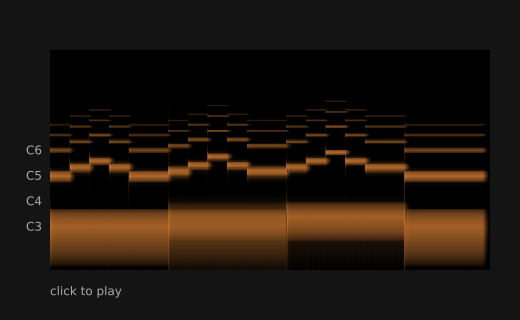
A short song is turned into a picture. Time goes across, pitch goes up, and the louder a pitch is, the brighter it is. Each note is a bright dash, and the low bass notes run along the bottom. Click to play the song, and a line shows where it is. The picture is also saved as fingerprint.png. With no sound device, the song plays silently.
How it works
- f.melody() makes the tune, and makes the bass again with wave="sine" and volume=0.35. f.mix() adds the two into one song. The bass is quiet, so the sum does not clip.
- f.spectrogram(song, WIDTH, HEIGHT) turns the whole sound into a picture. Its brightest colour is the fill colour at that moment, so setup() calls f.fill() first.
- fingerprint.save("fingerprint.png") writes the picture, and f.image() draws it.
- The picture runs from 40 Hz to 16,000 Hz. pitch_height() uses a log to find where a note name sits, so the side labels C3, C4, C5 and C6 are in the right place.
- mouse_pressed() calls song.play(). While song.is_playing(), the line sits at song.current_time() / song.duration() of the way across.
Make it yours
- Change the notes in LEAD or BASS.
- Change TEMPO. A faster song makes a shorter, tighter picture.
- Change f.fill(255, 150, 60) to another colour. The whole picture changes colour.
- Change wave="sine" to wave="square" in the bass. Square waves have many more lines above each note.
- Make the picture bigger: raise WIDTH and HEIGHT, and the size in f.size().
The code
Copy it into a file and run it.
"""Music: a song's fingerprint

A short song is turned into a picture. Time goes across, pitch goes up, and the louder a pitch
is, the brighter it is. Each note is a bright dash, and the low bass notes run along the bottom.
Click to play the song, and a line shows where it is. The picture is also saved as
fingerprint.png. With no sound device, the song plays silently.

How it works:
- f.melody() makes the tune, and makes the bass again with wave="sine" and volume=0.35. f.mix()
  adds the two into one song. The bass is quiet, so the sum does not clip.
- f.spectrogram(song, WIDTH, HEIGHT) turns the whole sound into a picture. Its brightest colour is
  the fill colour at that moment, so setup() calls f.fill() first.
- fingerprint.save("fingerprint.png") writes the picture, and f.image() draws it.
- The picture runs from 40 Hz to 16,000 Hz. pitch_height() uses a log to find where a note name
  sits, so the side labels C3, C4, C5 and C6 are in the right place.
- mouse_pressed() calls song.play(). While song.is_playing(), the line sits at
  song.current_time() / song.duration() of the way across.

Make it yours:
- Change the notes in LEAD or BASS.
- Change TEMPO. A faster song makes a shorter, tighter picture.
- Change f.fill(255, 150, 60) to another colour. The whole picture changes colour.
- Change wave="sine" to wave="square" in the bass. Square waves have many more lines above each
  note.
- Make the picture bigger: raise WIDTH and HEIGHT, and the size in f.size().
"""
import funground as f

TEMPO = 140
LEAD = "C5 E5 G5 E5 C5:2  D5 F5 A5 F5 D5:2  E5 G5 B5 G5 E5:2  C5:4"
BASS = "C3:6 D3:6 E3:6 C3:4"

# The tune in melody's soft voice, and a quieter sine bass, so the two together do not need
# mix() to squash them.
song = f.mix(f.melody(LEAD, tempo=TEMPO),
             f.melody(BASS, tempo=TEMPO, wave="sine", volume=0.35))
LEFT, TOP, WIDTH, HEIGHT = 50, 50, 440, 220
fingerprint = None


def setup():
    global fingerprint
    f.size(520, 320)
    f.fill(255, 150, 60)                      # the brightest colour in the picture
    fingerprint = f.spectrogram(song, WIDTH, HEIGHT)
    fingerprint.save("fingerprint.png")
    f.text_size(12)


def pitch_height(name):
    """How far down the picture a note is (the picture runs from 40 Hz to 16 kHz)."""
    from math import log
    return TOP + HEIGHT * (1 - log(f.note_to_frequency(name) / 40) / log(16000 / 40))


def draw():
    f.background(20)
    f.image(fingerprint, LEFT, TOP)

    # a few notes down the side
    f.no_stroke()
    f.fill(170)
    f.text_align("right", "center")
    for name in ("C3", "C4", "C5", "C6"):
        f.text(name, LEFT - 8, pitch_height(name))
    f.text_align("left", "top")
    f.text("click to play", LEFT, TOP + HEIGHT + 14)

    # where the song is now
    if song.is_playing():
        x = LEFT + WIDTH * song.current_time() / song.duration()
        f.stroke(255)
        f.stroke_width(2)
        f.line(x, TOP, x, TOP + HEIGHT)


def mouse_pressed():
    song.play()


f.run()