Music: compose and save
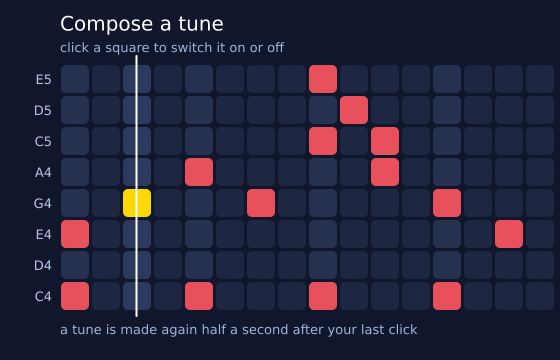
Click the squares to write a tune. Time goes across, with 16 beats. Pitch goes up. The rows are the five notes of a pentatonic scale, which always sounds right. Tick "sargam" to use the swaras S R G m P D N S' instead. The tune loops on its own, and a white line sweeps along it. "save WAV" writes my_tune.wav, and "save poster" writes a PDF of the grid. (This one uses real time, so the picture changes from run to run.)
How it works
- cells[row][beat] is a grid of True and False. mouse_pressed() turns a mouse position into a row and a beat, and flips that square.
- rebuild() turns the grid into text for f.melody(): "-" for an empty beat, and a chord such as "[C4 E4]" for squares in the same column. In sargam mode, it adds sa=SA, tuning="just". Sa is the home note, and a swara is a note named from it.
- A soft low pulse on every fourth beat comes from f.tone() and f.sequence(). f.mix() adds the pulse to the notes. room() adds a little reverb, then folds its tail back onto the start, so the loop has no gap.
- A tune is made again 30 frames after your last click, so quick clicking does not rebuild it every time.
- f.create_button() and f.create_checkbox() make the controls. tune.is_playing() and tune.current_time() / STEP find the beat that is sounding.
- tune.save("my_tune.wav") writes the sound. f.save("grid_poster.pdf") writes the picture, after drawing the grid again on white.
Make it yours
- Change STEP. A smaller number is a faster tune.
- Change PENTATONIC to another scale. Try ["A3", "C4", "D4", "E4", "G4", "A4", "C5", "D5"].
- Change SA to "D4" and tick "sargam" to hear the swaras on a new Sa.
- Change START to write a different starting tune. Each pair is (beat, row).
- Change beat % 4 to beat % 2 for a faster pulse.
The code
Copy it into a file and run it.
"""Music: compose and save

Click the squares to write a tune. Time goes across, with 16 beats. Pitch goes up. The rows are
the five notes of a pentatonic scale, which always sounds right. Tick "sargam" to use the swaras
S R G m P D N S' instead. The tune loops on its own, and a white line sweeps along it. "save WAV"
writes my_tune.wav, and "save poster" writes a PDF of the grid.

How it works:
- cells[row][beat] is a grid of True and False. mouse_pressed() turns a mouse position into a row
  and a beat, and flips that square.
- rebuild() turns the grid into text for f.melody(): "-" for an empty beat, and a chord such as
  "[C4 E4]" for squares in the same column. In sargam mode, it adds sa=SA, tuning="just". Sa is the
  home note, and a swara is a note named from it.
- A soft low pulse on every fourth beat comes from f.tone() and f.sequence(). f.mix() adds the
  pulse to the notes. room() adds a little reverb, then folds its tail back onto the start, so the
  loop has no gap.
- A tune is made again 30 frames after your last click, so quick clicking does not rebuild it every
  time.
- f.create_button() and f.create_checkbox() make the controls. tune.is_playing() and
  tune.current_time() / STEP find the beat that is sounding.
- tune.save("my_tune.wav") writes the sound. f.save("grid_poster.pdf") writes the picture, after
  drawing the grid again on white.

Make it yours:
- Change STEP. A smaller number is a faster tune.
- Change PENTATONIC to another scale. Try ["A3", "C4", "D4", "E4", "G4", "A4", "C5", "D5"].
- Change SA to "D4" and tick "sargam" to hear the swaras on a new Sa.
- Change START to write a different starting tune. Each pair is (beat, row).
- Change beat % 4 to beat % 2 for a faster pulse.
"""
# gallery: time-dependent
import funground as f

COLUMNS = 16
ROWS = 8
STEP = 0.3                      # seconds in one beat
TEMPO = 60 / STEP               # f.melody() counts beats a minute
RATE = 44100
LOOP = round(COLUMNS * STEP * RATE)            # the loop, in numbers
PENTATONIC = ["C4", "D4", "E4", "G4", "A4", "C5", "D5", "E5"]
SARGAM = ["S", "R", "G", "m", "P", "D", "N", "S'"]
SA = "C4"
LEFT, TOP, CELL = 60, 64, 31                    # the grid: its left, its top and the size of a square

# a tune to begin with: (beat, row) pairs, row 0 is the lowest note
START = [(0, 2), (2, 3), (4, 4), (6, 3), (8, 5), (10, 4), (12, 3), (14, 2),
         (0, 0), (4, 0), (8, 0), (12, 0), (8, 7), (9, 6), (10, 5)]
cells = [[False] * COLUMNS for _ in range(ROWS)]      # cells[row][beat]
tune = None
changed_at = None               # the frame of the last click that changed the tune
poster_next = False             # set by the button, used in the next draw()
status = ""
status_until = 0


def room(sound):
    """A light reverb that rings on past the end, folded back onto the start so the loop has no gap."""
    wet = sound.reverb(0.2).samples()
    looped = wet[:LOOP] + [0.0] * (LOOP - len(wet))
    for i, value in enumerate(wet[LOOP:]):
        looped[i % LOOP] += value
    return f.create_sound(looped)


def rebuild(start=False):
    """Make the loop from the grid: the notes, a pulse under them, and a room around both."""
    global tune, changed_at
    changed_at = None
    sargam = sargam_box.checked()
    names = SARGAM if sargam else PENTATONIC
    words = []
    for beat in range(COLUMNS):
        chosen = [names[row] for row in range(ROWS) if cells[row][beat]]
        if not chosen:
            words.append("-")
        else:
            words.append("[" + " ".join(chosen) + "]")
    if sargam:
        notes = f.melody(" ".join(words), tempo=TEMPO, sa=SA, tuning="just")
    else:
        notes = f.melody(" ".join(words), tempo=TEMPO)
    # the pulse: a soft low note on every fourth beat, a silence on the others
    quiet = f.create_sound([0.0] * round(STEP * RATE))
    low = f.note_to_frequency("C3")
    pulse = f.sequence(*[f.tone(low, STEP, "sine", 0.3) if beat % 4 == 0 else quiet
                         for beat in range(COLUMNS)])
    together = f.mix(notes, pulse)
    was_playing = tune is not None and tune.is_playing()
    if tune:
        tune.stop()
    tune = room(together)
    tune.set_volume(0.8)
    if was_playing or start:
        tune.loop()


def clear_grid():
    for row in cells:
        for beat in range(COLUMNS):
            row[beat] = False


def mouse_pressed():
    global changed_at
    column = int((f.mouse_x - LEFT) // CELL)
    row = ROWS - 1 - int((f.mouse_y - TOP) // CELL)
    if 0 <= column < COLUMNS and 0 <= row < ROWS and f.mouse_y >= TOP:
        cells[row][column] = not cells[row][column]
        changed_at = f.frame_count


def key_pressed():
    if f.key == " ":
        play_stop()


def play_stop():
    if tune.is_playing():
        tune.stop()
    else:
        tune.loop()


def say(message):
    global status, status_until
    status, status_until = message, f.frame_count + 240


def setup():
    global sargam_box, play_button, clear_button, wav_button, poster_button, scale_was
    f.size(560, 360)
    sargam_box = f.create_checkbox("sargam (off: pentatonic)", False)
    play_button = f.create_button("play / stop  (space)")
    clear_button = f.create_button("clear")
    wav_button = f.create_button("save WAV")
    poster_button = f.create_button("save poster")
    for beat, row in START:
        cells[row][beat] = True
    scale_was = False
    rebuild(start=True)


def draw_grid(sweeping, poster):
    """The grid. For the poster, it is drawn on white, with no sweep."""
    sargam = sargam_box.checked()
    names = SARGAM if sargam else PENTATONIC
    f.text_align("right", "center")
    f.text_size(13)
    f.no_stroke()
    for row in range(ROWS):
        y = TOP + (ROWS - 1 - row) * CELL
        f.fill("#444444" if poster else "#b8c4e6")
        f.text(names[row], LEFT - 8, y + CELL / 2)
        for beat in range(COLUMNS):
            x = LEFT + beat * CELL
            on = cells[row][beat]
            if poster:
                f.fill("#e8505b" if on else "#eeeeee")
            elif on:
                f.fill("gold" if beat == sweeping else "#e8505b")
            else:
                f.fill("#2b3a5e" if beat == sweeping else "#1d2742" if beat % 4 else "#25314f")
            f.rect(x + 1, y + 1, CELL - 3, CELL - 3, 5)


def draw():
    global changed_at, poster_next, scale_was
    if scale_was != sargam_box.checked():
        scale_was = sargam_box.checked()
        rebuild()
    if clear_button.clicked():
        clear_grid()
        rebuild()
    if play_button.clicked():
        play_stop()
    if wav_button.clicked():
        tune.save("my_tune.wav")
        say("saved my_tune.wav")
    if poster_button.clicked():
        poster_next = True
    if changed_at is not None and f.frame_count - changed_at > 30:
        rebuild()                                    # half a second after the last click

    if poster_next:
        # the poster: the same grid on white, with a title, then saved. The next frame is normal.
        poster_next = False
        f.background("white")
        f.text_align("left", "top")
        f.fill("#222222")
        f.text_size(30)
        f.text("My tune", LEFT, 12)
        f.text_size(14)
        f.fill("#666666")
        f.text("16 beats, left to right. Higher squares are higher notes.", LEFT, 46)
        draw_grid(-1, True)
        f.save("grid_poster.pdf")
        say("saved grid_poster.pdf")
        return

    f.background("#10162b")
    f.text_align("left", "top")
    f.no_stroke()
    f.fill("white")
    f.text_size(20)
    f.text("Compose a tune", LEFT, 12)
    f.text_size(13)
    f.fill("#9fb4d8")
    f.text("click a square to switch it on or off", LEFT, 40)
    sweeping = -1
    if tune.is_playing():
        sweeping = min(COLUMNS - 1, int(tune.current_time() / STEP))
    draw_grid(sweeping, False)
    if sweeping >= 0:                                # the playhead
        f.stroke("white")
        f.stroke_width(2)
        x = LEFT + sweeping * CELL + CELL / 2 - 1
        f.line(x, TOP - 8, x, TOP + ROWS * CELL + 4)
        f.no_stroke()
    f.fill("#9fb4d8")
    f.text_align("left", "top")
    f.text("a tune is made again half a second after your last click", LEFT, TOP + ROWS * CELL + 10)
    f.fill("gold" if f.frame_count < status_until else "#9fb4d8")
    f.text(status if f.frame_count < status_until else "", LEFT, TOP + ROWS * CELL + 32)


f.run()