Moving the paper, step 7: where the shape sits on the paper
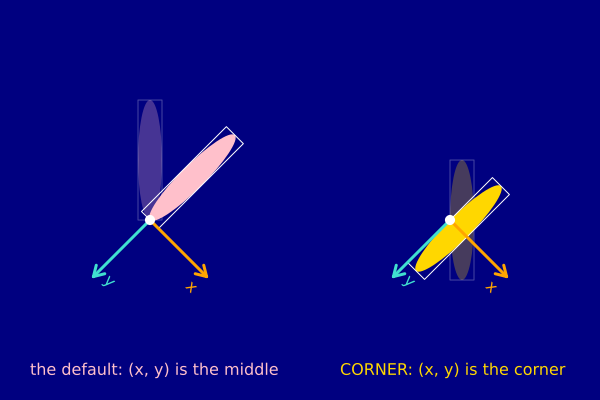
The same call, ellipse(0, -60, 24, 120), in two drawing modes, before a turn (faded) and after a turn of 45 degrees. The white outline is the box around each ellipse. In the default mode (x, y) is the middle of the box; with ellipse_mode(CORNER) it is the box's top-left corner, so the same numbers put the petal somewhere else. This is step 7 of the project Moving the paper in the guide.
In the guide: Project 11: Moving the paper › Step 7: where the shape sits on the paper
How it works
- Pink, the default mode: the middle of the box is (0, -60), so the petal runs from the white dot straight up.
- Gold, CORNER mode: the top-left corner of the box is (0, -60), so the box reaches from x 0 to 24 and from y -60 to 60. The petal sits to the right of the y arrow and runs through the dot, half above it and half below.
- Either way, rotate() turns the paper around its (0, 0), the white dot, and the box turns with the paper.
- To draw the pink petal in CORNER mode, give the corner instead: ellipse(-12, -120, 24, 120). In general the corner is (x - width / 2, y - height / 2).
- The drawing mode is saved by push() and brought back by pop(), like the colours. rect_mode() works the same way for rectangles, whose default is the corner.
Make it yours
- Change the gold call to ellipse(-12, -120, 24, 120). Does it now match the pink one?
- Draw circle(0, 0, 30) in each mode. Where does the circle go in CORNER mode?
- Try rect(0, -60, 24, 120) in each mode with rect_mode(). Which mode does rect() use when you do not choose one?
The code
Copy it into a file and run it.
"""Moving the paper, step 7: where the shape sits on the paper

The same call, ellipse(0, -60, 24, 120), in two drawing modes, before a turn (faded) and after a turn of 45
degrees. The white outline is the box around each ellipse. In the default mode (x, y) is the middle of the box;
with ellipse_mode(CORNER) it is the box's top-left corner, so the same numbers put the petal somewhere else. This
is step 7 of the project Moving the paper in the guide.

How it works:
- Pink, the default mode: the middle of the box is (0, -60), so the petal runs from the white dot straight up.
- Gold, CORNER mode: the top-left corner of the box is (0, -60), so the box reaches from x 0 to 24 and from y -60
  to 60. The petal sits to the right of the y arrow and runs through the dot, half above it and half below.
- Either way, rotate() turns the paper around its (0, 0), the white dot, and the box turns with the paper.
- To draw the pink petal in CORNER mode, give the corner instead: ellipse(-12, -120, 24, 120). In general the
  corner is (x - width / 2, y - height / 2).
- The drawing mode is saved by push() and brought back by pop(), like the colours. rect_mode() works the same way
  for rectangles, whose default is the corner.

Make it yours:
- Change the gold call to ellipse(-12, -120, 24, 120). Does it now match the pink one?
- Draw circle(0, 0, 30) in each mode. Where does the circle go in CORNER mode?
- Try rect(0, -60, 24, 120) in each mode with rect_mode(). Which mode does rect() use when you do not choose one?
"""
import funground as f


def axes(faded=False, size=80):
    """Draw the paper's x arrow (orange) and y arrow (turquoise) from its (0, 0)."""
    f.push()                                  # axes() tidies up after itself; step 6 shows how
    f.opacity(70 if faded else 255)
    f.stroke_width(3)
    f.stroke("orange")
    f.line(0, 0, size, 0)
    f.line(size, 0, size - 10, -6)
    f.line(size, 0, size - 10, 6)
    f.stroke("turquoise")
    f.line(0, 0, 0, size)
    f.line(0, size, -6, size - 10)
    f.line(0, size, 6, size - 10)
    f.stroke("white")
    f.stroke_width(10)
    f.point(0, 0)                             # the paper's (0, 0): a round dot, whatever drawing mode is chosen
    f.no_stroke()
    f.text_size(16)
    f.fill("orange")
    f.text("x", size - 8, 8)
    f.fill("turquoise")
    f.text("y", 10, size - 18)
    f.pop()


def petal_in_its_box(color, corner):
    """The petal ellipse(0, -60, 24, 120) and, in white, the box around it, whose top-left corner is given."""
    f.no_stroke()
    f.fill(color)
    f.ellipse(0, -60, 24, 120)
    f.no_fill()
    f.stroke("white")
    f.stroke_width(1)
    f.rect(corner[0], corner[1], 24, 120)


MIDDLE_MODE_CORNER = (-12, -120)  # the middle is (0, -60), so the corner is 12 to the left and 60 higher
CORNER_MODE_CORNER = (0, -60)     # in CORNER mode the corner is the (x, y) given


f.size(600, 400)
f.background("navy")

f.translate(150, 220)             # left: the default mode, (x, y) is the middle
f.opacity(70)
petal_in_its_box("pink", MIDDLE_MODE_CORNER)
f.rotate(45)
f.opacity(255)
petal_in_its_box("pink", MIDDLE_MODE_CORNER)
axes()

f.reset_matrix()
f.ellipse_mode(f.CONSTANTS.MODE.CORNER)
f.translate(450, 220)             # right: CORNER mode, (x, y) is the top-left corner
f.opacity(70)
petal_in_its_box("gold", CORNER_MODE_CORNER)
f.rotate(45)
f.opacity(255)
petal_in_its_box("gold", CORNER_MODE_CORNER)
axes()

f.reset_matrix()
f.no_stroke()
f.text_size(16)
f.fill("pink")
f.text("the default: (x, y) is the middle", 30, 360)
f.fill("gold")
f.text("CORNER: (x, y) is the corner", 340, 360)
f.show()