Reusable paths and clipping
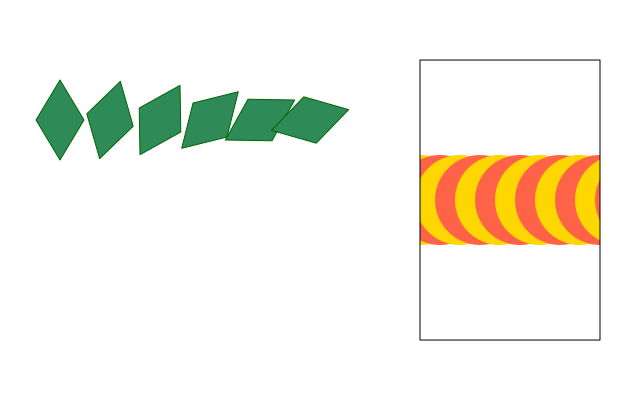
A leaf shape is built once and drawn six times, turned a little each time. On the right, a row of circles is clipped so it only shows inside a tall window.
How it works
- f.path() starts a path. .move_to(), .line_to() and .close() build a shape from straight lines.
- f.draw_path(path) draws it with the current fill and stroke. You build it once and draw it many times.
- f.translate() and f.rotate() inside the loop place each copy. The path itself does not change.
- f.clip(path) keeps later drawing inside the path. The circles that spill past the window are hidden.
- The clip ends with the with f.saved_state(): block, so the window outline is drawn afterwards, with no clipping.
Make it yours
- Change the range(6) in the leaf loop, or the 15 in f.rotate(i * 15).
- Change the leaf: move the points in .line_to(24, 0), for a fatter or thinner leaf.
- Make the window a different shape: add another .line_to() before .close().
- Change the circle size, 90, or the step, 20, in the clipped loop.
- Clip with a circle: use f.path().circle(510, 200, 120) in place of window.
The code
Copy it into a file and run it.
"""Reusable paths and clipping

A leaf shape is built once and drawn six times, turned a little each time. On the right, a row of
circles is clipped so it only shows inside a tall window.

How it works:
- f.path() starts a path. .move_to(), .line_to() and .close() build a shape from straight lines.
- f.draw_path(path) draws it with the current fill and stroke. You build it once and draw it many
  times.
- f.translate() and f.rotate() inside the loop place each copy. The path itself does not change.
- f.clip(path) keeps later drawing inside the path. The circles that spill past the window are
  hidden.
- The clip ends with the with f.saved_state(): block, so the window outline is drawn afterwards,
  with no clipping.

Make it yours:
- Change the range(6) in the leaf loop, or the 15 in f.rotate(i * 15).
- Change the leaf: move the points in .line_to(24, 0), for a fatter or thinner leaf.
- Make the window a different shape: add another .line_to() before .close().
- Change the circle size, 90, or the step, 20, in the clipped loop.
- Clip with a circle: use f.path().circle(510, 200, 120) in place of window.
"""
import funground as f

leaf = f.path().move_to(0, -40).line_to(24, 0).line_to(0, 40).line_to(-24, 0).close()


def setup():
    f.size(640, 400)


def draw():
    f.background("white")
    f.fill("seagreen")
    f.stroke("darkgreen")
    for i in range(6):
        with f.saved_state():
            f.translate(60 + i * 50, 120)
            f.rotate(i * 15)
            f.draw_path(leaf)

    window = f.path().move_to(420, 60).line_to(600, 60).line_to(600, 340).line_to(420, 340).close()
    with f.saved_state():
        f.clip(window)
        f.no_stroke()
        for i in range(12):
            f.fill("tomato" if i % 2 else "gold")
            f.circle(420 + i * 20, 200, 90)
    f.no_fill()
    f.stroke("black")
    f.draw_path(window)


f.run()