Clipping on and off
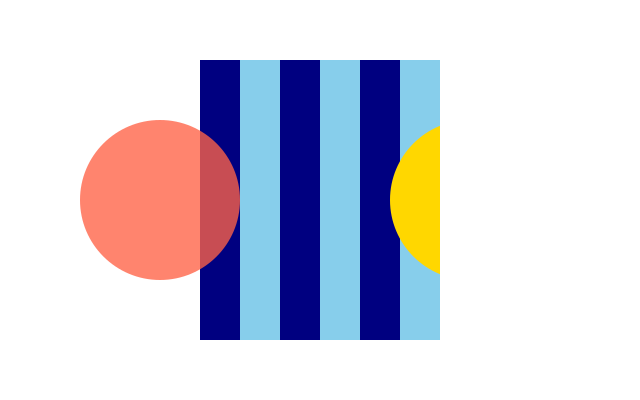
Stripes are clipped so they only show inside a tall window. A red circle on the left ignores the clip, and a gold circle on the right obeys it.
How it works
- f.clip(path) keeps later drawing inside the path. Anything outside it is hidden.
- f.no_clip() switches the clipping off. It lasts until the end of its with f.saved_state(): block.
- When that block ends, the clip that was there before comes back. The gold circle is clipped again.
- Blocks can sit inside blocks. The inner one holds the exception, and the outer one holds the clip.
- f.fill() with four numbers, such as (255, 99, 71, 200), is a see-through colour. The last number is the see-through amount.
Make it yours
- Move the tomato circle: change 160 in f.circle(160, 200, 160) and see where the clip cuts.
- Change the porthole: edit the four corners in the path at the top.
- Change the stripe colours or width: "navy", "skyblue" and the 40 in the loop.
- Remove the inner block: take out f.no_clip() and see the circle get cut.
- Change the last number in the fill colour, 200, to 100 for a fainter circle.
The code
Copy it into a file and run it.
"""Clipping on and off

Stripes are clipped so they only show inside a tall window. A red circle on the left ignores the
clip, and a gold circle on the right obeys it.

How it works:
- f.clip(path) keeps later drawing inside the path. Anything outside it is hidden.
- f.no_clip() switches the clipping off. It lasts until the end of its with f.saved_state(): block.
- When that block ends, the clip that was there before comes back. The gold circle is clipped again.
- Blocks can sit inside blocks. The inner one holds the exception, and the outer one holds the
  clip.
- f.fill() with four numbers, such as (255, 99, 71, 200), is a see-through colour. The last number
  is the see-through amount.

Make it yours:
- Move the tomato circle: change 160 in f.circle(160, 200, 160) and see where the clip cuts.
- Change the porthole: edit the four corners in the path at the top.
- Change the stripe colours or width: "navy", "skyblue" and the 40 in the loop.
- Remove the inner block: take out f.no_clip() and see the circle get cut.
- Change the last number in the fill colour, 200, to 100 for a fainter circle.
"""
import funground as f

porthole = f.path().move_to(200, 60).line_to(440, 60).line_to(440, 340).line_to(200, 340).close()


def setup():
    f.size(640, 400)


def draw():
    f.background("white")
    f.no_stroke()
    with f.saved_state():
        f.clip(porthole)
        for i in range(16):                       # stripes: only visible inside the porthole
            f.fill("navy" if i % 2 else "skyblue")
            f.rect(i * 40, 0, 40, 400)
        with f.saved_state():
            f.no_clip()                           # this circle ignores the clip
            f.fill((255, 99, 71, 200))
            f.circle(160, 200, 160)
        f.fill("gold")                            # clipped again
        f.circle(470, 200, 160)


f.run()