Shapes with holes
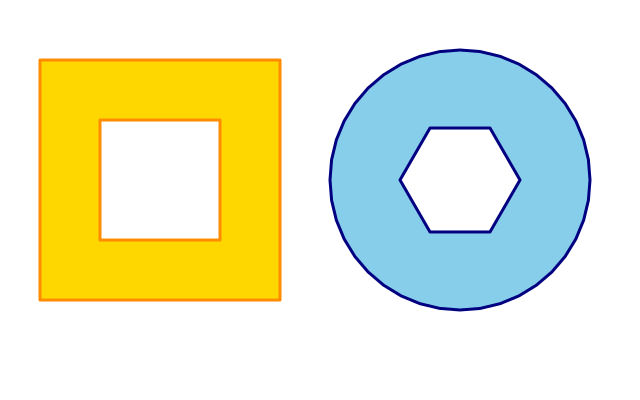
A square frame and a wheel. Each is one shape with a hole cut out of the middle.
How it works
- f.begin_shape() starts a shape and f.vertex() lists the corners of the outside edge.
- f.begin_contour() starts a hole. List the corners of the hole, then call f.end_contour().
- funground makes the hole cut out whichever way round you list the corners, so you do not have to think about direction.
- f.end_shape(close=True) finishes the whole shape. The fill and stroke follow both outlines.
- ring_of_points() makes the corners of a ring with cos and sin. A hole of 6 corners is a hexagon.
Make it yours
- Change the 6 in ring_of_points(460, 180, 60, 6): 3 makes a triangle hole and 40 a round one.
- Change the wheel's hole radius, 60, to make a thicker or thinner rim.
- Make the square's hole bigger or smaller: move the corners in the second list.
- Add a second hole: put another f.begin_contour() and f.end_contour() pair before f.end_shape().
- Change the colours: f.fill("skyblue") and f.stroke("navy").
The code
Copy it into a file and run it.
"""Shapes with holes

A square frame and a wheel. Each is one shape with a hole cut out of the middle.

How it works:
- f.begin_shape() starts a shape and f.vertex() lists the corners of the outside edge.
- f.begin_contour() starts a hole. List the corners of the hole, then call f.end_contour().
- funground makes the hole cut out whichever way round you list the corners, so you do not have
  to think about direction.
- f.end_shape(close=True) finishes the whole shape. The fill and stroke follow both outlines.
- ring_of_points() makes the corners of a ring with cos and sin. A hole of 6 corners is a hexagon.

Make it yours:
- Change the 6 in ring_of_points(460, 180, 60, 6): 3 makes a triangle hole and 40 a round one.
- Change the wheel's hole radius, 60, to make a thicker or thinner rim.
- Make the square's hole bigger or smaller: move the corners in the second list.
- Add a second hole: put another f.begin_contour() and f.end_contour() pair before f.end_shape().
- Change the colours: f.fill("skyblue") and f.stroke("navy").
"""
import math

import funground as f


def ring_of_points(cx, cy, r, n):
    return [(cx + r * math.cos(2 * math.pi * i / n), cy + r * math.sin(2 * math.pi * i / n)) for i in range(n)]


def setup():
    f.size(640, 400)


def draw():
    f.background("white")
    f.fill("gold")
    f.stroke("darkorange")
    f.stroke_width(3)

    f.begin_shape()                       # a square frame
    for x, y in [(40, 60), (280, 60), (280, 300), (40, 300)]:
        f.vertex(x, y)
    f.begin_contour()
    for x, y in [(100, 120), (220, 120), (220, 240), (100, 240)]:
        f.vertex(x, y)
    f.end_contour()
    f.end_shape(close=True)

    f.fill("skyblue")
    f.stroke("navy")
    f.begin_shape()                       # a wheel: many-sided outline, hexagonal hole
    for x, y in ring_of_points(460, 180, 130, 40):
        f.vertex(x, y)
    f.begin_contour()
    for x, y in ring_of_points(460, 180, 60, 6):
        f.vertex(x, y)
    f.end_contour()
    f.end_shape(close=True)


f.run()