Outlines, tests and moving paths
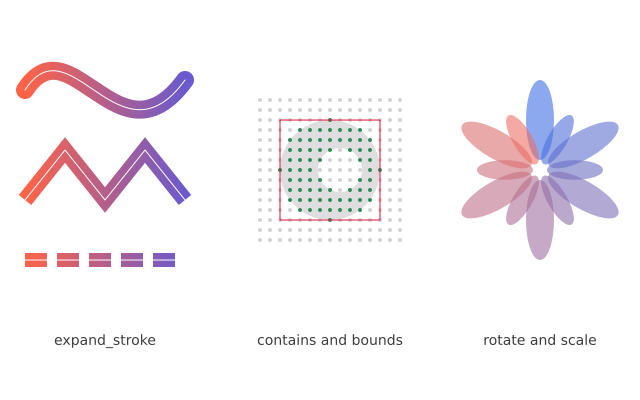
Three thick lines are turned into shapes with a gradient. A grid of dots tests which points are inside a shape. A ring of petals is made by turning and shrinking one path.
How it works
- path.expand_stroke() turns a thick line into a shape you can fill, so it can take a gradient. The options are width, cap, join and dash.
- f.linear_gradient() fills a shape with colours that change along a line.
- path.contains(x, y) says whether a point is inside the shape. The dots are green when it does.
- path.bounds() gives the box around the shape as (x, y, width, height). The red rectangle is drawn from it.
- path.rotate(), path.translate() and path.scale() give back a moved copy. The petals are one path changed twelve times.
Make it yours
- Change the width= numbers in jobs, such as width=18 for the wave.
- Change the dash list [22, 10]: the first number is the dash and the second is the gap.
- Move the shape in blob().translate(330, 170) and watch the green dots follow it.
- Change the step of the petals: i * 30 and the range(12) for more or fewer.
- Change the gradient colours in ["tomato", "slateblue"].
The code
Copy it into a file and run it.
"""Outlines, tests and moving paths

Three thick lines are turned into shapes with a gradient. A grid of dots tests which points are
inside a shape. A ring of petals is made by turning and shrinking one path.

How it works:
- path.expand_stroke() turns a thick line into a shape you can fill, so it can take a gradient. The
  options are width, cap, join and dash.
- f.linear_gradient() fills a shape with colours that change along a line.
- path.contains(x, y) says whether a point is inside the shape. The dots are green when it does.
- path.bounds() gives the box around the shape as (x, y, width, height). The red rectangle is
  drawn from it.
- path.rotate(), path.translate() and path.scale() give back a moved copy. The petals are one
  path changed twelve times.

Make it yours:
- Change the width= numbers in jobs, such as width=18 for the wave.
- Change the dash list [22, 10]: the first number is the dash and the second is the gap.
- Move the shape in blob().translate(330, 170) and watch the green dots follow it.
- Change the step of the petals: i * 30 and the range(12) for more or fewer.
- Change the gradient colours in ["tomato", "slateblue"].
"""
import funground as f


def wave():
    return f.path().move_to(25, 90).curve_to(70, 20, 120, 170, 185, 80)


def zigzag():
    return f.path().move_to(25, 200).line_to(65, 150).line_to(105, 200).line_to(145, 150).line_to(185, 200)


def dashes():
    return f.path().move_to(25, 260).line_to(185, 260)


def blob():
    """A round shape with a hole in it, centred on (0, 0)."""
    return f.path().circle(0, 0, 100) - f.path().circle(10, 0, 44)


def setup():
    f.size(640, 400)


def draw():
    f.background("white")

    # stroke outlines, filled with a gradient; the thin original line sits on top
    jobs = [(wave(), dict(width=18)),
            (zigzag(), dict(width=16, cap="butt", join="miter")),
            (dashes(), dict(width=14, cap="butt", dash=[22, 10]))]
    f.no_stroke()
    f.fill(f.linear_gradient(25, 0, 185, 0, ["tomato", "slateblue"]))
    for line, options in jobs:
        f.draw_path(line.expand_stroke(**options))
    f.no_fill()
    f.stroke("white")
    f.stroke_width(1)
    for line, _ in jobs:
        f.draw_path(line)

    # a hit test: a dot is green when contains() says it is inside the shape
    shape = blob().translate(330, 170)
    f.no_stroke()
    f.fill(222)
    f.draw_path(shape)
    for gx in range(260, 401, 10):
        for gy in range(100, 241, 10):
            f.fill("seagreen" if shape.contains(gx, gy) else "lightgray")
            f.circle(gx, gy, 4)

    # bounds: the box around the shape
    x, y, w, h = shape.bounds()
    f.no_fill()
    f.stroke("crimson")
    f.stroke_width(1)
    f.rect(x, y, w, h)

    # transforms: one petal, rotated and scaled about a centre
    petal = f.path().ellipse(540, 120, 28, 80)
    f.no_stroke()
    for i in range(12):
        f.fill(f.color(60 + i * 16, 110, 230 - i * 12, 150))
        scale = 1.0 if i % 2 == 0 else 0.7
        f.draw_path(petal.rotate(i * 30, 540, 170).translate(-540, -170).scale(scale).translate(540, 170))

    f.fill(60)
    f.text_size(14)
    f.text_align("center", "center")
    f.text("expand_stroke", 105, 340)
    f.text("contains and bounds", 330, 340)
    f.text("rotate and scale", 540, 340)


f.run()