Event poster series
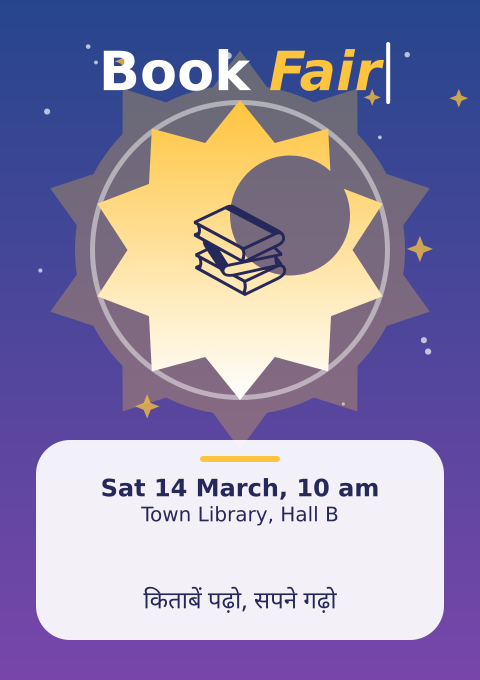
A poster designer. Flip through the events with the buttons or the arrow keys, and type to change the headline. Sliders change the colours, the sun and its rays. Tick boxes to hide the background, the art or the words. Buttons save the posters as PDF and SVG files, with real text.
How it works
- EVENTS is a list of dictionaries: words, an emoji, a colour theme and the style settings. The controls change the dictionary of the current event, so what you see is also what is saved.
- Three functions draw the three layers: background_layer(), art_layer() and words_layer(). Each runs inside with f.layer("..."), and a layer keeps what it was given. So a layer is drawn again only when something it shows changes, and draw() stays quick. The three tick boxes call f.hide_layer() and f.show_layer().
- burst() makes a star with f.path().polygon(). art_layer() joins and cuts paths with | (union) and
- (difference), and fills them with f.linear_gradient(). The "shuffle art" button changes the seed for the confetti, and f.random_seed() makes the same seed give the same confetti.
- f.FormattedString() mixes bold, italic and colour in one headline. f.text_box() wraps the details. The Hindi line and the emoji use the built-in fallback fonts. key_typed() adds letters to the headline, and key_pressed() handles Backspace and the arrows. The caret blinks as time passes.
- A poster in an animated sketch is one page, and f.new_page() belongs to scripts. So "save PDF" draws each event in turn, one per frame, and calls f.save("events_1.pdf"), f.save("events_2.pdf") and so on. The saved files keep the layers and real text. "save SVG" writes poster.svg with live text. "save final SVG" writes poster_final.svg with text="shapes": every letter is a shape, for handing over.
Make it yours
- Add an event to EVENTS: copy a dictionary, change the words and the four theme colours.
- Change "sun" or "points" in an event to start with a bigger sun or more rays.
- Change the Hindi line in an event to a line in your own language.
- Move the bite out of the sun: change the numbers in circle(...) in art_layer().
- Change MAX_TITLE to allow a longer headline, or CONFETTI for more or less confetti.
The code
Copy it into a file and run it.
"""Event poster series

A poster designer. Flip through the events with the buttons or the arrow keys, and type to change the
headline. Sliders change the colours, the sun and its rays. Tick boxes to hide the background, the art or
the words. Buttons save the posters as PDF and SVG files, with real text.

How it works:
- EVENTS is a list of dictionaries: words, an emoji, a colour theme and the style settings. The controls
  change the dictionary of the current event, so what you see is also what is saved.
- Three functions draw the three layers: background_layer(), art_layer() and words_layer(). Each runs
  inside with f.layer("..."), and a layer keeps what it was given. So a layer is drawn again only when
  something it shows changes, and draw() stays quick. The three tick boxes call f.hide_layer() and
  f.show_layer().
- burst() makes a star with f.path().polygon(). art_layer() joins and cuts paths with | (union) and
  - (difference), and fills them with f.linear_gradient(). The "shuffle art" button changes the seed
  for the confetti, and f.random_seed() makes the same seed give the same confetti.
- f.FormattedString() mixes bold, italic and colour in one headline. f.text_box() wraps the details.
  The Hindi line and the emoji use the built-in fallback fonts. key_typed() adds letters to the
  headline, and key_pressed() handles Backspace and the arrows. The caret blinks as time passes.
- A poster in an animated sketch is one page, and f.new_page() belongs to scripts. So "save PDF" draws
  each event in turn, one per frame, and calls f.save("events_1.pdf"), f.save("events_2.pdf") and so on.
  The saved files keep the layers and real text. "save SVG" writes poster.svg with live text.
  "save final SVG" writes poster_final.svg with text="shapes": every letter is a shape, for handing over.

Make it yours:
- Add an event to EVENTS: copy a dictionary, change the words and the four theme colours.
- Change "sun" or "points" in an event to start with a bigger sun or more rays.
- Change the Hindi line in an event to a line in your own language.
- Move the bite out of the sun: change the numbers in circle(...) in art_layer().
- Change MAX_TITLE to allow a longer headline, or CONFETTI for more or less confetti.
"""
import colorsys
import math

import funground as f

WIDTH, HEIGHT = 480, 680
MAX_TITLE = 20                              # the most letters in a headline
CONFETTI = 30                               # how many bits of confetti
BLINK = 30                                  # frames for the caret to be on, and then off
NOTE_FRAMES = 300                           # how long the "saved" note stays

# Each event: its words, an emoji, a colour theme (top, bottom, accent, panel text) and its style.
# "hue" turns the theme's colours round the colour wheel, in degrees. "sun" is the sun's radius.
# "points" is the number of rays. "seed" picks the confetti.
EVENTS = [
    {"title": "Book Fair", "date": "Sat 14 March, 10 am", "place": "Town Library, Hall B",
     "line": "किताबें पढ़ो, सपने गढ़ो", "emoji": "📚", "points": 10, "sun": 150, "hue": 0, "seed": 4,
     "theme": ((38, 70, 140), (120, 70, 170), (255, 196, 61), (38, 40, 90))},
    {"title": "Music Night", "date": "Fri 21 March, 7 pm", "place": "Riverside Garden",
     "line": "सुर और ताल की शाम", "emoji": "🎶", "points": 14, "sun": 150, "hue": 0, "seed": 9,
     "theme": ((20, 90, 90), (40, 150, 120), (255, 140, 105), (10, 60, 60))},
    {"title": "Spring Mela", "date": "Sun 30 March, 11 am", "place": "School Playground",
     "line": "वसंत मेले में आइए", "emoji": "🎪", "points": 18, "sun": 150, "hue": 0, "seed": 15,
     "theme": ((170, 40, 90), (240, 120, 60), (255, 230, 120), (110, 20, 60))},
]

index = 0                                   # which event is showing
dirty = {"background", "art", "words"}      # the layers that need drawing again
caret_start = 0                             # the frame when the caret last restarted
caret_was_on = True
jobs = []                                   # files still to save: (event number, file name, text mode)
saved_names = []                            # the files written so far
note = ""                                   # the message to show after saving
note_until = 0                              # the frame when the message goes away
note_layer_made = False
canvas_shows = None                         # which layers were hidden when the canvas was last painted
hindi_was = True                            # was the Hindi line showing when the words were last drawn


def turn(colour, degrees):
    """The same colour, with its hue turned round the colour wheel."""
    hue, sat, val = colorsys.rgb_to_hsv(colour[0] / 255, colour[1] / 255, colour[2] / 255)
    r, g, b = colorsys.hsv_to_rgb((hue + degrees / 360) % 1, sat, val)
    return (round(r * 255), round(g * 255), round(b * 255))


def theme_of(event):
    """The event's four theme colours, turned by its hue."""
    return [turn(c, event["hue"]) for c in event["theme"]]


def burst(cx, cy, outer, inner, points):
    """A star with many points, as a path."""
    corners = []
    for i in range(points * 2):
        r = outer if i % 2 == 0 else inner
        angle = math.radians(-90 + i * 180 / points)
        corners.append((cx + r * math.cos(angle), cy + r * math.sin(angle)))
    return f.path().polygon(corners)


def background_layer(event):
    top, bottom, accent, ink = theme_of(event)
    with f.layer("background"):
        f.clear()                                  # a layer keeps its drawing, so wipe it first
        f.no_stroke()
        f.fill(f.linear_gradient(0, 0, 0, HEIGHT, [top, bottom]))
        f.rect(0, 0, WIDTH, HEIGHT)


def confetti(event, accent, sun):
    """Bits of confetti at places chosen by the event's seed: the same seed, the same places."""
    f.random_seed(event["seed"])
    for i in range(CONFETTI):
        x, y = f.random(20, WIDTH - 20), f.random(20, 420)
        size = f.random(6, 14)
        if math.hypot(x - 240, y - 250) < sun + size + 8:
            continue                        # keep the sun clear
        if i % 3 == 0:
            f.fill(accent[0], accent[1], accent[2], 190)
            f.draw_path(burst(x, y, size, size / 2.5, 4))
        else:
            f.fill(255, 255, 255, 170)
            f.circle(x, y, size / 2)


def art_layer(event):
    top, bottom, accent, ink = theme_of(event)
    sun, rays = event["sun"], event["points"]
    with f.layer("art"):
        f.clear()
        f.no_stroke()
        confetti(event, accent, sun)
        # A glow: a big burst joined to a disc.
        glow = burst(240, 250, sun * 1.33, sun * 0.97, rays) | f.path().circle(240, 250, sun * 2.2)
        f.fill(accent[0], accent[1], accent[2], 70)
        f.draw_path(glow)
        # A ring: a disc with a smaller disc cut out of it.
        ring = f.path().circle(240, 250, 300) - f.path().circle(240, 250, 290)
        f.fill(255, 255, 255, 120)
        f.draw_path(ring)
        # A sun: a bright burst with a crescent bitten out of it.
        crescent = f.path().circle(240 + sun / 3, 250 - sun * 0.23, sun * 0.8)
        sun_shape = burst(240, 250, sun, sun * 0.75, rays) - crescent
        f.fill(f.linear_gradient(0, 250 - sun, 0, 250 + sun, [accent, (255, 255, 255)]))
        f.draw_path(sun_shape)
        # The rounded panel for the details.
        f.fill(255, 255, 255, 235)
        f.rect(36, 440, 408, 200, 34)
        f.fill(accent)
        f.rect(200, 456, 80, 6, 3)


def headline_of(event, size):
    """The title as one FormattedString: the first word bold and white, the rest bold italic in the accent."""
    accent = theme_of(event)[2]
    words = event["title"].split(" ")
    headline = f.FormattedString()
    headline.append(words[0] + (" " if len(words) > 1 else ""), size=size, style="bold", color=(255, 255, 255))
    headline.append(" ".join(words[1:]), size=size, style="bold_italic", color=accent)
    return headline


def words_layer(event, caret, hindi):
    top, bottom, accent, ink = theme_of(event)
    with f.layer("words"):
        f.clear()
        f.no_stroke()
        # A long headline gets smaller, so that it always fits.
        size = 54
        f.text_size(size)
        wide = f.text_width(headline_of(event, size))
        if wide > 430:
            size = max(20, int(size * 430 / wide))
        headline = headline_of(event, size)
        f.text_align("center", "top")
        f.text(headline, 240, 40)
        if caret:                           # the blinking caret, after the last letter
            f.text_size(size)
            right = 240 + f.text_width(headline) / 2 + 5
            f.fill(255, 255, 255)
            f.rect(right, 42, 4, size * 1.15, 2)
        # The emoji sits in the middle of the sun.
        f.fill(ink)
        f.text_size(90)
        f.text_align("center", "center")
        f.text(event["emoji"], 240, 250)
        # The details, wrapped in a box.
        details = f.FormattedString()
        details.append(event["date"] + "\n", size=24, style="bold", color=ink)
        details.append(event["place"], size=20, color=ink)
        f.text_align("center", "top")
        f.text_box(details, 56, 474, 368, 80)
        # A line in another script. The built-in fallback fonts draw it.
        if hindi:
            f.fill(ink)
            f.text_size(24)
            f.text_align("center", "center")
            f.text(event["line"], 240, 600)


def note_layer(message):
    """A short message over the poster. It is hidden while a file is saved, so it is never in a file."""
    global note_layer_made
    note_layer_made = True
    with f.layer("note"):
        f.clear()
        if message:
            f.no_stroke()
            f.fill(20, 20, 40, 225)
            f.rect(14, 640, 452, 36, 10)
            f.fill(255)
            f.text_size(12)
            f.text_align("center", "center")
            f.text_box(message, 24, 642, 432, 32)


def paint_canvas():
    """The canvas lies under the layers. When a layer is hidden, a chequered cloth shows through."""
    global canvas_shows
    f.background(236, 236, 240)
    f.no_stroke()
    f.fill(210, 210, 218)
    for row in range(0, HEIGHT, 20):
        for col in range(0, WIDTH, 20):
            if (row // 20 + col // 20) % 2 == 0:
                f.rect(col, row, 20, 20)


def go(step):
    """Show another event. The sliders take that event's settings."""
    global index, caret_start
    index = (index + step) % len(EVENTS)
    event = EVENTS[index]
    hue.value(event["hue"])
    sun.value(event["sun"])
    rays.value(event["points"])
    caret_start = f.frame_count
    dirty.update(("background", "art", "words"))


def title_changed():
    global caret_start
    caret_start = f.frame_count             # the caret shows while you type
    dirty.add("words")


def key_pressed():
    if f.key == "left":
        go(-1)
    elif f.key == "right":
        go(1)
    elif f.key == "backspace":
        event = EVENTS[index]
        event["title"] = event["title"][:-1]
        title_changed()


def key_typed():
    event = EVENTS[index]
    if (f.key.isalnum() or f.key == " ") and len(event["title"]) < MAX_TITLE:
        event["title"] += f.key
        title_changed()


def setup():
    global previous, next_one, hue, sun, rays, hindi, shuffle, show_background, show_art, show_words
    global save_pdf, save_svg, save_final
    f.size(WIDTH, HEIGHT)
    first = EVENTS[0]
    previous = f.create_button("previous")
    next_one = f.create_button("next")
    hue = f.create_slider(-180, 180, first["hue"], step=1, label="hue")
    sun = f.create_slider(90, 190, first["sun"], step=1, label="sun size")
    rays = f.create_slider(6, 24, first["points"], step=1, label="rays")
    hindi = f.create_checkbox("Hindi line", True)
    shuffle = f.create_button("shuffle art")
    show_background = f.create_checkbox("background layer", True)
    show_art = f.create_checkbox("art layer", True)
    show_words = f.create_checkbox("words layer", True)
    save_pdf = f.create_button("save PDF")
    save_svg = f.create_button("save SVG")
    save_final = f.create_button("save final SVG")


def start_saving(kind):
    """Queue the files to write. Each one is saved on its own frame, with its own event showing."""
    global saved_names
    saved_names = []
    if kind == "pdf":
        for number in range(len(EVENTS)):
            jobs.append((number, f"events_{number + 1}.pdf", "live"))
    elif kind == "svg":
        jobs.append((index, "poster.svg", "live"))
    else:
        jobs.append((index, "poster_final.svg", "shapes"))


def save_next_file():
    """Draw one event with no caret, save it, and queue the message once the last file is done."""
    global note, canvas_shows
    number, name, mode = jobs.pop(0)
    event = EVENTS[number]
    background_layer(event)
    art_layer(event)
    words_layer(event, False, hindi.checked())
    f.clear()                               # the canvas under the layers is empty in the file
    canvas_shows = None
    f.save(name, text=mode)
    saved_names.append(name)
    if not jobs:
        where = saved_names[0] if len(saved_names) == 1 else f"{saved_names[0]} to {saved_names[-1]}"
        note = f"Saved {where} — press O in the gallery browser to open the folder"
        dirty.update(("background", "art", "words"))


def draw():
    global caret_was_on, canvas_shows, note, note_until, hindi_was
    if jobs:                                # saving: one file for each frame
        if note_layer_made:
            f.hide_layer("note")
        save_next_file()
        return

    if previous.clicked():
        go(-1)
    if next_one.clicked():
        go(1)
    event = EVENTS[index]
    for key, slider, layers in (("hue", hue, ("background", "art", "words")), ("sun", sun, ("art",)),
                                ("points", rays, ("art",))):
        if slider.value() != event[key]:
            event[key] = slider.value()
            dirty.update(layers)
    if shuffle.clicked():
        event["seed"] += 1
        dirty.add("art")
    if save_pdf.clicked():
        start_saving("pdf")
    if save_svg.clicked():
        start_saving("svg")
    if save_final.clicked():
        start_saving("final")

    if hindi.checked() != hindi_was:
        hindi_was = hindi.checked()
        dirty.add("words")
    caret_on = ((f.frame_count - caret_start) // BLINK) % 2 == 0
    if caret_on != caret_was_on:
        caret_was_on = caret_on
        dirty.add("words")
    if note and note_until == 0:
        note_until = f.frame_count + NOTE_FRAMES
        note_layer(note)
    if note and f.frame_count >= note_until:
        note, note_until = "", 0
        note_layer("")

    if "background" in dirty:
        background_layer(event)
    if "art" in dirty:
        art_layer(event)
    if "words" in dirty:
        words_layer(event, caret_on, hindi.checked())
    dirty.clear()

    boxes = {"background": show_background, "art": show_art, "words": show_words}
    for name, box in boxes.items():
        if box.checked():
            f.show_layer(name)
        else:
            f.hide_layer(name)
    if note_layer_made:
        if note:
            f.show_layer("note")
        else:
            f.hide_layer("note")
    shown = tuple(box.checked() for box in boxes.values())
    if shown != canvas_shows:
        canvas_shows = shown
        paint_canvas()


f.run()