Typographic portrait
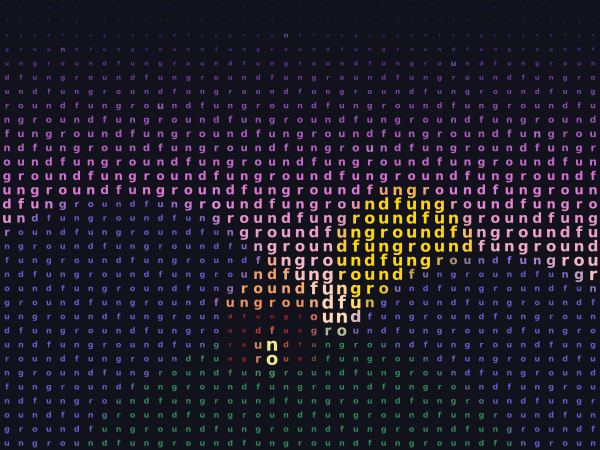
A picture redrawn from letters. The picture is cut into a grid, and each cell gets one letter. A bright cell gets a big letter and a dark cell gets a small one, so the letters draw the picture. Use the controls under the canvas to change the size of the cells, the letters, the colours and the order of light and dark. Press P (or "save PDF") to write portrait.pdf for a big print.
How it works
- f.load_image() reads the photo that comes with the gallery. A copy is shrunk with picture.resize() to one pixel for each cell. picture.load_pixels() then gives the red, green and blue of every cell in picture.pixels.
- brightness() turns those three numbers into one number from 0 to 1. The letter's size is that number times the size of the cell. The cell size slider changes how many cells there are.
- The letters come from LETTER_SETS. Cell number n gets piece n of the word, round and round, so "funground" runs along each row. The Devanagari set works because the built-in fonts cover it.
- Nothing changes while you leave the sliders alone, so draw() only paints again when something has changed. The picture is kept on the canvas in between, and that keeps the sketch quick.
- f.save("portrait.pdf") writes every letter as live text in a vector file, which stays sharp at any size. "save SVG" does the same for portrait.svg. A note layer says where the file went.
Make it yours
- Change the 1.5 in letter_size() to make the biggest letters bigger or smaller.
- Add your own word to LETTER_SETS. Use short pieces, such as your name split in two or three.
- Put in a different picture: change the name in f.load_image(), and set SIZE to match its shape.
- Make the letters turn with the picture: in paint(), call f.rotate() with a number that depends on the brightness.
- Draw the biggest letters in bold: call f.text_style("bold") when the brightness is above 0.8.
The code
Copy it into a file and run it.
"""Typographic portrait

A picture redrawn from letters. The picture is cut into a grid, and each cell gets one letter. A
bright cell gets a big letter and a dark cell gets a small one, so the letters draw the picture.
Use the controls under the canvas to change the size of the cells, the letters, the colours and
the order of light and dark. Press P (or "save PDF") to write portrait.pdf for a big print.

How it works:
- f.load_image() reads the photo that comes with the gallery. A copy is shrunk with picture.resize()
  to one pixel for each cell. picture.load_pixels() then gives the red, green and blue of every
  cell in picture.pixels.
- brightness() turns those three numbers into one number from 0 to 1. The letter's size is that
  number times the size of the cell. The cell size slider changes how many cells there are.
- The letters come from LETTER_SETS. Cell number n gets piece n of the word, round and round, so
  "funground" runs along each row. The Devanagari set works because the built-in fonts cover it.
- Nothing changes while you leave the sliders alone, so draw() only paints again when something has
  changed. The picture is kept on the canvas in between, and that keeps the sketch quick.
- f.save("portrait.pdf") writes every letter as live text in a vector file, which stays sharp at
  any size. "save SVG" does the same for portrait.svg. A note layer says where the file went.

Make it yours:
- Change the 1.5 in letter_size() to make the biggest letters bigger or smaller.
- Add your own word to LETTER_SETS. Use short pieces, such as your name split in two or three.
- Put in a different picture: change the name in f.load_image(), and set SIZE to match its shape.
- Make the letters turn with the picture: in paint(), call f.rotate() with a number that depends on
  the brightness.
- Draw the biggest letters in bold: call f.text_style("bold") when the brightness is above 0.8.
"""
import funground as f

SIZE = (600, 450)                          # the canvas, the same shape as the photo
LETTER_SETS = [
    ("funground", ["f", "u", "n", "g", "r", "o", "u", "n", "d"]),
    ("रंग", ["रं", "ग", " ", "भ", "रो"]),
    ("ABC", list("ABCDEFGHIJKLMNOPQRSTUVWXYZ")),
]
NOTE_FRAMES = 240                          # how long the "saved" note stays

photo = f.load_image("../images/data/photo.jpg")      # the gallery's own picture
grid_cache = {}                                       # cell size -> (columns, rows, pixels)
dirty = True                                          # does the portrait need painting again?
jobs = []                                             # files to write on the next frame
note = ""
note_until = 0
note_layer_made = False
which = 0                                             # the letter set in use
last_state = None                                     # the controls when the portrait was last painted
INK_ON_PAPER = (30, 28, 40)                           # mono letters on the light paper
PAPER_ON_INK = (240, 236, 226)                        # mono letters on the dark paper


def brightness(r, g, b):
    """How bright a colour looks, from 0 (black) to 1 (white). Green counts most."""
    return (0.299 * r + 0.587 * g + 0.114 * b) / 255


def grid(cell):
    """The photo as one pixel for each cell: (columns, rows, pixels). Made once for each cell size."""
    if cell not in grid_cache:
        columns, rows = round(SIZE[0] / cell), round(SIZE[1] / cell)
        small = photo.copy()                          # never change the photo itself
        small.resize(columns, rows)
        small.load_pixels()
        grid_cache[cell] = (columns, rows, bytes(small.pixels))
    return grid_cache[cell]


def letter_size(amount, cell):
    """The size of a letter: nothing for black, a bit bigger than the cell for white."""
    return amount * cell * 1.5


def paint():
    """Paint the whole portrait from the controls."""
    cell = cell_slider.value()
    inverted, in_colour = invert_box.checked(), colour_box.checked()
    pieces = LETTER_SETS[which][1]
    columns, rows, pixels = grid(cell)
    cell_w, cell_h = SIZE[0] / columns, SIZE[1] / rows
    if inverted:
        f.background(238, 232, 218)
    else:
        f.background(18, 18, 28)
    f.no_stroke()
    f.text_style("bold")
    f.text_align("center", "center")
    for row in range(rows):
        for column in range(columns):
            i = (row * columns + column) * 4
            r, g, b = pixels[i], pixels[i + 1], pixels[i + 2]
            amount = brightness(r, g, b)
            if inverted:
                amount = 1 - amount                   # dark cells get the big letters
            if amount < 0.08:
                continue                              # too small to see
            if in_colour:
                f.fill(r, g, b)
            else:
                f.fill(INK_ON_PAPER if inverted else PAPER_ON_INK)
            f.text_size(letter_size(amount, cell))
            piece = pieces[(row * columns + column) % len(pieces)]
            f.text(piece, (column + 0.5) * cell_w, (row + 0.5) * cell_h)


def show_note(message):
    """A short message over the portrait. It is hidden while a file is saved, so it is never in the file."""
    global note_layer_made
    note_layer_made = True
    with f.layer("note"):
        f.clear()
        if message:
            f.no_stroke()
            f.fill(20, 20, 40, 225)
            f.rect(14, 400, 572, 36, 10)
            f.fill(255)
            f.text_style("normal")
            f.text_size(13)
            f.text_align("center", "center")
            f.text(message, 300, 418)


def setup():
    global cell_slider, letters_button, invert_box, colour_box, pdf_button, svg_button
    f.size(*SIZE)
    cell_slider = f.create_slider(8, 30, 14, step=1, label="cell size")
    letters_button = f.create_button("change letters")
    invert_box = f.create_checkbox("invert", False)
    colour_box = f.create_checkbox("colour", True)
    pdf_button = f.create_button("save PDF")
    svg_button = f.create_button("save SVG")


def key_pressed():
    if f.key in ("p", "P"):
        jobs.append("portrait.pdf")


def draw():
    global dirty, which, note, note_until, last_state
    if jobs:                                          # saving: paint, hide the note, save
        if note_layer_made:
            f.hide_layer("note")
        paint()
        name = jobs.pop(0)
        f.save(name)
        note = f"Saved {name} - letters are live text, so it stays sharp at any size"
        return
    if letters_button.clicked():
        which = (which + 1) % len(LETTER_SETS)
        dirty = True
    if pdf_button.clicked():
        jobs.append("portrait.pdf")
    if svg_button.clicked():
        jobs.append("portrait.svg")
    state = (cell_slider.value(), invert_box.checked(), colour_box.checked())
    if state != last_state:
        last_state = state
        dirty = True
    if dirty:
        paint()
        dirty = False
    if note and note_until == 0:
        note_until = f.frame_count + NOTE_FRAMES
        show_note(note)
        f.show_layer("note")
    if note and f.frame_count >= note_until:
        note, note_until = "", 0
        show_note("")


f.run()