Kinetic type
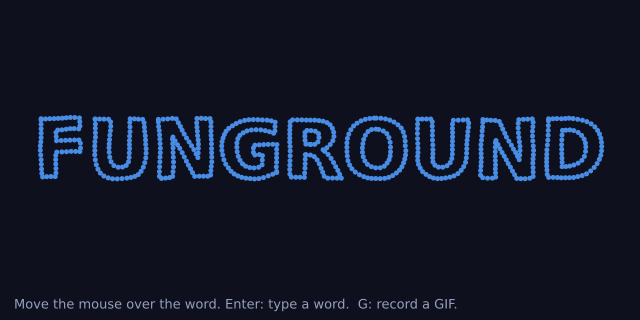
A word made of dots. Move the mouse over it and the dots scatter, then spring back to their places. Press Enter, type a new word, and press Enter again. Two sliders set how hard the mouse pushes and how tight the springs are. Press G (or click "record GIF") to record three seconds as kinetic.gif.
How it works
- f.text_to_points() gives a list of points along the letters. Each point becomes a dot: a home place and a position, both f.Vector objects, and a speed (also a Vector).
- Every frame each dot feels two forces. The mouse pushes it away, more strongly the closer the mouse is. A spring pulls it home, harder the further it has gone. The speed is then slowed a little, so the dot settles and does not swing for ever.
- f.noise() moves each home a tiny way as time passes, so the word is never quite still. Dots near each other move alike, because noise gives nearby numbers nearby answers.
- A dot's colour comes from how fast it is moving. f.lerp_color() mixes calm blue with hot orange.
- f.save_gif("kinetic.gif", 3) records the next three seconds. While it records, a ghost mouse sweeps across the word, so the GIF shows a scatter even if your mouse is elsewhere.
Make it yours
- Change DAMPING from 0.86 to 0.95 for a bouncier word, or to 0.7 for a stiff one.
- Change REACH, how far from the mouse the dots feel it, from 110 to 200.
- Change the spacing in f.text_to_points(): a smaller number gives more, smaller dots.
- Colour the dots by where they are: use f.hsb() with the x place of the home for the hue.
- Pull the dots toward the mouse and not away: change the sign in push().
The code
Copy it into a file and run it.
"""Kinetic type

A word made of dots. Move the mouse over it and the dots scatter, then spring back to their places.
Press Enter, type a new word, and press Enter again. Two sliders set how hard the mouse pushes and
how tight the springs are. Press G (or click "record GIF") to record three seconds as kinetic.gif.

How it works:
- f.text_to_points() gives a list of points along the letters. Each point becomes a dot: a home
  place and a position, both f.Vector objects, and a speed (also a Vector).
- Every frame each dot feels two forces. The mouse pushes it away, more strongly the closer the
  mouse is. A spring pulls it home, harder the further it has gone. The speed is then slowed a
  little, so the dot settles and does not swing for ever.
- f.noise() moves each home a tiny way as time passes, so the word is never quite still. Dots near
  each other move alike, because noise gives nearby numbers nearby answers.
- A dot's colour comes from how fast it is moving. f.lerp_color() mixes calm blue with hot orange.
- f.save_gif("kinetic.gif", 3) records the next three seconds. While it records, a ghost mouse
  sweeps across the word, so the GIF shows a scatter even if your mouse is elsewhere.

Make it yours:
- Change DAMPING from 0.86 to 0.95 for a bouncier word, or to 0.7 for a stiff one.
- Change REACH, how far from the mouse the dots feel it, from 110 to 200.
- Change the spacing in f.text_to_points(): a smaller number gives more, smaller dots.
- Colour the dots by where they are: use f.hsb() with the x place of the home for the hue.
- Pull the dots toward the mouse and not away: change the sign in push().
"""
import math

import funground as f

W, H = 640, 320
FPS = 60
REACH = 110                                # how far from the mouse a dot feels it
DAMPING = 0.86                             # each frame a dot keeps this much of its speed
MOST_LETTERS = 10
RECORD_SECONDS = 3
CALM, HOT = (70, 140, 230), (255, 130, 60)

word = "FUNGROUND"
typing = False
dots = []                                  # each dot: {"home": Vector, "pos": Vector, "speed": Vector}
note = ""
note_until = 0
recording_until = 0                        # the frame when a recording ends (0 for none)


def make_dots(text, from_scattered=False):
    """One dot for each point along the letters. The big word is made smaller to fit."""
    size = 170
    f.text_style("bold")
    f.text_size(size)
    wide = f.text_width(text)
    if wide > W - 60:
        size = int(size * (W - 60) / wide)
    f.text_size(size)
    f.text_align("center", "center")
    points = f.text_to_points(text, W / 2, H / 2 - 10, max(4, size / 18))
    found = []
    for x, y in points:
        home = f.Vector(x, y)
        start = f.Vector(f.random(0, W), f.random(0, H)) if from_scattered else home.copy()
        found.append({"home": home, "pos": start, "speed": f.Vector(0, 0)})
    return found


def mouse_place():
    """Where the mouse pushes: the real mouse, or a ghost that sweeps across while recording."""
    if recording_until and not (0 < f.mouse_x < W and 0 < f.mouse_y < H):
        left = recording_until - RECORD_SECONDS * FPS
        t = (f.frame_count - left) / (RECORD_SECONDS * FPS)
        return f.Vector(W * (0.1 + 0.8 * t), H / 2 + 50 * math.sin(t * 9))
    if 0 < f.mouse_x < W and 0 < f.mouse_y < H:     # 0, 0 means no mouse yet
        return f.Vector(f.mouse_x, f.mouse_y)
    return None


def push(dot, mouse, strength):
    """Push a dot away from the mouse. Closer means harder, and past REACH there is no push."""
    away = dot["pos"] - mouse
    d = away.mag()
    if 0 < d < REACH:
        dot["speed"] += away.set_mag(strength * (1 - d / REACH))


def pull(dot, spring, t):
    """Pull a dot toward its home. The home itself drifts a little, following noise."""
    home = dot["home"]
    drift = f.Vector(f.noise(home.x * 0.02, home.y * 0.02, t) - 0.5,
                     f.noise(home.x * 0.02 + 40, home.y * 0.02, t) - 0.5) * 8
    dot["speed"] += (home + drift - dot["pos"]) * spring


def step(mouse):
    t = f.frame_count * 0.02
    strength, spring = scatter_slider.value(), spring_slider.value()
    for dot in dots:
        if mouse is not None:
            push(dot, mouse, strength)
        pull(dot, spring, t)
        dot["speed"] *= DAMPING
        dot["pos"] += dot["speed"]


def paint():
    f.background(14, 16, 30)
    f.no_stroke()
    for dot in dots:
        heat = f.constrain(dot["speed"].mag() / 6, 0, 1)
        f.fill(f.lerp_color(CALM, HOT, heat))
        f.circle(dot["pos"].x, dot["pos"].y, 5 + 3 * heat)
    f.fill(150, 160, 190)
    f.text_style("normal")
    f.text_size(13)
    f.text_align("left", "center")
    if typing:
        f.text("Typing: " + word + ("|" if (f.frame_count // 20) % 2 == 0 else " ") + "   (Enter to finish)", 14, H - 16)
    elif f.frame_count < FPS * 20 or note:
        f.text(note or "Move the mouse over the word. Enter: type a word.  G: record a GIF.", 14, H - 16)


def start_recording():
    global recording_until, note, note_until
    if recording_until:
        return
    f.save_gif("kinetic.gif", RECORD_SECONDS)
    recording_until = f.frame_count + RECORD_SECONDS * FPS + 1
    note, note_until = "Recording kinetic.gif ...", recording_until


def key_pressed():
    global typing, word, dots
    if f.key == "enter":
        typing = not typing
        if not typing and word.strip():
            dots = make_dots(word, True)
    elif typing and f.key == "backspace":
        word = word[:-1]
    elif not typing and f.key in ("g", "G"):
        start_recording()


def key_typed():
    global word
    if typing and len(word) < MOST_LETTERS and f.key.isprintable() and len(f.key) == 1:
        word += f.key.upper()


def setup():
    global scatter_slider, spring_slider, record_button, dots
    f.size(W, H, fps=FPS)
    f.random_seed(11)
    f.noise_seed(11)
    scatter_slider = f.create_slider(1, 12, 5, step=0.5, label="scatter")
    spring_slider = f.create_slider(0.01, 0.2, 0.06, step=0.01, label="spring")
    record_button = f.create_button("record GIF")
    dots = make_dots(word)


def draw():
    global recording_until, note, note_until
    if record_button.clicked():
        start_recording()
    mouse = mouse_place()
    step(mouse)
    if recording_until and f.frame_count >= recording_until:
        recording_until = 0
        note, note_until = "Saved kinetic.gif", f.frame_count + 180
    if note and not recording_until and f.frame_count >= note_until:
        note = ""
    paint()


f.run()