Flow-field print
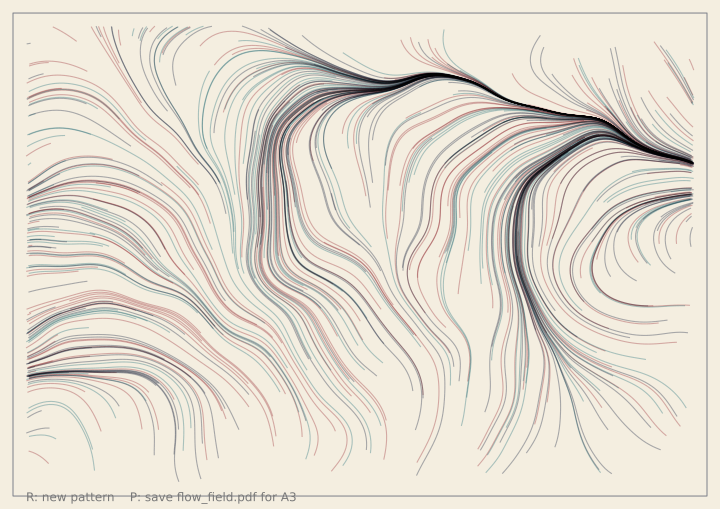
Hundreds of tiny walkers cross the page, and each one leaves a thin line. A hidden map of noise tells every walker which way to turn, so the lines flow side by side like wind, water or grain in wood. Overlapping lines mix their colours. Use the sliders under the canvas to change the swirl, the number of lines and the colours. Press R for a new pattern. Press P (or the "save PDF" button) to write flow_field.pdf: a print for an A3 sheet, made of lines and not of dots, so it stays sharp at any size.
How it works
- A noise field gives an angle at every point: f.noise(x * scale, y * scale) is a number from 0 to 1, and times 720 it becomes a direction. A small scale makes wide, slow swirls. A big scale makes tight ones.
- Each walker holds its place in an f.Vector. Every step, f.Vector.from_angle() makes a short arrow that points the way the field says, and .add() moves the walker along it.
- Each walker draws its short step as a line on the "trails" layer, using
with f.layer("trails"):. The layer keeps what was drawn, so each frame only adds the new steps, and the canvas under it holds the paper and the frame. - f.blend_mode("screen") or f.blend_mode("multiply") makes overlapping lines mix their colours. Light lines on dark paper use "screen". Dark lines on light paper use "multiply".
- Every walker also keeps its list of points. To print, the sketch makes a picture the size of an A3 page (f.page_size("A3", landscape=True)) and draws each walker once, as one line made with begin_shape() and vertex(). Joining the steps into one line keeps the PDF small: about one line for each walker, and not one for every step.
- f.noise_seed() and f.random_seed() make each pattern repeatable, and R adds one to the seed.
Make it yours
- Change the 720 in angle_at(): 360 makes gentler curves, 1440 makes busier ones.
- Add a palette to PALETTES: a name, a paper colour, three line colours and "screen" or "multiply". Then raise the palette slider's top value.
- Change STEP (the length of each step) and LENGTHS (how many steps a walker takes) for long, smooth lines or short, sharp ones.
- Change the line colour's last number, the 90 in PALETTES, to make the lines fainter or stronger.
- Make walkers start in a circle and not all over the page: use f.Vector.from_angle() in new_walkers().
The code
Copy it into a file and run it.
"""Flow-field print

Hundreds of tiny walkers cross the page, and each one leaves a thin line. A hidden map of noise tells
every walker which way to turn, so the lines flow side by side like wind, water or grain in wood.
Overlapping lines mix their colours. Use the sliders under the canvas to change the swirl, the number
of lines and the colours. Press R for a new pattern. Press P (or the "save PDF" button) to write
flow_field.pdf: a print for an A3 sheet, made of lines and not of dots, so it stays sharp at any size.

How it works:
- A noise field gives an angle at every point: f.noise(x * scale, y * scale) is a number from 0 to 1,
  and times 720 it becomes a direction. A small scale makes wide, slow swirls. A big scale makes
  tight ones.
- Each walker holds its place in an f.Vector. Every step, f.Vector.from_angle() makes a short arrow
  that points the way the field says, and .add() moves the walker along it.
- Each walker draws its short step as a line on the "trails" layer, using `with f.layer("trails"):`.
  The layer keeps what was drawn, so each frame only adds the new steps, and the canvas under it
  holds the paper and the frame.
- f.blend_mode("screen") or f.blend_mode("multiply") makes overlapping lines mix their colours.
  Light lines on dark paper use "screen". Dark lines on light paper use "multiply".
- Every walker also keeps its list of points. To print, the sketch makes a picture the size of an A3
  page (f.page_size("A3", landscape=True)) and draws each walker once, as one line made with
  begin_shape() and vertex(). Joining the steps into one line keeps the PDF small: about one line
  for each walker, and not one for every step.
- f.noise_seed() and f.random_seed() make each pattern repeatable, and R adds one to the seed.

Make it yours:
- Change the 720 in angle_at(): 360 makes gentler curves, 1440 makes busier ones.
- Add a palette to PALETTES: a name, a paper colour, three line colours and "screen" or "multiply".
  Then raise the palette slider's top value.
- Change STEP (the length of each step) and LENGTHS (how many steps a walker takes) for long, smooth
  lines or short, sharp ones.
- Change the line colour's last number, the 90 in PALETTES, to make the lines fainter or stronger.
- Make walkers start in a circle and not all over the page: use f.Vector.from_angle() in
  new_walkers().
"""
import funground as f

W, H = 720, 509                       # the screen is the shape of A3 on its side
MARGIN = 26                           # empty paper all round
STEP = 4                              # how far a walker moves in one step
STEPS_PER_FRAME = 3                   # each walker takes this many steps in every frame
LENGTHS = (60, 130)                   # a walker takes between this many steps
MAX_POINTS_PER_LINE = 140             # a safety cap, so a line never has more points than this

# Paper colour, three line colours (red, green, blue, strength) and how overlapping lines mix.
PALETTES = [
    ("Ink", (244, 238, 224), [(24, 36, 64, 90), (150, 40, 50, 90), (30, 110, 120, 90)], "multiply"),
    ("Night", (14, 18, 34), [(255, 190, 90, 80), (240, 90, 120, 80), (110, 190, 255, 80)], "screen"),
    ("Forest", (232, 236, 222), [(30, 90, 60, 90), (190, 120, 30, 90), (60, 60, 40, 90)], "multiply"),
    ("Sunset", (30, 14, 40), [(255, 120, 60, 80), (255, 210, 120, 80), (200, 70, 160, 80)], "screen"),
]

seed = 3
walkers = []                          # each one: {"pos": Vector, "points": [...], "colour": ..., "left": steps}
message = ""
settings_now = None                   # what the sliders said when the pattern was made


def angle_at(x, y, scale):
    """The way the field points at (x, y), in degrees. noise() is 0 to 1, so this is 0 to 720."""
    return f.noise(x * scale, y * scale) * 720


def setup():
    global noise_scale, line_count, palette, save_button
    f.size(W, H)
    noise_scale = f.create_slider(1, 8, 3, step=0.5, label="noise scale")
    line_count = f.create_slider(100, 1200, 500, step=50, label="lines")
    palette = f.create_slider(1, 4, 1, step=1, label="palette")
    save_button = f.create_button("save PDF")
    new_walkers()


def current_settings():
    return (noise_scale.value(), line_count.value(), palette.value())


def new_walkers():
    """Start again: new walkers, an empty trails layer, and the same noise for the same seed."""
    global walkers, settings_now
    settings_now = current_settings()
    f.noise_seed(seed)
    f.random_seed(seed)
    colours = PALETTES[palette.value() - 1][2]
    walkers = []
    for _ in range(line_count.value()):
        start = f.Vector(f.random(MARGIN, W - MARGIN), f.random(MARGIN, H - MARGIN))
        walkers.append({
            "pos": start,
            "points": [(start.x, start.y)],
            "colour": f.random_choice(colours),
            "left": int(f.random(*LENGTHS)),
        })
    with f.layer("trails"):
        f.clear()                     # wipe the layer; the walkers draw it again


def inside(p):
    return MARGIN <= p.x <= W - MARGIN and MARGIN <= p.y <= H - MARGIN


def move_walkers():
    """Every walker takes a few steps and draws each one as a short line on the trails layer."""
    scale = noise_scale.value() * 0.001
    mode = PALETTES[palette.value() - 1][3]
    with f.layer("trails"):
        f.blend_mode(mode)
        f.stroke_width(1.1)
        f.stroke_cap("butt")
        for walker in walkers:
            f.stroke(*walker["colour"])
            for _ in range(STEPS_PER_FRAME):
                if walker["left"] <= 0 or len(walker["points"]) >= MAX_POINTS_PER_LINE:
                    break
                here = walker["pos"]
                arrow = f.Vector.from_angle(angle_at(here.x, here.y, scale), STEP)
                there = here + arrow
                if not inside(there):
                    walker["left"] = 0
                    break
                f.line(here.x, here.y, there.x, there.y)
                walker["pos"] = there
                walker["points"].append((there.x, there.y))
                walker["left"] -= 1


def draw_frame_and_paper(target, scale=1.0):
    """The paper and a thin frame, on the canvas or on the print."""
    name, paper, colours, mode = PALETTES[palette.value() - 1]
    target.background(*paper)
    target.no_fill()
    target.stroke(*colours[0][:3], 140)
    target.stroke_width(max(1, scale))
    target.rect(MARGIN * 0.5 * scale, MARGIN * 0.5 * scale, (W - MARGIN) * scale, (H - MARGIN) * scale)


def save_print():
    """Draw every walker again, as one line each, on a picture the size of A3, and save it as a PDF."""
    global message
    page_w, page_h = f.page_size("A3", landscape=True)
    k = page_w / W                                  # how much bigger the print is than the screen
    sheet = f.create_graphics(page_w, page_h)
    draw_frame_and_paper(sheet, k)
    sheet.scale(k)
    mode = PALETTES[palette.value() - 1][3]
    sheet.blend_mode(mode)
    sheet.no_fill()
    sheet.stroke_width(1.1)
    sheet.stroke_cap("round")
    sheet.stroke_join("round")
    for walker in walkers:
        if len(walker["points"]) < 2:
            continue
        sheet.stroke(*walker["colour"])
        sheet.begin_shape()
        for x, y in walker["points"]:
            sheet.vertex(x, y)
        sheet.end_shape()
    sheet.save("flow_field.pdf")
    message = f"Saved flow_field.pdf: A3, {len(walkers)} lines"


def draw():
    if current_settings() != settings_now:
        new_walkers()
    if save_button.clicked():
        save_print()
    draw_frame_and_paper(f)
    move_walkers()
    f.fill(120)
    f.no_stroke()
    f.text_size(12)
    f.text_align("left", "center")
    f.text(message or "R: new pattern    P: save flow_field.pdf for A3", MARGIN, H - MARGIN / 2 + 1)


def key_pressed():
    global seed
    if f.key in ("r", "R"):
        seed += 1
        new_walkers()
    if f.key in ("p", "P"):
        save_print()


f.run()