Bell-curve randomness and random choices
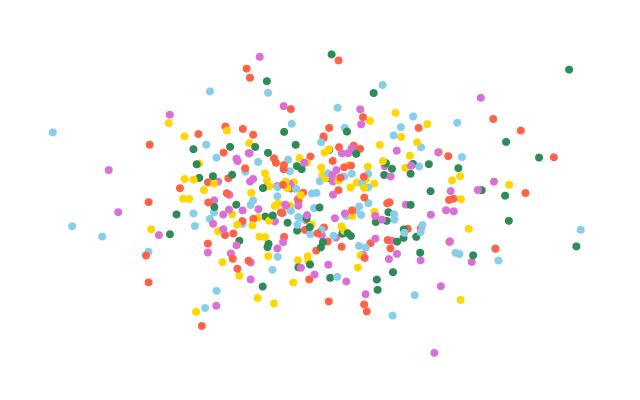
400 dots cluster around the middle of the window, each in a colour picked at random from a list. Most dots land near the centre and a few land far away.
How it works
- f.random_gaussian(mean, sd) gives numbers that cluster around the mean. The sd says how far they spread.
- Heights in a class work this way: most people are near the middle, a few are very tall or short.
- x uses a spread of 90 and y uses 50, so the cloud is wider than it is tall.
- f.random_choice(PALETTE) picks one item from the list, with the same chance for each.
- f.random_seed(11) makes both repeat exactly, so the picture is the same each frame.
Make it yours
- Change the 90 and 50 spreads. A small number gives a tight cluster.
- Change PALETTE: add colour names, or use fewer for a simpler look.
- Change the seed 11 for a different cloud.
- Change range(400) for more dots, and the size 8 in f.circle() to make them smaller.
- Colour by distance instead of by choice: use f.distance(x, y, 320, 200) to decide the fill.
The code
Copy it into a file and run it.
"""Bell-curve randomness and random choices

400 dots cluster around the middle of the window, each in a colour picked at random from a list.
Most dots land near the centre and a few land far away.

How it works:
- f.random_gaussian(mean, sd) gives numbers that cluster around the mean. The sd says how far they
  spread.
- Heights in a class work this way: most people are near the middle, a few are very tall or short.
- x uses a spread of 90 and y uses 50, so the cloud is wider than it is tall.
- f.random_choice(PALETTE) picks one item from the list, with the same chance for each.
- f.random_seed(11) makes both repeat exactly, so the picture is the same each frame.

Make it yours:
- Change the 90 and 50 spreads. A small number gives a tight cluster.
- Change PALETTE: add colour names, or use fewer for a simpler look.
- Change the seed 11 for a different cloud.
- Change range(400) for more dots, and the size 8 in f.circle() to make them smaller.
- Colour by distance instead of by choice: use f.distance(x, y, 320, 200) to decide the fill.
"""
import funground as f

PALETTE = ["tomato", "gold", "seagreen", "skyblue", "orchid"]


def setup():
    f.size(640, 400)


def draw():
    f.random_seed(11)
    f.background("white")
    f.no_stroke()
    for _ in range(400):
        x = f.random_gaussian(320, 90)                     # most dots near the middle
        y = f.random_gaussian(200, 50)
        f.fill(f.random_choice(PALETTE))
        f.circle(x, y, 8)


f.run()