Noise: smooth randomness
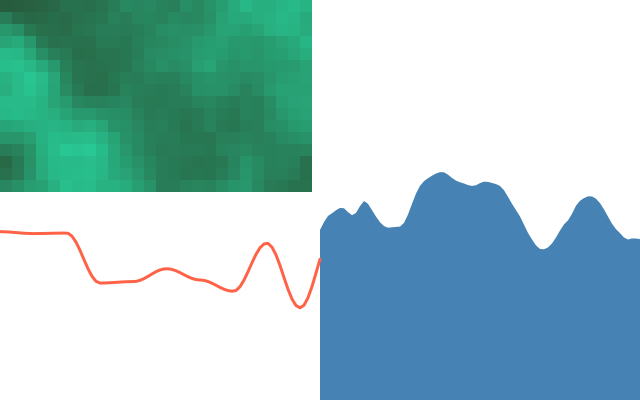
Noise is randomness that changes smoothly, like hills instead of static. The left grid shows 2-D noise. The blue hills scroll over time. The red line has less detail.
How it works
- f.noise(x) gives a number from 0 to 1 that changes smoothly as x changes.
- f.noise(x, y) makes a smooth 2-D pattern. Each tile of the grid takes its shade from it.
- Small steps in x, such as x * 0.01, give gentle hills. Bigger steps give a rougher line.
- f.noise_seed(2026) picks the pattern. The same seed gives the same values.
- f.noise_detail(1) turns the rough extra layers off, so the red line is smoother. f.noise_detail(4) puts them back.
- Adding f.frame_count * 0.02 to x makes the blue hills scroll.
Make it yours
- Change the seed 2026 for a new landscape.
- Change the 0.01 in x * 0.01: smaller is smoother, bigger is rougher.
- Change the scroll speed: the 0.02 in f.frame_count * 0.02.
- Change f.noise_detail(1) to 8 and look at the red line become jagged.
- Use noise for colour: f.fill(f.noise(x * 0.01) * 255) in the landscape loop.
The code
Copy it into a file and run it.
"""Noise: smooth randomness

Noise is randomness that changes smoothly, like hills instead of static. The left grid shows
2-D noise. The blue hills scroll over time. The red line has less detail.

How it works:
- f.noise(x) gives a number from 0 to 1 that changes smoothly as x changes.
- f.noise(x, y) makes a smooth 2-D pattern. Each tile of the grid takes its shade from it.
- Small steps in x, such as x * 0.01, give gentle hills. Bigger steps give a rougher line.
- f.noise_seed(2026) picks the pattern. The same seed gives the same values.
- f.noise_detail(1) turns the rough extra layers off, so the red line is smoother.
  f.noise_detail(4) puts them back.
- Adding f.frame_count * 0.02 to x makes the blue hills scroll.

Make it yours:
- Change the seed 2026 for a new landscape.
- Change the 0.01 in x * 0.01: smaller is smoother, bigger is rougher.
- Change the scroll speed: the 0.02 in f.frame_count * 0.02.
- Change f.noise_detail(1) to 8 and look at the red line become jagged.
- Use noise for colour: f.fill(f.noise(x * 0.01) * 255) in the landscape loop.
"""
import funground as f


def setup():
    f.size(640, 400)
    f.noise_seed(2026)


def draw():
    f.background("white")
    f.no_stroke()

    # a 2-D noise texture: each tile's shade comes from noise(x, y)
    for row in range(16):
        for col in range(26):
            v = f.noise(col * 0.15, row * 0.15)
            f.fill((40, 90 + v * 150, 60 + v * 120))
            f.rect(col * 12, row * 12, 12, 12)

    # a landscape: the height of each column comes from noise(x), and it scrolls over time
    f.fill("steelblue")
    f.begin_shape()
    f.vertex(320, 400)
    for x in range(320, 641, 4):
        f.vertex(x, 80 + f.noise(x * 0.01 + f.frame_count * 0.02) * 260)
    f.vertex(640, 400)
    f.end_shape(close=True)

    # the same line with less detail: smoother
    f.noise_detail(1)
    f.no_fill()
    f.stroke("tomato")
    f.stroke_width(3)
    f.begin_shape()
    for x in range(0, 321, 4):
        f.vertex(x, 230 + f.noise(x * 0.03) * 160)
    f.end_shape()
    f.noise_detail(4)


f.run()