Saving an animation as frames
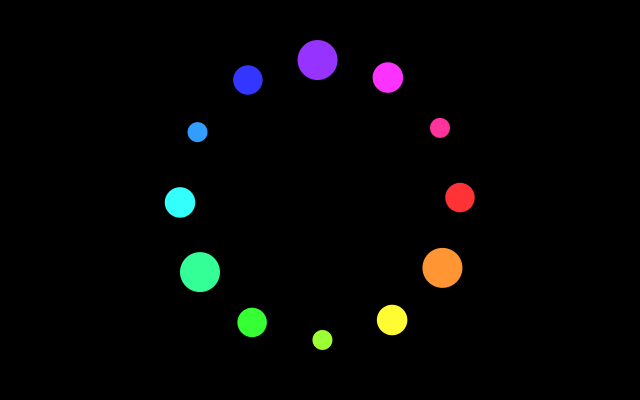
Twelve coloured dots go round in a circle. f.save_frames() saves 30 numbered pictures of it, which loop without a jump when they are joined up.
How it works
- f.save_frames("frames/####.png", 30) saves this frame and the next 29. The #### is replaced by the frame number: frames/0001.png, frames/0002.png and so on.
- It is called once, on the first frame, by the test f.frame_count == 0.
- The twelve dots are 30 degrees apart. The animation turns by 30 degrees in 30 frames, so the last frame leads straight back to the first.
- The colour and the size depend only on the angle, so they join up too. f.hsb() makes the colour.
- A program such as ffmpeg can join the pictures into a video or a GIF. Chapter 13 of the guide shows how.
Make it yours
- Change the 140 in the dot position to make a bigger or smaller circle.
- Change the size of the dots: the 30 in f.circle() is the middle size.
- Change the 30 in f.save_frames() to save fewer or more pictures.
- Change the 80 in f.hsb() to make the colours paler or stronger.
- Change the folder: "pics/####.png".
The code
Copy it into a file and run it.
"""Saving an animation as frames

Twelve coloured dots go round in a circle. f.save_frames() saves 30 numbered pictures of it, which
loop without a jump when they are joined up.

How it works:
- f.save_frames("frames/####.png", 30) saves this frame and the next 29. The #### is replaced by
  the frame number: frames/0001.png, frames/0002.png and so on.
- It is called once, on the first frame, by the test f.frame_count == 0.
- The twelve dots are 30 degrees apart. The animation turns by 30 degrees in 30 frames, so the last
  frame leads straight back to the first.
- The colour and the size depend only on the angle, so they join up too. f.hsb() makes the colour.
- A program such as ffmpeg can join the pictures into a video or a GIF. Chapter 13 of the guide
  shows how.

Make it yours:
- Change the 140 in the dot position to make a bigger or smaller circle.
- Change the size of the dots: the 30 in f.circle() is the middle size.
- Change the 30 in f.save_frames() to save fewer or more pictures.
- Change the 80 in f.hsb() to make the colours paler or stronger.
- Change the folder: "pics/####.png".
"""
import math

import funground as f


def setup():
    f.size(640, 400)


def draw():
    f.background("black")
    f.no_stroke()
    for i in range(12):
        angle = f.frame_count + i * 30              # 30 frames turn 30 degrees: back to the start
        x = 320 + 140 * math.cos(f.radians(angle))
        y = 200 + 140 * math.sin(f.radians(angle))
        f.fill(f.hsb(angle % 360, 80, 100))          # colour and size depend on the angle only
        f.circle(x, y, 30 + 10 * math.sin(f.radians(angle * 3)))
    if f.frame_count == 0:
        f.save_frames("frames/####.png", 30)      # 30 pictures that loop seamlessly


f.run()