A poster file
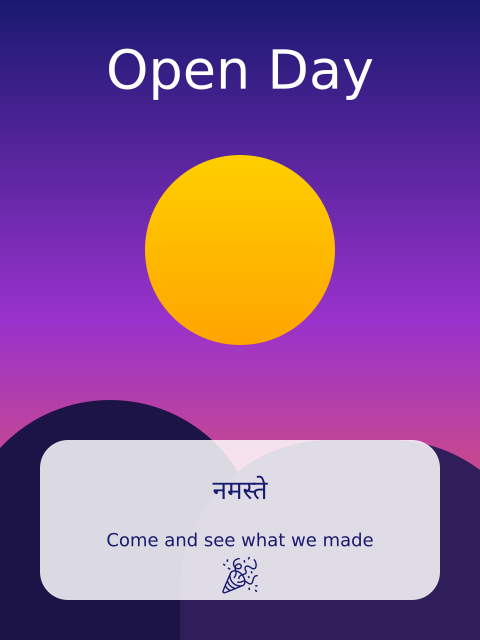
This script draws a poster and saves it as poster.pdf and poster.svg, and again as poster_final.pdf and poster_final.svg. The files carry more than a picture.
How it works
- The poster has four layers, made with f.layer("name"). The "notes" layer is hidden with f.hide_layer(), so it is in the files but switched off.
- The words are real text, with English, Hindi and an emoji. funground's fallback fonts draw the Hindi and the emoji.
- The PDF opens in Acrobat or Illustrator, with the layers in the layers panel. The SVG opens in Inkscape or Illustrator, where the layers are Inkscape layers. The text can be selected and changed.
- To edit the text, the font must be installed on your computer. For Hindi in Illustrator, switch on the World-Ready Composer in its Type settings. Guide chapter 13 has more on fonts.
- Save two copies for a handoff. poster.pdf and poster.svg have live text, for you to edit. poster_final.pdf and poster_final.svg use text="shapes". Every letter is a shape, so they look right without the font. The layers are still layers, but the letters cannot be edited.
- The gallery picture shows the poster. The hidden notes are not in it.
Make it yours
- Change the headline "Open Day" and the other words.
- Change the gradient colours in the "background" layer.
- Hide another layer: f.hide_layer("artwork") after drawing it.
- Add a layer of your own with a new with f.layer("stars"): block.
- Save a copy with a different name, such as f.save("poster2.svg", text="shapes").
The code
Copy it into a file and run it.
"""A poster file

This script draws a poster and saves it as poster.pdf and poster.svg, and again as poster_final.pdf
and poster_final.svg. The files carry more than a picture.

How it works:
- The poster has four layers, made with f.layer("name"). The "notes" layer is hidden with
  f.hide_layer(), so it is in the files but switched off.
- The words are real text, with English, Hindi and an emoji. funground's fallback fonts draw the
  Hindi and the emoji.
- The PDF opens in Acrobat or Illustrator, with the layers in the layers panel. The SVG opens in
  Inkscape or Illustrator, where the layers are Inkscape layers. The text can be selected and
  changed.
- To edit the text, the font must be installed on your computer. For Hindi in Illustrator, switch on
  the World-Ready Composer in its Type settings. Guide chapter 13 has more on fonts.
- Save two copies for a handoff. poster.pdf and poster.svg have live text, for you to edit.
  poster_final.pdf and poster_final.svg use text="shapes". Every letter is a shape, so they look
  right without the font. The layers are still layers, but the letters cannot be edited.
- The gallery picture shows the poster. The hidden notes are not in it.

Make it yours:
- Change the headline "Open Day" and the other words.
- Change the gradient colours in the "background" layer.
- Hide another layer: f.hide_layer("artwork") after drawing it.
- Add a layer of your own with a new with f.layer("stars"): block.
- Save a copy with a different name, such as f.save("poster2.svg", text="shapes").
"""
import funground as f


def setup():
    f.size(480, 640)


def draw():
    if f.frame_count > 0:                # the poster is made once, in the first frame
        return
    # Each layer has its own pen, so each one turns the outline off.
    # Layer 1: the background, a soft gradient from top to bottom.
    with f.layer("background"):
        f.no_stroke()
        f.fill(f.linear_gradient(0, 0, 0, 640, ["midnightblue", "darkorchid", "tomato"]))
        f.rect(0, 0, 480, 640)

    # Layer 2: the artwork, a sun, hills and a rounded card for the words.
    with f.layer("artwork"):
        f.no_stroke()
        f.fill(f.linear_gradient(0, 120, 0, 340, ["gold", "orange"]))
        f.circle(240, 250, 190)
        f.fill(28, 20, 70)
        f.rect(-40, 400, 300, 300, 150, 150, 0, 0)
        f.fill(48, 30, 90)
        f.rect(180, 440, 360, 300, 180, 180, 0, 0)
        f.fill(255, 255, 255, 215)
        f.rect(40, 440, 400, 160, 28)

    # Layer 3: the words. All of it is real text in the saved files.
    with f.layer("words"):
        f.no_stroke()
        f.text_align("center", "center")
        f.fill("white")
        f.text_size(54)
        f.text("Open Day", 240, 70)
        f.text_size(26)
        f.fill("midnightblue")
        f.text("नमस्ते", 240, 490)
        f.text_size(18)
        f.text("Come and see what we made", 240, 540)
        f.text_size(36)
        f.text("🎉", 240, 575)

    # Layer 4: notes for the person who edits the file. Hidden, but still in it.
    with f.layer("notes"):
        f.fill("lime")
        f.text_align("left", "top")
        f.text_size(14)
        f.text("Check the date before printing", 12, 12)
    f.hide_layer("notes")

    f.save("poster.pdf")
    f.save("poster.svg")
    # The same poster again, for handing over: every letter is a shape.
    f.save("poster_final.pdf", text="shapes")
    f.save("poster_final.svg", text="shapes")


f.run()