The basic shapes
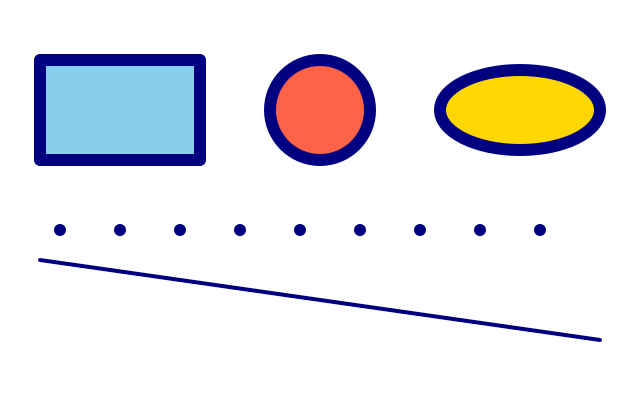
rect is placed by its top-left corner; circle and ellipse by their centre. line joins two points; point is a dot in the stroke colour.
How it works
- f.rect(x, y, width, height) starts at the top-left corner and goes right and down.
- f.circle(x, y, diameter) and f.ellipse(x, y, width, height) are placed by their centre.
- f.fill() sets the inside colour. It stays until you change it, so each shape sets its own.
- f.line(x1, y1, x2, y2) joins two points. It is drawn with the stroke colour and f.stroke_width().
- f.point() draws one dot in the stroke colour. The loop makes a row of them, 60 pixels apart.
Make it yours
- Change the numbers on the rect line and see which one moves it and which one resizes it.
- Make the dots bigger or smaller with the f.stroke_width(12) line before the loop.
- Change the step in range(60, 600, 60) to 30 for a closer row of dots.
- Add f.no_fill() before the circle to see only its outline.
- Add a second line with a different f.stroke() colour.
The code
Copy it into a file and run it.
"""The basic shapes

rect is placed by its top-left corner; circle and ellipse by their centre. line joins two
points; point is a dot in the stroke colour.

How it works:
- f.rect(x, y, width, height) starts at the top-left corner and goes right and down.
- f.circle(x, y, diameter) and f.ellipse(x, y, width, height) are placed by their centre.
- f.fill() sets the inside colour. It stays until you change it, so each shape sets its own.
- f.line(x1, y1, x2, y2) joins two points. It is drawn with the stroke colour and f.stroke_width().
- f.point() draws one dot in the stroke colour. The loop makes a row of them, 60 pixels apart.

Make it yours:
- Change the numbers on the rect line and see which one moves it and which one resizes it.
- Make the dots bigger or smaller with the f.stroke_width(12) line before the loop.
- Change the step in range(60, 600, 60) to 30 for a closer row of dots.
- Add f.no_fill() before the circle to see only its outline.
- Add a second line with a different f.stroke() colour.
"""
import funground as f


def setup():
    f.size(640, 400)


def draw():
    f.background("white")
    f.fill("skyblue")
    f.rect(40, 60, 160, 100)            # top-left x, y, width, height
    f.fill("tomato")
    f.circle(320, 110, 100)             # centre x, y, diameter
    f.fill("gold")
    f.ellipse(520, 110, 160, 80)        # centre x, y, width, height
    f.stroke("navy")
    f.stroke_width(4)
    f.line(40, 260, 600, 340)           # from (x1, y1) to (x2, y2)
    f.stroke_width(12)
    for x in range(60, 600, 60):
        f.point(x, 230)


f.run()