Placing shapes by their centre or corners
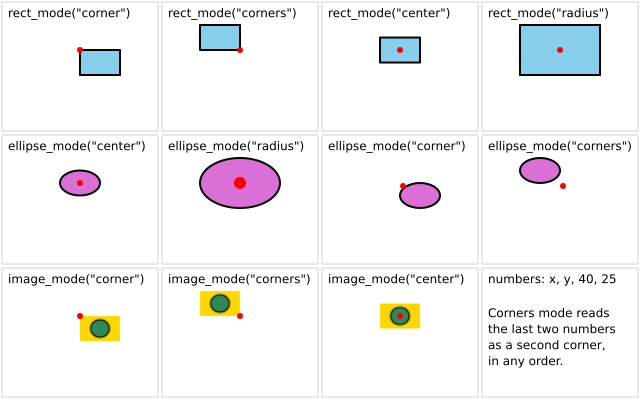
The same four numbers, drawn under each drawing mode. The red dot marks (x, y) in every box. rect_mode and ellipse_mode have four modes each. image_mode has three.
How it works
- A shape is given four numbers. A mode decides what they mean. The default for f.rect() is "corner": x, y is the top-left corner, then width and height.
- f.rect_mode() and f.ellipse_mode() take "corner", "corners", "center" or "radius". "corners" reads the last two numbers as a second corner. "radius" reads them as half the width and half the height.
- f.image_mode() has "corner", "corners" and "center". The picture comes from f.create_graphics().
- f.saved_state() puts back the style, the mode and the moved origin at the end of each box. One mode does not leak into the next box.
- f.translate() moves the origin to each box, so every box can use the same X and Y.
Make it yours
- Change X, Y, A and B at the top. Every box changes at once.
- Try A = 120 and B = 90. In "corners" mode they now work as the second corner.
- Add another box: copy one of the loop blocks and use a new colour with f.rect_mode("center").
- Call f.rect_mode("center") once, before the loops, and see how the plain f.rect() calls change.
- Change the colours in make_picture() and watch the image boxes.
The code
Copy it into a file and run it.
"""Placing shapes by their centre or corners

The same four numbers, drawn under each drawing mode. The red dot marks (x, y) in every box.
rect_mode and ellipse_mode have four modes each. image_mode has three.

How it works:
- A shape is given four numbers. A mode decides what they mean. The default for f.rect() is
  "corner": x, y is the top-left corner, then width and height.
- f.rect_mode() and f.ellipse_mode() take "corner", "corners", "center" or "radius". "corners" reads
  the last two numbers as a second corner. "radius" reads them as half the width and half the height.
- f.image_mode() has "corner", "corners" and "center". The picture comes from f.create_graphics().
- f.saved_state() puts back the style, the mode and the moved origin at the end of each box. One
  mode does not leak into the next box.
- f.translate() moves the origin to each box, so every box can use the same X and Y.

Make it yours:
- Change X, Y, A and B at the top. Every box changes at once.
- Try A = 120 and B = 90. In "corners" mode they now work as the second corner.
- Add another box: copy one of the loop blocks and use a new colour with f.rect_mode("center").
- Call f.rect_mode("center") once, before the loops, and see how the plain f.rect() calls change.
- Change the colours in make_picture() and watch the image boxes.
"""
import funground as f

X, Y, A, B = 80, 50, 40, 25          # the numbers every shape below is given


def make_picture():
    pic = f.create_graphics(30, 20)
    pic.background("gold")
    pic.fill("seagreen")
    pic.circle(15, 10, 14)
    return pic


def cell(column, row, label):
    """Move to a box, draw its frame and its label, and mark (X, Y)."""
    f.translate(column * 160, row * 133)
    f.no_fill()
    f.stroke("lightgray")
    f.stroke_width(1)
    f.rect(2, 2, 156, 129)
    f.fill("black")
    f.no_stroke()
    f.text_size(12)
    f.text(label, 8, 6)


def dot():
    f.fill("red")
    f.no_stroke()
    f.circle(X, Y, 6)


def setup():
    f.size(640, 400)


def draw():
    f.background("white")
    f.stroke("black")
    f.stroke_width(2)
    picture = make_picture()

    for column, mode in enumerate(("corner", "corners", "center", "radius")):
        with f.saved_state():
            cell(column, 0, f'rect_mode("{mode}")')
            f.rect_mode(mode)
            f.fill("skyblue")
            f.stroke("black")
            f.stroke_width(2)
            f.rect(X, Y, A, B)
            dot()

    for column, mode in enumerate(("center", "radius", "corner", "corners")):
        with f.saved_state():
            cell(column, 1, f'ellipse_mode("{mode}")')
            f.ellipse_mode(mode)
            f.fill("orchid")
            f.stroke("black")
            f.stroke_width(2)
            f.ellipse(X, Y, A, B)
            dot()

    for column, mode in enumerate(("corner", "corners", "center")):
        with f.saved_state():
            cell(column, 2, f'image_mode("{mode}")')
            f.image_mode(mode)
            f.image(picture, X, Y, A, B)
            dot()

    with f.saved_state():
        cell(3, 2, "numbers: x, y, 40, 25")
        f.fill("black")
        f.text_size(12)
        f.text("Corners mode reads", 8, 40)
        f.text("the last two numbers", 8, 56)
        f.text("as a second corner,", 8, 72)
        f.text("in any order.", 8, 88)


f.run()