Rounded corners
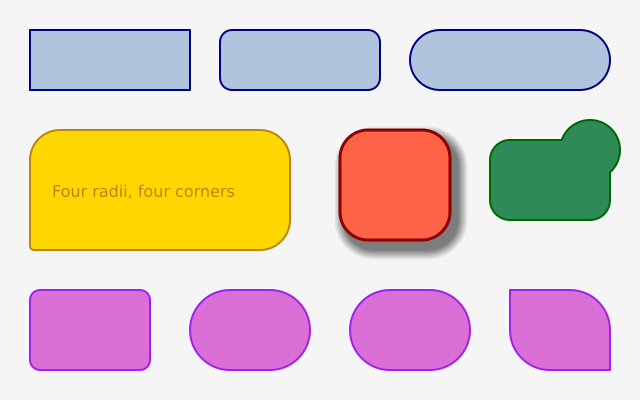
Give rect() or square() one more number and every corner is rounded by that radius. Give it four numbers and each corner gets its own radius. They go clockwise, starting at the top left. A radius that is too big is cut down to fit.
How it works
- f.rect(x, y, width, height, radius) rounds every corner by one radius. f.square() works the same.
- With four radii, as in f.rect(30, 130, 260, 120, 30, 30, 30, 4), each corner has its own. They go clockwise from the top left.
- A radius bigger than the shape allows is cut down to fit. That is why 999 gives a pill shape.
- f.shadow() adds a soft shadow to what you draw next, and f.no_shadow() switches it off again.
- f.path().rect() makes a rounded rectangle as a path, and the | operator joins it to a circle into one shape. f.draw_path() draws it.
Make it yours
- Change the 12 on the second button to a bigger or smaller radius.
- Change the four radii on the speech bubble. Try 4, 30, 30, 30 to move the tail.
- Change the shadow: f.shadow(6, 8, blur=10) takes how far right, how far down, and how soft.
- Join the path to the circle with & in place of |, to keep only the part where they overlap.
- Add a button of your own with f.rect(x, y, 160, 60, 20) and f.text() on top.
The code
Copy it into a file and run it.
"""Rounded corners

Give rect() or square() one more number and every corner is rounded by that radius.
Give it four numbers and each corner gets its own radius. They go clockwise,
starting at the top left. A radius that is too big is cut down to fit.

How it works:
- f.rect(x, y, width, height, radius) rounds every corner by one radius. f.square() works the same.
- With four radii, as in f.rect(30, 130, 260, 120, 30, 30, 30, 4), each corner has its own. They go
  clockwise from the top left.
- A radius bigger than the shape allows is cut down to fit. That is why 999 gives a pill shape.
- f.shadow() adds a soft shadow to what you draw next, and f.no_shadow() switches it off again.
- f.path().rect() makes a rounded rectangle as a path, and the | operator joins it to a circle
  into one shape. f.draw_path() draws it.

Make it yours:
- Change the 12 on the second button to a bigger or smaller radius.
- Change the four radii on the speech bubble. Try 4, 30, 30, 30 to move the tail.
- Change the shadow: f.shadow(6, 8, blur=10) takes how far right, how far down, and how soft.
- Join the path to the circle with & in place of |, to keep only the part where they overlap.
- Add a button of your own with f.rect(x, y, 160, 60, 20) and f.text() on top.
"""
import funground as f


def setup():
    f.size(640, 400)


def draw():
    f.background(245)

    # three buttons: no radius, a small radius, and a radius so big it makes a pill
    f.stroke("navy")
    f.stroke_width(2)
    f.fill("lightsteelblue")
    f.rect(30, 30, 160, 60)
    f.rect(220, 30, 160, 60, 12)
    f.rect(410, 30, 200, 60, 999)

    # a speech bubble: three round corners and one nearly sharp corner for the tail
    f.fill("gold")
    f.stroke("darkgoldenrod")
    f.rect(30, 130, 260, 120, 30, 30, 30, 4)
    f.no_stroke()
    f.fill("darkgoldenrod")
    f.text_size(16)
    f.text("Four radii, four corners", 52, 182)

    # a rounded square with a soft shadow
    f.shadow(6, 8, blur=10)
    f.fill("tomato")
    f.stroke("darkred")
    f.stroke_width(3)
    f.square(340, 130, 110, 28)
    f.no_shadow()

    # a rounded path from the builder, joined to a circle with union
    tag = f.path().rect(490, 140, 120, 80, 20)
    dot = f.path().circle(590, 150, 60)
    f.fill("seagreen")
    f.stroke("darkgreen")
    f.stroke_width(2)
    f.draw_path(tag | dot)

    # the radius is cut down so neighbouring corners never overlap
    f.fill("orchid")
    f.stroke("purple")
    f.stroke_width(2)
    f.rect(30, 290, 120, 80, 10)
    f.rect(190, 290, 120, 80, 40)
    f.rect(350, 290, 120, 80, 500)
    f.rect(510, 290, 100, 80, 0, 40, 0, 40)


f.run()