Sound: play a tune and watch it
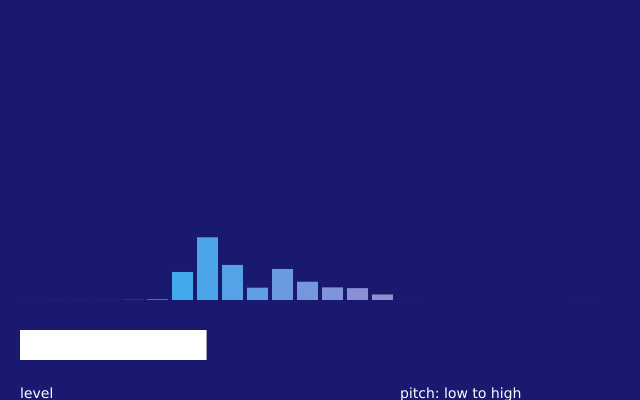
A tune plays over and over, and you see it. Each bar is one range of pitch, low notes on the left and high notes on the right. The wide bar below shows how loud it is. With no sound device, the sketch still runs, in silence. (This one uses real time, so the picture changes from run to run.)
How it works
- f.load_sound("data/tune.wav") reads a sound file. The path is found next to this file.
- In setup(), tune.set_volume() sets how loud it is, and tune.loop() plays it again and again.
- tune.spectrum(BANDS) gives a list of 24 numbers from 0 to 1, one for each range of pitch. The for loop draws one bar for each number. A stronger range gives a taller bar.
- f.lerp_color() mixes deepskyblue into hotpink, a little more for each bar along the row.
- tune.level() gives one number from 0 to 1 for how loud the sound is now. It sets the width of the white bar. The min(1, ...) stops the bar from growing past its box.
Make it yours
- Change BANDS to 48 for thinner bars, or to 8 for fat ones. The bar width follows.
- Change the two colours in f.lerp_color(), or the background colour.
- Change the 1.5 in tune.level() * 1.5 to make the white bar more or less sensitive.
- Draw circles instead of bars: use f.circle(20 + i * bar_width + bar_width / 2, 200, 120 * strength).
- Play another sound. Put your own .wav file next to this one and change the name in f.load_sound().
The code
Copy it into a file and run it.
"""Sound: play a tune and watch it

A tune plays over and over, and you see it. Each bar is one range of pitch, low notes on the
left and high notes on the right. The wide bar below shows how loud it is. With no sound device,
the sketch still runs, in silence.

How it works:
- f.load_sound("data/tune.wav") reads a sound file. The path is found next to this file.
- In setup(), tune.set_volume() sets how loud it is, and tune.loop() plays it again and again.
- tune.spectrum(BANDS) gives a list of 24 numbers from 0 to 1, one for each range of pitch. The
  for loop draws one bar for each number. A stronger range gives a taller bar.
- f.lerp_color() mixes deepskyblue into hotpink, a little more for each bar along the row.
- tune.level() gives one number from 0 to 1 for how loud the sound is now. It sets the width of
  the white bar. The min(1, ...) stops the bar from growing past its box.

Make it yours:
- Change BANDS to 48 for thinner bars, or to 8 for fat ones. The bar width follows.
- Change the two colours in f.lerp_color(), or the background colour.
- Change the 1.5 in tune.level() * 1.5 to make the white bar more or less sensitive.
- Draw circles instead of bars: use f.circle(20 + i * bar_width + bar_width / 2, 200, 120 * strength).
- Play another sound. Put your own .wav file next to this one and change the name in f.load_sound().
"""
# gallery: time-dependent
import funground as f

tune = f.load_sound("data/tune.wav")      # found next to this file
BANDS = 24


def setup():
    f.size(640, 400)
    tune.set_volume(0.8)                  # the file peaks at 0.8: this leaves room to spare
    tune.loop()


def draw():
    f.background("midnightblue")
    f.no_stroke()

    # the spectrum: one bar for each range of pitch
    bar_width = 600 / BANDS
    for i, strength in enumerate(tune.spectrum(BANDS)):
        height = 260 * strength
        f.fill(f.lerp_color("deepskyblue", "hotpink", i / BANDS))
        f.rect(20 + i * bar_width + 2, 300 - height, bar_width - 4, height)

    # the level: one wide bar below
    f.fill("white")
    f.rect(20, 330, 600 * min(1, tune.level() * 1.5), 30)
    f.text_size(14)
    f.text("level", 20, 385)
    f.text("pitch: low to high", 400, 385)


f.run()