Making sound: write a tune, then watch it play
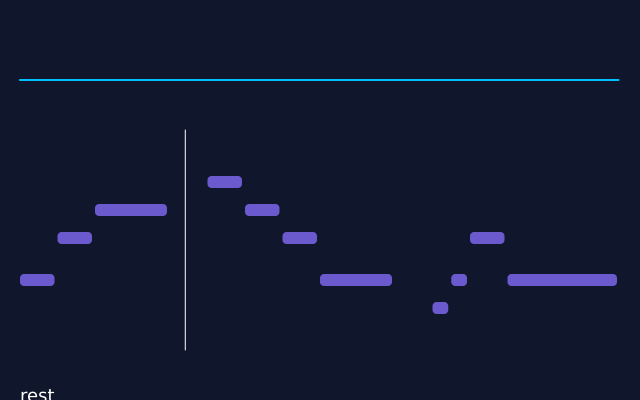
A tune is written as a short list in the code. The same list makes the sound and draws the bars. The top shows the wave itself. A soft chord plays underneath. The text at the bottom names the note that is sounding. With no sound device, the sketch still runs, in silence. (This one uses real time, so the picture changes from run to run.)
How it works
- TUNE is a list of (note, beats) pairs. The code joins it into text such as "E4:1 G4:1 A4:2". A note is a name like "E4", a dash is a rest, and :2 means two beats.
- f.melody(text, tempo=TEMPO) turns that text into a sound. sound.reverb(0.2) puts it in a small room.
- tune.samples() gives the wave as a list of numbers. The loop in draw() draws the few that are around the place where tune.current_time() says the sound is now.
- f.mix() adds three quiet, long notes into one chord. f.note() and f.tone() make them. Each is quiet, so the sum stays below the loudest a sound can be.
- The bars use the same TUNE list. A note is gold while tune.current_time() is inside it.
- tune.pitch() gives the pitch that is sounding, and f.frequency_to_note() turns it into a name.
Make it yours
- Change TEMPO to play the tune slower or faster.
- Change the notes in TUNE, or add ("C5", 2) at the end. The sound and the bars both follow.
- Change the chord. Try "F3" and "A3" in place of "E3" and "G3" in f.mix().
- Change 0.2 in .reverb(0.2) to 0.6 for a bigger room.
- Use a sharper voice: f.melody(text, tempo=TEMPO, wave="square").
The code
Copy it into a file and run it.
"""Making sound: write a tune, then watch it play

A tune is written as a short list in the code. The same list makes the sound and draws the bars.
The top shows the wave itself. A soft chord plays underneath. The text at the bottom names the
note that is sounding. With no sound device, the sketch still runs, in silence.

How it works:
- TUNE is a list of (note, beats) pairs. The code joins it into text such as "E4:1 G4:1 A4:2".
  A note is a name like "E4", a dash is a rest, and :2 means two beats.
- f.melody(text, tempo=TEMPO) turns that text into a sound. sound.reverb(0.2) puts it in a small
  room.
- tune.samples() gives the wave as a list of numbers. The loop in draw() draws the few that are
  around the place where tune.current_time() says the sound is now.
- f.mix() adds three quiet, long notes into one chord. f.note() and f.tone() make them. Each is
  quiet, so the sum stays below the loudest a sound can be.
- The bars use the same TUNE list. A note is gold while tune.current_time() is inside it.
- tune.pitch() gives the pitch that is sounding, and f.frequency_to_note() turns it into a name.

Make it yours:
- Change TEMPO to play the tune slower or faster.
- Change the notes in TUNE, or add ("C5", 2) at the end. The sound and the bars both follow.
- Change the chord. Try "F3" and "A3" in place of "E3" and "G3" in f.mix().
- Change 0.2 in .reverb(0.2) to 0.6 for a bigger room.
- Use a sharper voice: f.melody(text, tempo=TEMPO, wave="square").
"""
# gallery: time-dependent
import math

import funground as f

TEMPO = 126
TUNE = [("E4", 1), ("G4", 1), ("A4", 2), ("-", 1), ("B4", 1), ("A4", 1), ("G4", 1),
        ("E4", 2), ("-", 1), ("D4", 0.5), ("E4", 0.5), ("G4", 1), ("E4", 3)]

text = " ".join(f"{name}:{beats}" for name, beats in TUNE)
# melody() plays a gentle "soft" voice unless you ask for another wave. A little reverb makes
# it sound as if it is played in a room rather than inside the computer.
tune = f.melody(text, tempo=TEMPO).reverb(0.2)
numbers = tune.samples()                          # the wave, as a list of numbers

# A soft chord underneath, added together from three long, slow notes. Each note is quiet, so
# the three added together stay well below the loudest a sound can be.
length = tune.duration()
pad = f.mix(f.note("E3", length, volume=0.25, attack=1, release=1),
            f.note("G3", length, volume=0.25, attack=1, release=1),
            f.tone(f.note_to_frequency("B3"), length, "sine", 0.25, attack=1, release=1))
pad.set_volume(0.5)
total_beats = sum(beats for _, beats in TUNE)
low = f.note_to_frequency("C4")


def semitones(name):
    """How many steps a note is above middle C."""
    return 12 * math.log2(f.note_to_frequency(name) / low)


def setup():
    f.size(640, 400)
    tune.set_volume(0.8)          # tune and pad together stay below full volume, so nothing clips
    tune.loop()
    pad.loop()


def draw():
    f.background("#10162b")
    now = tune.current_time()
    here = int(now * 44100)

    # the wave: the little bit of sound around the playing position
    f.stroke("deepskyblue")
    f.stroke_width(2)
    f.no_fill()
    previous = None
    for i in range(0, 1200, 3):
        index = min(len(numbers) - 1, max(0, here - 600 + i))
        point = (20 + i * 0.5, 80 - 60 * numbers[index])
        if previous:
            f.line(*previous, *point)
        previous = point

    # the notes: one bar for each, higher notes higher up
    f.no_stroke()
    beat = 0
    for name, beats in TUNE:
        if name != "-":
            playing = beat <= now * TEMPO / 60 < beat + beats
            f.fill("gold" if playing else "slateblue")
            f.rect(20 + beat * 600 / total_beats, 330 - semitones(name) * 14,
                   beats * 600 / total_beats - 3, 12, 4)
        beat += beats

    # the playhead and the note that pitch() hears
    f.stroke("white")
    f.stroke_width(1)
    x = 20 + now * TEMPO / 60 * 600 / total_beats
    f.line(x, 130, x, 350)
    f.no_stroke()
    f.fill("white")
    f.text_size(18)
    hz = tune.pitch()
    f.text(f"{f.frequency_to_note(hz)}  {hz:.0f} Hz" if hz else "rest", 20, 385)


f.run()