Placement: one mark in nine places (studio 1)
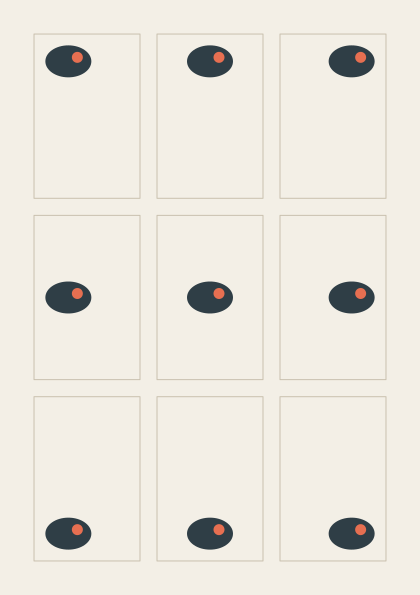
Where a shape sits in its frame changes how it feels: tucked into a corner, resting on the floor, or floating in the middle. Nine frames on an A5 page hold the same small drawing, each one placed at a different point of its frame. The same picture is written without the studio words in examples/studios/01_placement_before.py.
How it works
- f.size("A5", margin=f.mm(12)) makes a canvas the size of an A5 page, with a 12 mm margin. f.ground.content is the area inside the margin.
- f.grid(3, 3, gutter=f.mm(6)) divides that area into nine cells. Each cell knows its col and row.
- with f.mark() as pebble: records the drawing once, around its own (0, 0), and draws nothing yet.
- cell.inset() gives a smaller area inside the cell. pebble.place() draws the pebble at a point of it, and anchor= says which point of the pebble lands there: "top-left", "center", and so on.
- grid.show() draws thin guide lines in the window only. They are not in saved files.
Make it yours
- Change the pebble: draw a different shape inside the with f.mark() block.
- Change f.mm(4) in cell.inset() to f.mm(0), so the pebble touches the frame.
- Use rotate=30 or scale=1.5 in pebble.place(). The anchor point stays where it is.
- Try f.size("A4", landscape=True, margin=f.mm(12)): the grid follows the page.
The code
Copy it into a file and run it.
"""Placement: one mark in nine places (studio 1)

Where a shape sits in its frame changes how it feels: tucked into a corner, resting on the floor, or
floating in the middle. Nine frames on an A5 page hold the same small drawing, each one placed at a
different point of its frame. The same picture is written without the studio words in
examples/studios/01_placement_before.py.

How it works:
- f.size("A5", margin=f.mm(12)) makes a canvas the size of an A5 page, with a 12 mm margin.
  f.ground.content is the area inside the margin.
- f.grid(3, 3, gutter=f.mm(6)) divides that area into nine cells. Each cell knows its col and row.
- with f.mark() as pebble: records the drawing once, around its own (0, 0), and draws nothing yet.
- cell.inset() gives a smaller area inside the cell. pebble.place() draws the pebble at a point of
  it, and anchor= says which point of the pebble lands there: "top-left", "center", and so on.
- grid.show() draws thin guide lines in the window only. They are not in saved files.

Make it yours:
- Change the pebble: draw a different shape inside the with f.mark() block.
- Change f.mm(4) in cell.inset() to f.mm(0), so the pebble touches the frame.
- Use rotate=30 or scale=1.5 in pebble.place(). The anchor point stays where it is.
- Try f.size("A4", landscape=True, margin=f.mm(12)): the grid follows the page.
"""
import funground as f

f.size("A5", margin=f.mm(12))
f.background("#f3efe6")

with f.mark() as pebble:                    # recorded once, around its own (0, 0)
    f.no_stroke()
    f.fill("#2f3e46")
    f.ellipse(0, 0, 46, 32)
    f.fill("#e76f51")
    f.circle(9, -4, 11)

# One anchor for each cell, in the grid's order: row by row, left to right.
ANCHORS = ["top-left", "top", "top-right",
           "left", "center", "right",
           "bottom-left", "bottom", "bottom-right"]

grid = f.grid(3, 3, gutter=f.mm(6))
for cell in grid:
    f.no_fill()
    f.stroke("#c9c0ae")
    f.stroke_width(1)
    f.rect(cell.left, cell.top, cell.width, cell.height)
    inside = cell.inset(f.mm(4))
    x = inside.left + inside.width * cell.col / 2      # 0, a half or all of the way across
    y = inside.top + inside.height * cell.row / 2
    pebble.place(x, y, anchor=ANCHORS[cell.index])

grid.show()
f.show()