Proximity: 36 dots, four groupings (studio 2)
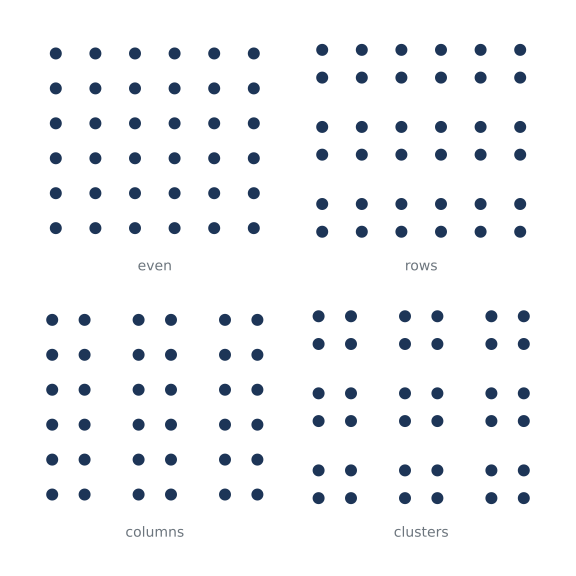
Things that are close together look as if they belong together. Each panel holds the same 36 dots of the same size. Only the spaces between them change, and the eye reads an even field, rows, columns or clusters. The same picture is written without the studio words in examples/studios/02_proximity_before.py.
How it works
- f.size(f.inch(8), f.inch(8), margin=f.inch(0.5)) makes an 8 inch square page with a half-inch margin. f.inch() turns inches into funground's units, 72 to the inch.
- f.grid(2, 2, gutter=f.inch(0.4)) makes the four panels. Each panel is an area, and panel.inset(bottom=28) keeps a strip under it for the caption.
- Grids nest: area.grid() divides the panel into groups, and each group into the dots' cells. The gutter of the outer grid is the space that separates the groups.
- The loops are ordinary Python. Each dot is an f.circle() at the centre of its cell, cell.cx and cell.cy.
Make it yours
- Change DOT to 18 or 6. When do the groups stop reading as groups?
- Change GAP, the space between groups, to f.inch(0.1).
- Add a fifth grouping to GROUPINGS, such as (2, 3, 3, 2), and make the page grid 3 by 2.
- Colour one group differently: use group.index inside the loop.
The code
Copy it into a file and run it.
"""Proximity: 36 dots, four groupings (studio 2)

Things that are close together look as if they belong together. Each panel holds the same 36 dots
of the same size. Only the spaces between them change, and the eye reads an even field, rows,
columns or clusters. The same picture is written without the studio words in
examples/studios/02_proximity_before.py.

How it works:
- f.size(f.inch(8), f.inch(8), margin=f.inch(0.5)) makes an 8 inch square page with a half-inch
  margin. f.inch() turns inches into funground's units, 72 to the inch.
- f.grid(2, 2, gutter=f.inch(0.4)) makes the four panels. Each panel is an area, and
  panel.inset(bottom=28) keeps a strip under it for the caption.
- Grids nest: area.grid() divides the panel into groups, and each group into the dots' cells.
  The gutter of the outer grid is the space that separates the groups.
- The loops are ordinary Python. Each dot is an f.circle() at the centre of its cell, cell.cx and
  cell.cy.

Make it yours:
- Change DOT to 18 or 6. When do the groups stop reading as groups?
- Change GAP, the space between groups, to f.inch(0.1).
- Add a fifth grouping to GROUPINGS, such as (2, 3, 3, 2), and make the page grid 3 by 2.
- Colour one group differently: use group.index inside the loop.
"""
import funground as f

f.size(f.inch(8), f.inch(8), margin=f.inch(0.5))
f.background("white")

DOT = 12                              # every dot is the same size
GAP = f.inch(0.3)                     # the space between groups
# name, then groups across and down, then dots across and down in each group: always 36 dots
GROUPINGS = [("even", 1, 1, 6, 6), ("rows", 1, 3, 6, 2), ("columns", 3, 1, 2, 6), ("clusters", 3, 3, 2, 2)]

f.text_size(14)
f.text_align("center", "bottom")
for panel, (name, groups_x, groups_y, dots_x, dots_y) in zip(f.grid(2, 2, gutter=f.inch(0.4)), GROUPINGS):
    field = panel.inset(bottom=28)
    f.no_stroke()
    f.fill("#1d3557")
    for group in field.grid(groups_x, groups_y, gutter=GAP):
        for cell in group.grid(dots_x, dots_y):
            f.circle(cell.cx, cell.cy, DOT)
    f.fill("#6c757d")
    f.text(name, panel.cx, panel.bottom)

f.show()