Boolean shapes: two shapes, four new ones (studio 4)
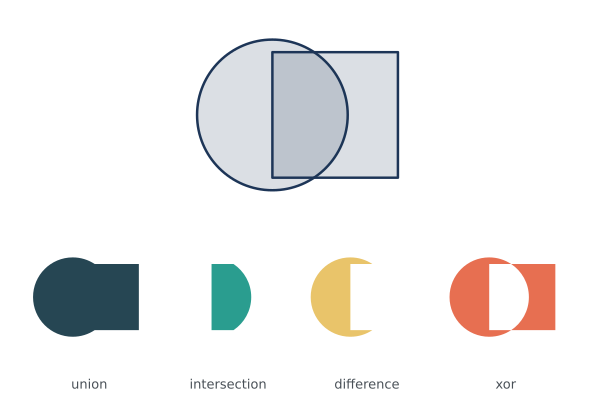
A circle and a square overlap. Joined, cut and crossed, they make four new shapes: the union, the intersection, the difference and the xor. The top row shows the pair; the row below shows the four results at the same size and in the same place, so they can be compared. The same picture is written without the studio words in examples/studios/04_boolean_shapes_before.py.
How it works
- f.path().circle() and f.path().rect() make the two shapes as paths, around (0, 0).
- The operators | & - and ^ are union, intersection, difference and xor. Each gives a new path.
- f.mark(path, fill=..., stroke=None) turns a path into a mark: a shape with its own colour.
- f.grid(4, 2) divides the page. grid.span(0, 0, cols=4) is one area over the whole top row, and grid.cell(i, 1) is one cell of the second row.
- pair.place(..., anchor="center", height=...) fits the pair into the top row. The results are placed by their (0, 0) with one shared scale, worked out from union.width.
Make it yours
- Move the square: change -25 in f.path().rect() and watch all four results change.
- Swap the difference: square - circle is not circle - square.
- Use a third shape, such as a smaller circle, and cut it out of every result.
- Place the results with anchor="center" instead, and see what is lost.
The code
Copy it into a file and run it.
"""Boolean shapes: two shapes, four new ones (studio 4)

A circle and a square overlap. Joined, cut and crossed, they make four new shapes: the union, the
intersection, the difference and the xor. The top row shows the pair; the row below shows the four
results at the same size and in the same place, so they can be compared. The same picture is
written without the studio words in examples/studios/04_boolean_shapes_before.py.

How it works:
- f.path().circle() and f.path().rect() make the two shapes as paths, around (0, 0).
- The operators | & - and ^ are union, intersection, difference and xor. Each gives a new path.
- f.mark(path, fill=..., stroke=None) turns a path into a mark: a shape with its own colour.
- f.grid(4, 2) divides the page. grid.span(0, 0, cols=4) is one area over the whole top row, and
  grid.cell(i, 1) is one cell of the second row.
- pair.place(..., anchor="center", height=...) fits the pair into the top row. The results are
  placed by their (0, 0) with one shared scale, worked out from union.width.

Make it yours:
- Move the square: change -25 in f.path().rect() and watch all four results change.
- Swap the difference: square - circle is not circle - square.
- Use a third shape, such as a smaller circle, and cut it out of every result.
- Place the results with anchor="center" instead, and see what is lost.
"""
import funground as f

f.size("A5", landscape=True, margin=f.mm(10))
f.background("white")

circle = f.path().circle(-25, 0, 120)
square = f.path().rect(-25, -50, 100, 100)

with f.mark() as pair:                       # the two shapes, overlapping, as outlines
    f.fill(29, 53, 87, 40)
    f.stroke("#1d3557")
    f.stroke_width(2)
    f.draw_path(circle)
    f.draw_path(square)

RESULTS = [("union", circle | square, "#264653"), ("intersection", circle & square, "#2a9d8f"),
           ("difference", circle - square, "#e9c46a"), ("xor", circle ^ square, "#e76f51")]
marks = [(name, f.mark(shape, fill=colour, stroke=None)) for name, shape, colour in RESULTS]

grid = f.grid(4, 2, gutter=f.mm(6))
top = grid.span(0, 0, cols=4)
pair.place(top.cx, top.cy, anchor="center", height=top.height - 20)

union = marks[0][1]
scale = (grid.cell(0, 1).width - 16) / union.width        # one scale for all four
f.text_size(13)
f.text_align("center", "bottom")
for i, (name, result) in enumerate(marks):
    cell = grid.cell(i, 1)
    result.place(cell.cx, cell.cy - 8, scale=scale)
    f.fill("#495057")
    f.text(name, cell.cx, cell.bottom)

f.show()