Text as geometry: one word, three ways (studio 5)
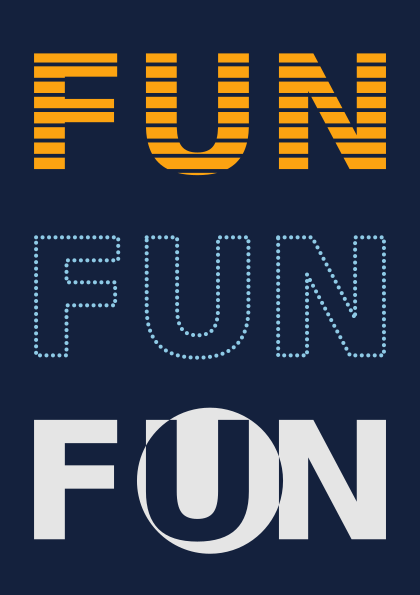
Letters are shapes. Turned into a path, a word can be cut into stripes, traced with dots and crossed with a circle, like any other shape. Each version is fitted to the width of the page. The same picture is written without the studio words in examples/studios/05_text_as_geometry_before.py.
How it works
- f.text_path("FUN", 0, 0) gives the outlines of the word as a path, in the current font and size.
- word - stripes cuts bands out of it, and word ^ ring swaps inside and outside where a circle crosses it. Both are path booleans.
- f.text_to_points() gives points along the outlines. The dots are drawn inside with f.mark(), so they become one drawing with one size.
- f.grid(1, 3) makes three rows. mark.place(row.cx, row.cy, anchor="center", width=..., height=...) makes each version as large as fits in its row, and centres it there.
Make it yours
- Change "FUN" to your own word, or f.text_style("bold") to "normal".
- Change the stripes: more of them, or thicker, in the loop that builds them.
- Change the spacing in f.text_to_points() from 4 to 2 or 8.
- Fit with width= only, and see which versions grow out of their rows.
The code
Copy it into a file and run it.
"""Text as geometry: one word, three ways (studio 5)

Letters are shapes. Turned into a path, a word can be cut into stripes, traced with dots and
crossed with a circle, like any other shape. Each version is fitted to the width of the page. The
same picture is written without the studio words in examples/studios/05_text_as_geometry_before.py.

How it works:
- f.text_path("FUN", 0, 0) gives the outlines of the word as a path, in the current font and size.
- word - stripes cuts bands out of it, and word ^ ring swaps inside and outside where a circle
  crosses it. Both are path booleans.
- f.text_to_points() gives points along the outlines. The dots are drawn inside with f.mark(), so
  they become one drawing with one size.
- f.grid(1, 3) makes three rows. mark.place(row.cx, row.cy, anchor="center", width=..., height=...)
  makes each version as large as fits in its row, and centres it there.

Make it yours:
- Change "FUN" to your own word, or f.text_style("bold") to "normal".
- Change the stripes: more of them, or thicker, in the loop that builds them.
- Change the spacing in f.text_to_points() from 4 to 2 or 8.
- Fit with width= only, and see which versions grow out of their rows.
"""
import funground as f

f.size("A5", margin=f.mm(12))
f.background("#14213d")

f.text_style("bold")
f.text_size(100)
word = f.text_path("FUN", 0, 0)
x, y, w, h = word.bounds()

stripes = f.path()
for i in range(8):                                   # eight thin bands across the word
    stripes.rect(x - 5, y + h * (i + 0.6) / 8, w + 10, h / 32)
striped = f.mark(word - stripes, fill="#fca311", stroke=None)

ring = f.path().circle(x + w / 2, y + h / 2, h * 1.2)
crossed = f.mark(word ^ ring, fill="#e5e5e5", stroke=None)

with f.mark() as dotted:                             # a dot every 4 units along the outlines
    f.no_stroke()
    f.fill("#8ecae6")
    for px, py in f.text_to_points("FUN", 0, 0, 4):
        f.circle(px, py, 2.5)

for row, version in zip(f.grid(1, 3, gutter=f.mm(8)), [striped, dotted, crossed]):
    version.place(row.cx, row.cy, anchor="center", width=row.width, height=row.height)

f.show()